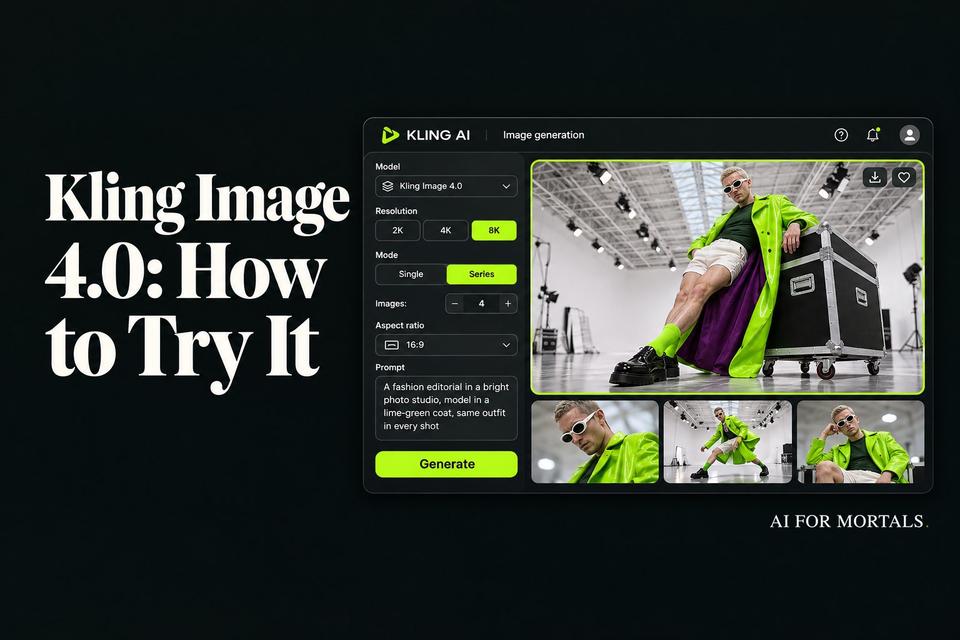
Kling Image 4.0: What the New 8K Image Model Does and How to Try It
Kling's new image model makes native 8K pictures, matching sets of up to 10 and posters full of real text, and you can try it today in several apps.
 AI for Mortals Staff
On this page
- What Kling Image 4.0 can do
- Where to use the Kling AI image generator today
- Is Kling AI free? What each image costs
- Make an 8K image that holds up when you zoom in
- Put real words on a poster, menu or slide
- Make a matching set of 4 to 10 images
- Turn one product photo into a product page
- Change one object and keep the rest of the picture
- How Kling Image 4.0 compares with Nano Banana, ChatGPT Images and Seedream
- What early users are saying about Kling Image 4.0
Kling's AI image generator just got its biggest upgrade. Kling Image 4.0 came out on November 17 and makes pictures at up to 8K, sets of up to 10 matching images from one prompt, and posters or slides with up to 2,000 characters of text.
You can already use it in Kling's own app and in several other apps, including Higgsfield, Genspark and Krea. Most people know Kling for video, so this guide covers what the new image model does, what a picture costs, and five prompts you can copy to try each new feature.
We haven't run our own side-by-side tests yet. Everything below comes from Kling's own guide and developer docs, the apps that added it, and the first hands-on tests people posted in the day after launch.
What Kling Image 4.0 can do
- Native 8K pictures. You pick 2K, 4K or 8K. One early tester's 8K file came out at 9,984 by 6,656 pixels, big enough to print a poster or crop deep into the frame.
- Matching sets. "Series" mode makes 2 to 10 images from one prompt that share the same person, product and lighting. That's handy for a storyboard, an ad campaign or a product shot from several angles.
- Real words in the picture. It can fit up to 2,000 characters of text in one image, in seven languages, with more than 70 built-in fonts.
- Up to 10 reference images. You can upload a face, an outfit, a product and a style, then mention each one in your prompt.
- Long product pages and website mockups. Give it one product photo and it lays out a whole scrolling page in a single image.
- Edit one part and keep the rest. In Kling's app, the Layer Editor splits a finished image into pieces you can change, move or regenerate. Higgsfield's version lets you click an object and type what you want changed.
Where to use the Kling AI image generator today
Kling's own app at kling.ai is the most complete version. It has the Layer Editor, the font library and the long-page modes.
Higgsfield says on X that Image 4.0 is live there, and its demo shows the click-an-object editing. We couldn't find a Higgsfield model page or a credit price for it yet. Our Higgsfield pricing guide covers what its plans include.
Genspark added it to its AI Media Studio and AI Image Agent. Krea, OpenArt, PixelDojo, Venice and Lovart have it too, and fal sells it to developers by the image.

Is Kling AI free? What each image costs
Kling has a free Basic plan, but its plan page doesn't say whether free accounts can use Image 4.0, or how many credits they get. Sign up, open the image tool and check whether Image 4.0 shows up in the model menu before you pay for anything.
Kling also doesn't publish how many credits one Image 4.0 picture costs in its app. One early tester was charged 4 credits for a 2K image, 6 for 4K and 10 for 8K, and a set of six 2K images cost 24.
| Plan | Price | Credits a month | Roughly how many 2K images |
|---|---|---|---|
| Basic | Free | Not listed | Not confirmed |
| Standard | $6.50 a month for 3 months, then $8.80 | 660 | About 165 |
| Pro | $24 a month for 3 months, then $32.56 | 3,000 | About 750 |
| Premier | $135 a month for 3 months, then $181.99 | 18,000 | About 4,500 |
Those are Kling's Black Friday prices with monthly billing, checked on November 18. Every paid plan also lists 8K Image 4.0 pictures at 40% off, so 8K may cost less than the tester's 10 credits once you subscribe.
Through fal, developers pay about 6 cents for a 2K image, 9 cents for 4K and 16 cents for 8K. Kling's own developer prices work out about the same. On PixelDojo it's 1.75 credits (11 cents) for a 2K image, on plans from $10 a month.
If you're mostly here for video, our Kling 4.0 Flash pricing guide breaks down what Kling's video models cost.
Make an 8K image that holds up when you zoom in
Kling's sample portraits show the detail it's going for: skin texture, stray hairs, real-looking light. Early testers who zoomed into 8K files say the detail holds up at full size, down to the brushing on a steel watch part.

8K pictures take a lot longer. One tester's 8K portrait took 2 minutes and 12 seconds, compared with well under a minute at 2K.
So try your idea at 2K first, and only switch to 8K for the version you want to print or crop. Kling's prompt guide suggests describing the subject, the place, the light and then the camera, in that order.
A close-up photo of a ceramic coffee mug on a wooden kitchen table, morning light coming through a window on the left, steam rising from the coffee, a few crumbs and a folded newspaper in the background. Shot on a 50mm lens, shallow depth of field, natural colors. No text or logos anywhere.
Put real words on a poster, menu or slide
This is the feature most worth trying if you make flyers, slides or social posts. Kling says one image can hold up to 2,000 characters, which is a few paragraphs, and you can choose from more than 70 fonts or name your own.

Early tests are encouraging. One tester's 4K event poster spelled every line right, down to the dots and dashes, and a Chinese menu came back with every character correct.

Kling's own guide still tells you to proofread names, numbers and small print before you use an image. Testers also noticed it likes to add extra labels and signs of its own, so finish your prompt by asking for no other text.
A clean, modern presentation slide, 16:9. Headline at the top in a bold sans-serif font: "Q4 Customer Survey: What We Heard". Below it, a short paragraph in a smaller font: "We asked 1,200 customers what they want next. The top three answers were faster delivery, easier returns and a loyalty program." On the right, a simple bar chart with three bars labeled Delivery, Returns and Loyalty. White background, navy and orange accents. No other text anywhere, including signs, labels and watermarks.
Make a matching set of 4 to 10 images
In series mode, you describe a short sequence, and Kling keeps the same person, outfit and product across every frame.
One tester made six ad images of a soda can and the can looked identical in all six. The same set of six 2K images cost 24 credits, the same per image as making them one at a time.
To get a good set, number each frame and say what happens in it, then list what must stay the same in every one.
Start at 2K. In one early test, a set of four 8K images came back with three failed, and sets take noticeably longer because the images arrive one after another.
Make a series of 4 images for an Instagram carousel about a weekend bike ride.
1. A woman in her 30s pumps up the tires of a red bike outside her apartment, early morning.
2. She rides along a quiet country road lined with trees.
3. She stops at a small café and drinks an iced coffee next to the bike.
4. She rides home at sunset, smiling.
Keep the same woman, the same red bike, the same yellow rain jacket and the same gray backpack in all 4 images. Natural photo style, 4:5.
Turn one product photo into a product page
Kling's long-image mode takes a photo of something you sell and lays out a whole product page around it: hero shot, features, close-ups and selling points, all in one tall image.


This mode is the least finished. Pages stop at 2K, and early testers found the top half usually looks good while the lower half loses numbers, skips sections they asked for or turns into nonsense words.
One tester's English prompt came back with a page full of Chinese text, twice. So say the language outright, and treat the result as a mockup you rebuild in Canva or Shopify before it goes on your store.
Using the product photo I uploaded, create a product page for an online store. The product is a 12 oz insulated travel mug called "Ridge Mug" in matte green. Sections, top to bottom: a hero shot with the name and price ($28), three feature icons (keeps drinks hot 6 hours, leak-proof lid, fits car cup holders), a lifestyle photo of someone holding it on a hike, a close-up of the lid, and three short customer reviews with star ratings. All text in English. Clean, modern design with lots of white space.
Change one object and keep the rest of the picture
This is where the apps differ the most. In Higgsfield, you make an image, click an object such as a couch or a laptop, and type the change, like "make the couch blue" or "swap the laptop for a book."

In Kling's own app, open a finished Image 4.0 picture in the Layer Editor. It separates the text, background and objects into layers you can select, replace, delete, move or regenerate one at a time, and you can also retype words and change fonts after the fact.
Kling's developer docs say edits made from a reference image redraw the whole picture, so details you didn't touch can shift too. After any edit, compare the before and after side by side and check faces, hands and anything with writing on it.
Change only the sofa: make it a deep navy velvet sofa with the same shape and size. Keep everything else in the room exactly the same, including the person, the pillows, the lighting, the rug and the shelves.
How Kling Image 4.0 compares with Nano Banana, ChatGPT Images and Seedream
Kling says a preview of Image 4.0 ranked among the leaders on Artificial Analysis's public image leaderboard. Reported numbers put that preview around sixth for making images and sixth for editing, within a few points of Nano Banana 2.1. That puts it in the top group of image models, a few places behind the leaders.
The bigger differences early on are speed and price. In one side-by-side test on fal, Kling took about a minute and cost 9 to 12 cents per image, compared with about 5 cents and 19 seconds for Nano Banana 2.1 and about 7 cents for Seedream.
Another tester found Kling stuck closer to the prompt than Seedream 5.5 on camera angle, while Seedream drew cleaner icons and cost less.
So we'd use Kling for big prints, matching sets and product mockups, and something cheaper like Seedream for everyday single images.
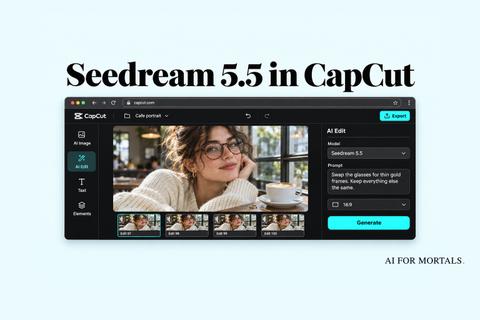
If you already pay for ChatGPT or Gemini, you don't need Kling for everyday pictures. Our AI image generator comparison and ChatGPT Images 2.6 test show what you already have, and Seedream 5.5 in CapCut is a cheap option for quick edits.
Kling earns its place when you need print-size files, a set of images that match, or a poster with a lot of words on it.
What early users are saying about Kling Image 4.0
The early praise is mostly about text and detail. People who tried posters and menus say the spelling is right far more often than they expected, and 8K close-ups hold up when you zoom in.
The complaints are about waiting and polish. People say 8K and series images are slow, some sets fail partway through, product pages fall apart toward the bottom, and it costs more per picture than Seedream or Nano Banana.
There's almost no discussion on Reddit yet, so expect a clearer picture once more regular users have had a week with it. We'll run our own tests and update this post.
For a sense of what a strong image model can do in everyday work, here's our walkthrough of 50+ real uses for ChatGPT's image model. The same kinds of prompts are a good way to test Kling.
Sources
- Kling Image 4.0 User Guide (Kling AI, Nov 17, 2026)
- Kling Image 4.0 Is Here!, developer launch page and specs (Kling AI)
- Kling Image 4.0 API docs and API pricing (Kling AI)
- Kling AI membership plans (checked Nov 18, 2026)
- Kling AI on X: Kling Image 4.0 is now available (Nov 18, 2026)
- Higgsfield on X: Kling Image 4.0 is live on Higgsfield (Nov 18, 2026)
- Genspark on X: Kling Image 4.0 in AI Media Studio (Nov 18, 2026)
- Kling Image 4.0 on fal and on PixelDojo
- Kuaishou launches Kling Image 4.0 with native 8K generation (TechNode, Nov 18, 2026)
- Kling Image 4.0 review: 8K photos, long text and image sets, tested (dev.to, Nov 18, 2026)

Comments
Sign in to join the conversation.