MAGI-2 Makes 30-Second Videos With Sound for $2.40. Here's How to Use It
Sand.ai's new video model makes up to 30 seconds of 1080p video, with dialogue, cuts and music, from one prompt. On Higgsfield's API that's $2.40 a clip.
 AI for Mortals Staff
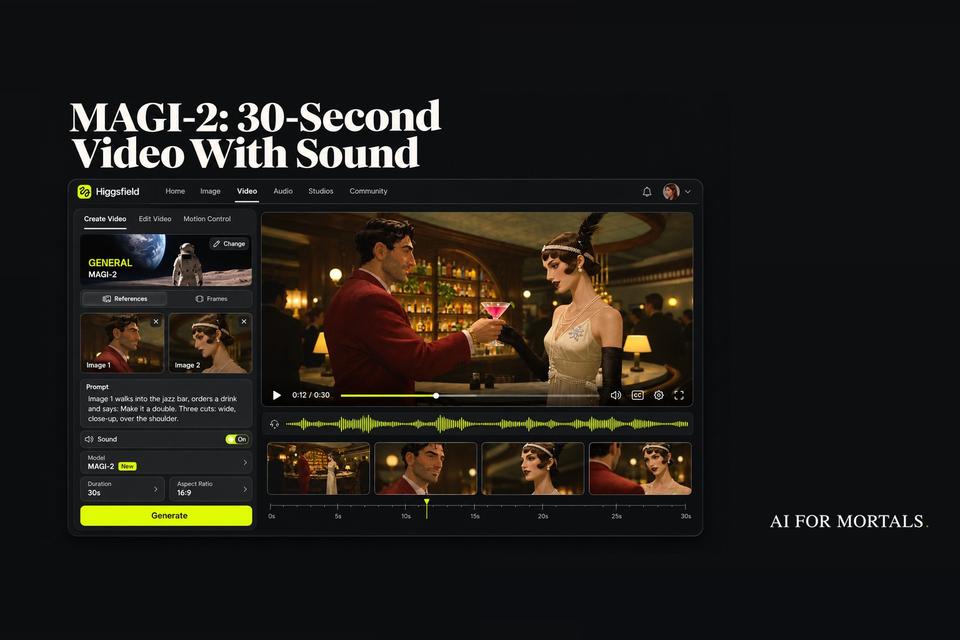
The Higgsfield AI video generator has a new model, and it's a cheap one. MAGI-2, from the Chinese lab Sand.ai, went live on Higgsfield on November 24 and makes up to 30 seconds of 1080p video with the sound built in: dialogue with lip-sync, sound effects and music, all from one prompt.
It can also plan its own cuts, so a single 30-second clip can come back as 15 different shots. Through Higgsfield's API it costs 8 cents a second, which is $2.40 for the full 30 seconds.
We haven't run our own clips through it yet. This first look covers what it does, what it really costs, how to use it in Higgsfield, and the five prompts we'll test first, built from Sand.ai's and Higgsfield's own launch material.
What MAGI-2 does
MAGI-2 makes the picture and the sound together, in one pass, so there's no separate step to add a voice or music afterward. Sand.ai says that covers dialogue with lip-sync, foley (footsteps, doors, the clink of a glass), background sound and music.
The main features, from Sand.ai's launch post and Higgsfield's guide:
- Length: anywhere from 4 to 30 seconds per clip, at 1080p and 25 frames a second.
- Shapes: six aspect ratios, from tall 9:16 for Reels and TikTok to extra-wide 21:9.
- References: up to 10 images, 5 videos and 5 audio clips in one request, so you can lock a character's face, a location, a voice or a song.
- Frames: give it a start picture, and optionally an end picture, and it animates between them.
- Shot control: you can list the shots and where each cut falls, as in the demo above, or let the model decide.
- Editing: Sand.ai and Higgsfield both show it changing existing footage, like removing something from a scene while the camera move stays the same.
MAGI-2 can remove unwanted scene details while preserving the original camera motion and action. Now exclusively on Higgsfield and via Higgsfield API. Open weights coming soon.
Higgsfield on X, November 25, 2026
The one-take demo below shows the length doing real work. Sand.ai fed it five famous paintings and got one continuous 30-second shot that walks through Starry Night, Monet's water lilies and Seurat's park without a cut.
Is 30 seconds longer than other AI video generators?
Not anymore, and that's worth knowing before you pay for anything. When we wrote about Seedance 2.5 making 30-second clips in June, that length was new. Today, Higgsfield's own model menu lists Seedance 2.5 and Kling 4.0 at up to 30 seconds too, and both go up to 4K, where MAGI-2 stops at 1080p.
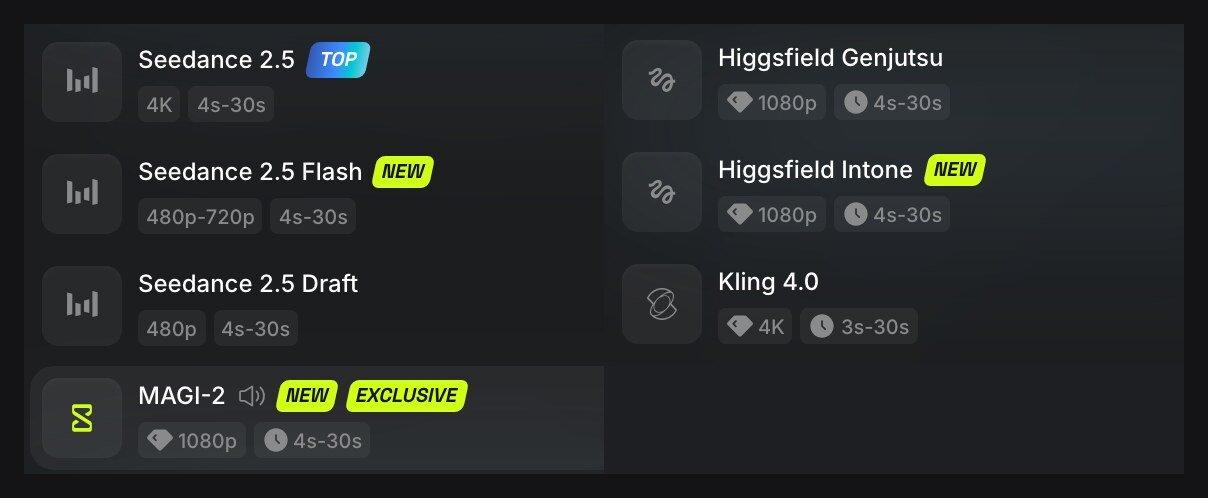
What MAGI-2 changes is the price. On Higgsfield's API, Seedance 2.5 costs about 65 cents a second at 1080p, so a 30-second clip runs about $19.55. The same clip from MAGI-2 is $2.40, roughly an eighth of that.
On quality, the early numbers come from the companies themselves. Higgsfield runs its own blind arena, where directors, animators and designers pick the better of two clips without seeing model names. There, MAGI-2 came second of six, behind Seedance 2.5, which won 61% of their head-to-heads. MAGI-2 beat Seedance 2.0, Wan 3.0, Kling 4.0 and MiniMax H3.
That's Higgsfield's leaderboard, though, and MAGI-2 is Higgsfield's exclusive. Nobody outside the two companies has published a careful test of the lip-sync yet, so treat the ranking as a first read.
What a MAGI-2 video costs
There are two prices, depending on how you use it. The API charges 8 cents a second with sound included. The Higgsfield web app charges 2.5 credits a second, and Higgsfield works out the dollar cost using its Plus plan ($59 a month for 1,200 credits).
| Length | Web app | API |
|---|---|---|
| 10 sec | $1.23 | $0.80 |
| 15 sec | $1.84 | $1.20 |
| 30 sec | $3.69 | $2.40 |
So a Plus plan's 1,200 credits buys about sixteen 30-second clips. Higgsfield is running a Black Friday sale right now, which lowers the price of a credit, so check our Higgsfield pricing guide for what each plan includes.
Two things push the real cost up. First, AI video rarely lands on the first try: if a 30-second scene takes three goes, it's $7.20 on the API or about $11 in the app.
Second, MAGI-2 only makes 1080p, with no cheaper 720p draft mode. Higgsfield's guide points to shorter clips as the way to spend fewer credits, so test short and go to 30 seconds once the prompt works.
How to use MAGI-2 in the Higgsfield AI video generator
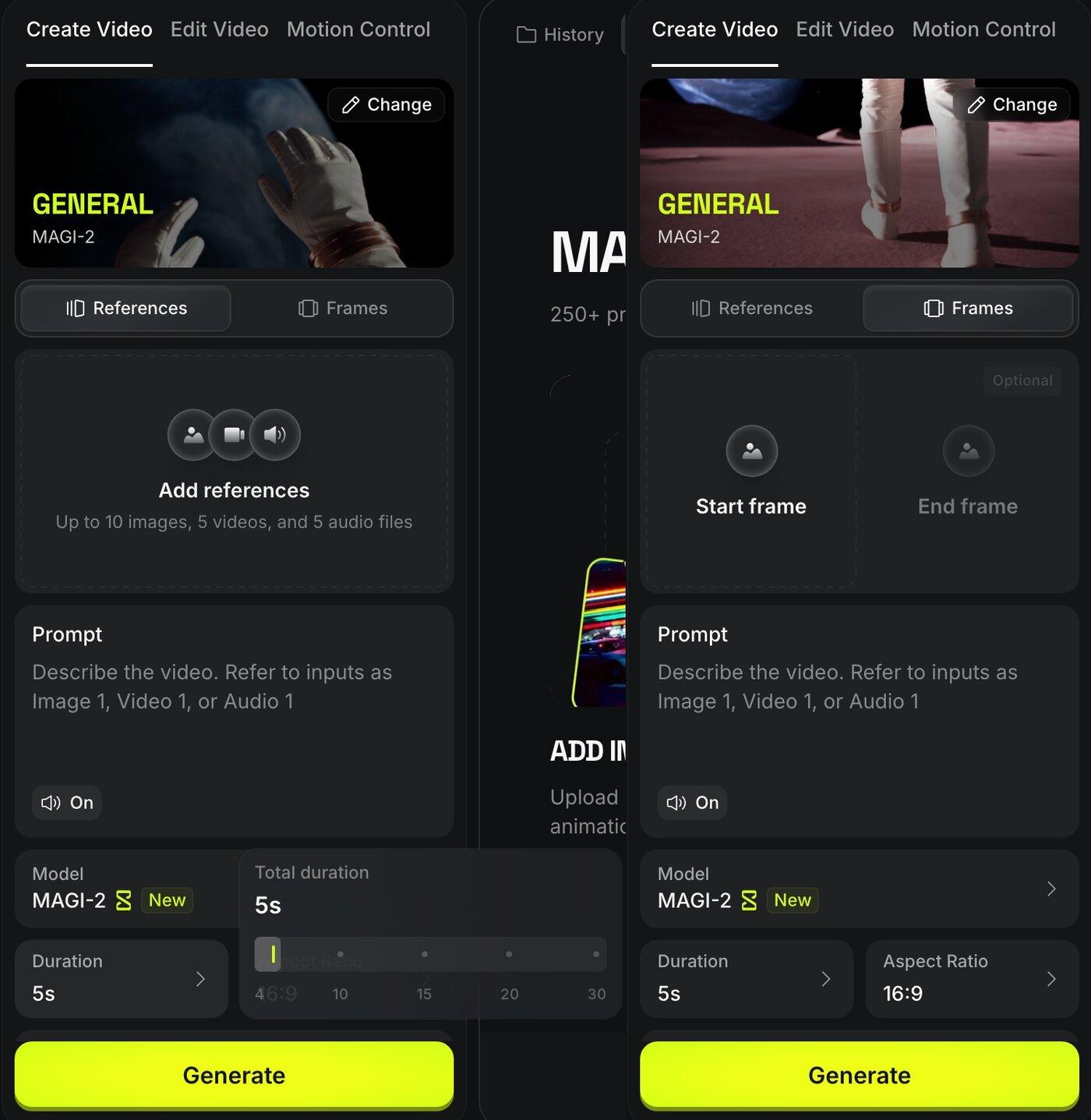
- Open Higgsfield, go to Video, then Create Video, and pick MAGI-2 from the model list.
- Choose a mode. References takes your images, videos and audio clips. Frames takes a start picture and, if you want, an end picture.
- Upload what you're using. Higgsfield asks that it's material you own or have permission to use.
- Write the prompt, and call each upload by its label: Image 1, Video 1, Audio 1.
- Set Duration (4 to 30 seconds) and Aspect Ratio, and check the speaker button under the prompt says On if you want sound.
- The Generate button shows the credit cost before you click it.
Higgsfield runs one MAGI-2 job at a time per account, so a second generation waits in line until the first finishes.
Its prompting tips are practical. In Frames, describe what's already in the start picture and the movement you want, because a prompt describing a different scene can change the picture a lot. And keep each clip to one or two actions and one camera move.
References are how you keep a character the same from shot to shot. Sand.ai's example below locked one woman's look and three giant-flower settings with six reference pictures.

Five MAGI-2 prompts to try first
These are the five jobs we'll run when we test it, written so you can paste them in and swap the details. Start each one at 10 seconds to save credits, then stretch to 30 once you like the result.
A product clip from one prompt, about 80 cents on the API at 10 seconds:
A 10-second product video for a matte green ceramic coffee mug on a wooden kitchen counter in soft morning light. Shot 1: slow push-in on the mug as steam rises. Shot 2: a hand lifts the mug and turns it to show the small logo. Shot 3: close-up of coffee being poured in. Sound: quiet kitchen ambience, the pour, a soft acoustic guitar. No text on screen.
A 30-second scene with two people talking, to check lip-sync and music:
A 30-second scene in a busy neighborhood bakery at closing time. Image 1 is the owner behind the counter; Image 2 is a regular customer. Shot 1, wide: the customer walks in as the owner flips the sign to Closed. Shot 2, close-up on the owner: "We're closed, but I saved you the last loaf." Shot 3, close-up on the customer, smiling: "You always do." Shot 4, wide: she hands it over the counter. Sound: the door bell, low chatter fading out, a warm piano tune under the dialogue.
A talking head from a short script:
A 20-second talking-head video. Image 1 is the presenter, sitting at a tidy desk with a bookshelf behind her, looking into the camera. She says, in a friendly, unhurried voice: "Three things to check before you sign any contract. Who can end it, how much notice they need to give, and what happens to your money if they do." Keep the camera still, chest-up framing, natural room sound, no music.
An edit of footage you already have. Higgsfield's guide doesn't yet say which screen handles MAGI-2 edits, so we'll try it in References with the footage uploaded as Video 1:
Video 1 is a handheld shot of my street. Keep the camera movement, timing and everything else exactly the same, but remove the parked white van on the left and fill the space with the empty sidewalk behind it.
A start-to-end-frame transition, using Frames mode with two of your own photos:
The start frame shows the empty room before the renovation; the end frame shows the same room finished. Move the camera slowly forward the whole time while the room changes around it, from bare walls to the finished space. Sound: a soft rising synth that resolves on the last frame.
We'll add the results, retry counts and the real cost to this post once we've run them.
Is MAGI-2 open source?
Not yet. Sand.ai says it will release the full model's weights and a technical report, but it hasn't given a date or a license.
There's some confusion online because there are two MAGI-2s. The smaller MAGI-2 Preview came out in August with open weights. The full MAGI-2 on Higgsfield is much bigger: Sand.ai puts it at 480 billion parameters, while Higgsfield's announcement says 400 billion.
For most people this doesn't matter much. A model this size needs a rack of data-center GPUs to run, so even once the weights are out, you'll be using it through an app like Higgsfield.
Is MAGI-2 only on Higgsfield?
Higgsfield calls it exclusive, and its API is the only one listing MAGI-2 right now. But Sand.ai's own homepage sends visitors to VidMuse, which it calls an official partner, and VidMuse lists MAGI-2 on its plans, with a free tier of 100 one-time credits at 720p with a watermark.
The free tier says "limited model access," so we can't promise MAGI-2 runs on it. VidMuse's paid Pro plan, $39 a month or $33 a month billed yearly, lists 1080p and all models.
AI video does dialogue and lip-sync in one shot now. 30 seconds at 1080p.
Product Hunt on X, November 25, 2026
What to watch for
Sand.ai is upfront about where MAGI-2 still struggles. Very fast motion can break the movement or continuity, wide shots of 2D animation can look too smooth, and busy soundscapes don't yet have the layering of real sound.
The editing works on screen recordings too. In one of Sand.ai's demos, a recording of its own website has the word "Preview" rubbed out of the headline, and the planet behind it turns into a black hole while the rest of the page stays put.
If you want one clip with dialogue, cuts and music for a few dollars, MAGI-2 is one of the cheapest ways to get 30 seconds at 1080p right now. If you need 4K or the best-looking result regardless of price, Seedance 2.5 still ranks first, and our guide to AI video generators by job covers the rest.
For a sense of what one of these tools does on a real brief, we also had Claude direct a 15-second video ad with Google's video model, with every take and its cost.
Sources
- MAGI-2: A 480B Frontier Video Generation Model (Sand.ai, November 24, 2026)
- Meet MAGI-2: Sand AI's New Video Model With Built-In Sound on Higgsfield (Higgsfield guide: steps, modes, credits)
- Announcing MAGI-2 (Higgsfield: Video Arena results)
- MAGI-2 text-to-video API reference and Seedance 2.5 API reference (Higgsfield API prices and limits)
- Higgsfield on X: removing scene details and the $0.08 a second post (November 25, 2026)
- Sand.ai homepage and MAGI-2 on VidMuse, VidMuse pricing
- Sand.ai launches full MAGI-2, open weights still promised (Pandaily)
- Product Hunt on X (November 25, 2026)




Comments
Sign in to join the conversation.