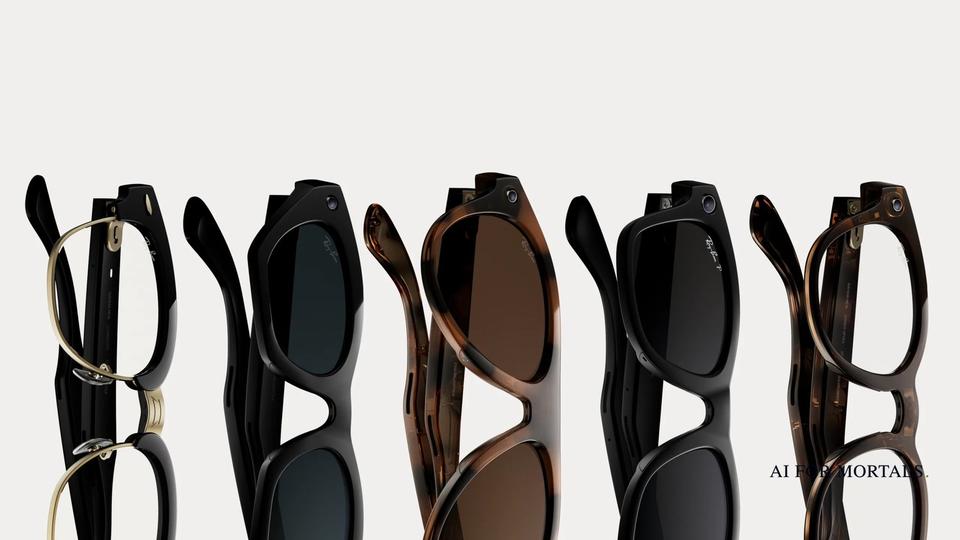
Meta AI Glasses: Every Model, the Price, and How to Use Meta AI on Them
Meta sells Ray-Ban Meta, Oakley Meta, Meta Glasses and the screen-equipped Meta Ray-Ban Display, at US prices from $224 to $799, and all of them run Meta AI.

On this page
- Do Meta smart glasses have AI?
- Which Meta AI glasses can you buy: Ray-Ban Meta, Oakley Meta and Meta Ray-Ban Display
- How to set up Meta AI glasses with the Meta AI app
- What to say to Meta AI on your glasses: copy-paste voice commands
- Where can I buy Meta Display glasses?
- What do AI glasses record, and why are smart glasses legal?
- Other AI-powered smart glasses, and which ones come out in 2026
- Questions people ask
Meta AI glasses are camera-and-speaker glasses that run Meta's assistant, Meta AI. You say "Hey Meta" to ask a question, take a photo or video, play music, make calls or send messages, or have it describe what you're looking at. Meta sells three lines with no screen, Ray-Ban Meta, Oakley Meta and Meta Glasses, plus Meta Ray-Ban Display, which has a small screen in the right lens and comes with the Meta Neural Band wristband. Every pair works with the free Meta AI app on your phone.
On Meta's US store, Meta Glasses start at $249, Ray-Ban Meta (Gen 3) at $449, Oakley Meta at $399 and Meta Ray-Ban Display at $799. Older Ray-Ban Meta styles are on sale from $224. Below: every model, how to set them up, what to say to them, and what they record.
Last checked November 15, 2026: prices from Meta's US store, and setup steps and voice commands from Meta's help center, read that day.
Do Meta smart glasses have AI?
Yes. Every pair of Meta's AI glasses has Meta AI built in. On Ray-Ban Meta, Oakley Meta and Meta Glasses you start it by saying "Hey Meta" or by tapping and holding the touchpad on the frame, according to Meta's help article on how to use Meta AI on AI glasses. It answers out loud through open-ear speakers in the arms. On Meta Ray-Ban Display, the answers also appear on the in-lens screen.
Meta AI can answer general questions, and it can use the camera to answer questions about what's in front of you. Saying "Hey Meta, look and..." makes the glasses take a photo to use in the answer. Meta's own examples include translating an Italian sign, naming a houseplant and writing a caption for a photo you just took.
Meta says more is coming. Its September 23 lineup announcement says the glasses will get "a connection to your Muse personal AI agent," Meta's personal agent app, and Meta has also said voice conversations in Meta's Muse app are coming to its glasses. Our page on Meta's AI products and models covers the rest of Meta's assistant line.
Which Meta AI glasses can you buy: Ray-Ban Meta, Oakley Meta and Meta Ray-Ban Display
Meta sells four lines in the US: Ray-Ban Meta for everyday wear, Oakley Meta for sport, Meta Glasses under its own name, and Meta Ray-Ban Display, the only one with a screen. Every model except Ray-Ban Meta Audio has a camera. The prices below are the "From" prices on Meta's shop-all page.
| Line | Styles | Screen | Camera | Starting US price |
|---|---|---|---|---|
| Ray-Ban Meta (Gen 3) | Wayfarer, Aviator, Zena | No | Yes, 12 MP photos and 3K video | $449 |
| Ray-Ban Meta (Gen 2) | Wayfarer, Skyler, Headliner; Blayzer Optics, Scriber Optics | No | Yes | $379; Optics styles $499 |
| Ray-Ban Meta (Gen 1) | Wayfarer, Skyler | No | Yes | $224 on sale (was $299) |
| Ray-Ban Meta Audio | Clubmaster, Burbank | No | No, audio only | $349 |
| Oakley Meta | HSTN, Vanguard | No | Yes, 12 MP ultra-wide and 3K video | $399 (HSTN), $499 (Vanguard) |
| Meta Glasses | Adventurer, Capri, Nova, Fury, Starfire Kylie Edition, LISA Editions | No | Yes, up to 3K video | $249 (Adventurer); $299 (Capri, Nova, Fury); $399 (Kylie and LISA editions) |
| Meta Ray-Ban Display | 2 colors | Yes, full color, in the right lens | Yes, 12 MP with 3x zoom | $799 with Meta Neural Band ($999 with prescription lenses) |
Ray-Ban Meta is the line Meta's store labels the "#1 selling AI glasses." Gen 3 lasts up to 9 hours on a charge and adds a customizable action button. Ray-Ban Meta Audio is the lightest pair at 43 grams, with no camera and up to 12 hours on a charge, and Meta said it would ship October 13. All Ray-Ban Meta glasses except Audio have 32GB of storage, and there is no monthly fee: Meta's FAQ says Meta AI, the camera, audio and calling are "included with your purchase at no additional cost."
Oakley Meta is built for sport. HSTN is the everyday pair, takes prescription lenses and lasts up to 8 hours. Vanguard has wrap-around lenses, a centered camera, IP67 water resistance and up to 9 hours, works with Garmin devices and Strava for workout stats, and can't take prescription lenses.
Meta Glasses are Meta's own frames, made with EssilorLuxottica. Meta added Capri and Nova in September, plus a $249 Adventurer with a black frame, grey lenses and a plug-in case. Meta lists IPX4 splash resistance and prescription lenses for every frame.
Meta Ray-Ban Display has a 600x600 full-color screen in the right lens that shows messages, Meta AI answers, walking directions, live captions and translations, then disappears when you don't need it. You control it with the Meta Neural Band, a wristband that reads small muscle signals at your wrist so you can move around the screen with small hand gestures. It lasts up to 6 hours per charge, and the case adds up to 24 more.
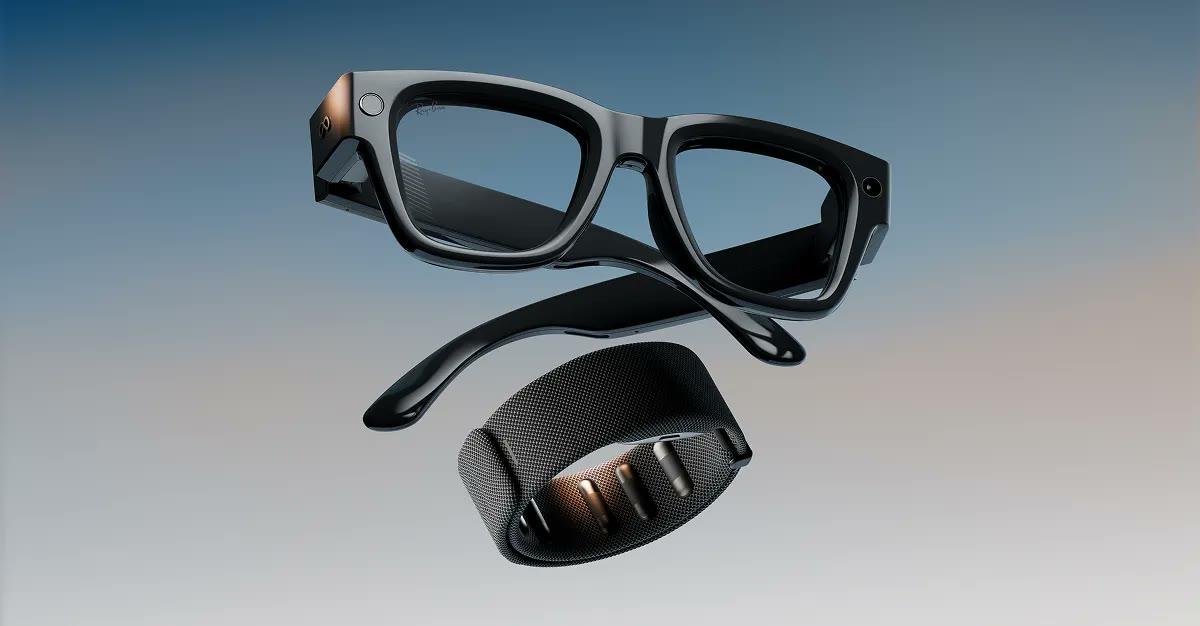
To compare frames on your own face before you buy, Meta's AI glasses store has a virtual try-on that covers more than 70 styles.
How to set up Meta AI glasses with the Meta AI app
You set up Meta AI glasses by pairing them with the Meta AI app on your phone, signed in with a Meta account. Meta's product pages say the app "is required," and the Display page adds that you need an internet connection for features like translation and navigation. If you owned older glasses, the app you used before, Meta View, is now the Meta AI app.
These are the steps from Meta's help article on pairing AI glasses with the Meta AI app:
- Install the Meta AI app and sign in with your Meta account.
- Take the glasses out of the case and slide the power button on the left side of the frame toward the front to turn them on.
- Put them back in the case and press down gently so the nose bridge touches the charging port.
- Wait for the case light to flash blue. If it doesn't, hold the button on the back of the case for at least 5 seconds.
- In the app, tap Glasses in the top right, then Add, and follow the on-screen steps.
Glasses pair with one Meta account at a time, so a second person has to factory reset them before pairing their own account. For weather and other questions about where you are, Meta's help article says to set the Meta AI app's location access to "always allow" in your phone's settings.
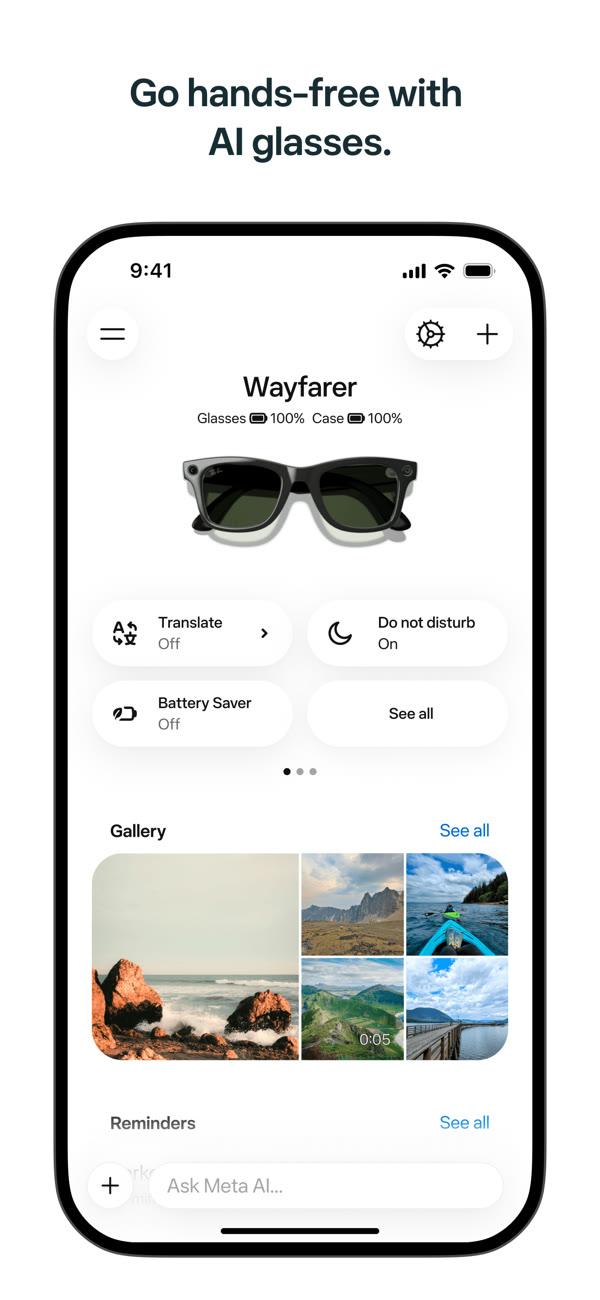
Some features depend on your country and language. To see what your pair supports, open the app, tap Glasses, then Device settings, and scroll to Experiences, as Meta's feature availability article describes.
What to say to Meta AI on your glasses: copy-paste voice commands
Start with "Hey Meta," then say what you want in plain words. Every phrasing below comes from Meta's own help center or store pages.
| What you want | Say |
|---|---|
| Take a photo | "Hey Meta, take a picture." |
| Record a video | "Hey Meta, take a video." Then "Hey Meta, stop recording." |
| Ask about what you see | "Hey Meta, describe what I'm seeing." |
| Read a sign or menu in another language | "Hey Meta, translate this text into English." |
| Get the short version of a page or notice | "Hey Meta, summarize this." |
| Call a number printed on a flyer | "Hey Meta, call this phone number." |
| Open a QR code | "Hey Meta, scan this QR code." |
| Call someone | "Hey Meta, call [contact name] on WhatsApp." |
| Send a message | "Hey Meta, send a message to [contact name]." |
| Share your last photo | "Hey Meta, send my last picture to [contact name]." |
| Find somewhere to eat | "Hey Meta, what restaurants are open near me?" |
| Set a reminder | "Hey Meta, remind me to pick up the cake in 20 minutes." |
| Control music | "Hey Meta, pause." / "Next." / "Volume up." |
| Check the battery | "Hey Meta, how much battery is left?" |
| Translate a conversation | "Hey Meta, start live translation." |
| Talk without repeating "Hey Meta" | "Hey Meta, start live AI." |
| Get help from a sighted volunteer | "Hey Meta, call a volunteer on Be My Eyes." |
While you're on a call, "Hey Meta" followed by "Mute," "Camera off" or "Hang up" controls the call. If you connect a fitness app in the Meta AI app, you can ask about past workouts, with questions like "What was my mileage on yesterday's ride?" On Meta Ray-Ban Display you can also say "Zoom in" and "Zoom out" when taking photos.
For questions about what you're looking at, Meta's article on asking Meta AI about what you see lists more phrasings, such as "Hey Meta, tell me about this monument" and "Hey Meta, how much water do these flowers need?"
Live translation
Live translation translates a conversation as people speak. Meta's live translation article lists 20 languages with Wi-Fi or mobile data, and six that work offline once you download the language pack: English, Spanish, French, Italian, Portuguese and German (offline doesn't work on Ray-Ban Meta Audio). On Ray-Ban Meta, Oakley Meta and Meta Glasses, your speech is translated into text in the Meta AI app for the other person to read, and they can tap the speaker icon to hear it. On Meta Ray-Ban Display, Meta's product page says the in-lens screen shows live captions and translations. To end it, say "Hey Meta, stop live translation."
Live AI
Live AI keeps a conversation going so you don't have to say "Hey Meta" each time. According to Meta's live AI article, it works in English and is "rolling out over time in the US and Canada." The camera and microphone stay on for the whole session. Say "Pause live AI" to turn both off, and "Stop live AI" to end the session.
Where can I buy Meta Display glasses?
You can buy Meta Ray-Ban Display online at meta.com or at an authorized retailer that carries it, and Meta's FAQ says you can walk in and buy without an appointment or demo. Demos are recommended, though not required, and are booked through Meta's Demo Scheduler at select stores.
If you wear glasses, you can try it with prescription inserts at select Meta Lab, Ray-Ban, LensCrafters and Best Buy stores in the US. Prescription lenses cost $200 more and can only be added when you buy. Meta calls inventory "very limited": if a store is out of your size or color, you go on a waitlist, and some retailers will ship a backorder to your home. Meta's return window for Display is 30 days.
The other lines are easier to find. Oakley Meta is sold on meta.com, oakley.com, at Best Buy, LensCrafters and Oakley stores. Ray-Ban Meta is sold on meta.com, Ray-Ban.com and at Ray-Ban retailers. In September, Meta brought Meta Glasses to Singapore, South Korea, Mexico and the United Arab Emirates, with Brazil next.
What do AI glasses record, and why are smart glasses legal?
Meta's glasses take photos and video when the wearer presses the capture button or asks Meta AI, and a bright white Capture LED blinks while they do. Recording laws depend on where you are, and Meta's own terms make the person wearing the glasses responsible for following them.
Meta's AI glasses privacy page says that if the glasses detect the Capture LED has been covered or tampered with, "they'll automatically disable the camera." Photos and videos you take stay on the glasses until you import them to your phone. Video clips run up to 3 minutes at a time on Meta Glasses.
Meta AI keeps more than your gallery does. When you ask about what you're looking at, the glasses send a photo to Meta's cloud. Meta says faces and license plates are blurred and that photo isn't saved to your gallery, and you can review the request and the image in the app under Chats. Voice is stored too: Meta's voice privacy notice for AI glasses says recordings and transcripts are "stored by default to help improve Meta's products," can be checked by trained reviewers, and are kept for up to one year unless you delete them sooner in the app. Recordings from accidental wake-ups are deleted within 90 days of detection.
On the law, Meta's supplemental terms of service say you are "responsible for complying with all applicable laws," including giving notice to or getting consent from the people you record where "video recording, audio recording, biometric data, or other privacy or data protection laws" require it. The same terms bar covering up the parts that signal recording. Meta's privacy page also asks wearers to stop recording if someone objects and to turn the glasses off in places like a doctor's office, a locker room or a school.
For what Meta AI keeps from your chats compared with ChatGPT, Claude and Gemini, see what Meta AI and other assistants keep from your chats.
Other AI-powered smart glasses, and which ones come out in 2026
The main alternative to Meta's glasses is Google's Gemini glasses, which go on sale December 10. Google's pre-order announcement lists Warby Parker frames from $395 and Gentle Monster frames from $449, with pre-orders open in the US and South Korea. They have a 12 MP ultra-wide camera and open-ear speakers, and you talk to Gemini instead of Meta AI. This comparison comes from the makers' own pages; AI for Mortals hasn't tested either brand.

Samsung's Galaxy glasses come from the same partnership. Samsung introduced its "intelligent eyewear" at Galaxy Unpacked in London on July 22, 2026, built with Google and running Gemini, in Gentle Monster and Warby Parker designs, and Google says the frames were designed with Warby Parker, Gentle Monster and Samsung. Samsung lists up to nine hours on a charge, with up to seven more full charges from the case. Our write-up of Google's Gemini glasses, from $395, covers which phones they work with and how they compare with Ray-Ban Meta Gen 3.
Meta's own 2026 releases are already on sale: Ray-Ban Meta (Gen 3) from $449, Ray-Ban Meta Audio from $349, the Capri and Nova Meta Glasses, and the $249 Meta Adventurer, which Meta said would go on sale October 23. Pick by the job: Ray-Ban Meta or Meta Glasses for everyday photos, calls and music, Oakley Meta Vanguard if you want workout stats on a run or ride, Meta Ray-Ban Display if you want to read messages and directions without your phone, and Ray-Ban Meta Audio if you don't want a camera at all.
Questions people ask
Is there a monthly fee for Meta AI glasses?
No. Meta's Ray-Ban Meta FAQ says "there is no monthly fee or subscription required," and that Meta AI, the camera, audio and calling come with the glasses.
Do Meta AI glasses work with an iPhone?
Yes. Meta's Meta Glasses FAQ says to download the Meta AI app from the App Store, sign in with your Meta account, turn on Bluetooth and follow the pairing steps in the app.
Can you get Meta AI glasses with prescription lenses?
Most models take them. Ray-Ban Meta (Gen 3) Wayfarer and Zena, Ray-Ban Meta Audio and Oakley Meta HSTN take prescriptions from -12.00 to +6.00 on meta.com, Gen 3 Aviator from -6.00 to +4.00, and Meta Ray-Ban Display from -4.00 to +4.00 for $200 more. Oakley Meta Vanguard doesn't take prescription lenses.
Which Meta glasses don't have a camera?
Ray-Ban Meta Audio has no camera. It comes in Clubmaster and Burbank styles, and Meta's Ray-Ban Meta page lists it as "Audio only," with music, calls and Meta AI through the speakers.
Are Meta AI glasses waterproof?
No. Meta Glasses, Meta Ray-Ban Display and Oakley Meta HSTN are water resistant with an IPX4 rating, which Meta says handles splashes and light rain but not swimming or submersion. Oakley Meta Vanguard is rated IP67, a higher water resistance rating.
Can Meta glasses describe things for people who are blind or have low vision?
Yes. Meta says Meta AI can give detailed spoken descriptions of your surroundings, read text aloud, and connect you hands-free to a sighted volunteer through Be My Eyes.
Sources
- Meta Store: Shop all AI glasses (US prices, checked November 15, 2026)
- Meta Store: Ray-Ban Meta
- Meta Store: Oakley Meta
- Meta Store: Meta Glasses
- Meta Store: Meta Ray-Ban Display
- Meta: Introducing Ray-Ban Meta Audio and our deepest lineup of AI glasses yet
- Meta Help: How to pair and unpair AI glasses with the Meta AI app
- Meta Help: How to use Meta AI on AI glasses
- Meta: AI glasses privacy
- Meta: AI Glasses Voice Privacy Notice
- Google: Intelligent eyewear collections open for pre-order
- Samsung Newsroom: Samsung brings Galaxy ecosystem into everyday eyewear





Comments
Sign in to join the conversation.