Netflix Tests an AI Tab That Recommends Shows by Mood
Netflix AI Discover is a new tab on the TV app where you start from a mood, like "Scare Me" or "Family Movie Night," and narrow down to something to watch. Here's how it works, who gets it first, how to find it and how to tell it what you don't want to see again.
 AI for Mortals Staff
Netflix introduced AI Discover on November 3, a new tab on its TV app that gives you Netflix recommendations based on what you're in the mood for. You pick a theme like "Something Light," "Scare Me" or "Family Movie Night," and the tab shows titles that match.
It's rolling out first to a small group of US members who use Netflix in English on supported TVs, with more people getting it over the coming weeks.
How Netflix AI Discover picks something to watch
The tab opens on themes, and each one is previewed with a clip from a show or movie. Netflix groups them by how you want to feel ("Something Light," "Scare Me"), who you're watching with ("Family Movie Night"), how much time you have ("Quick Watches"), or what's new, popular or close to what you've been watching lately.

Pick a theme and you get matching recommendations, along with narrower themes to keep digging. If nothing fits, "Something Different" brings up a fresh set.
Netflix's help page says the picks draw on your watch history, your preferences and the time of day.
How to tell Netflix to stop recommending a show
Every title in the tab gets a "Tune Your Recommendations" button, right next to Play and My List. Use it to keep a pick, or to tell AI Discover not to suggest that title again.
Netflix says the tab remembers what you turn down inside AI Discover, so it won't keep showing up there. It runs on what the company calls "a new intelligence layer," an AI system that responds to what you tell it as you go and keeps learning.
The rest of Netflix already tailors picks to what you've watched, given a Thumbs Up or added to My List, and AI Discover adds what you tell it you want tonight.
Who gets AI Discover first, and how to find it on your TV
The first group is small: US members using Netflix in English, on TVs and streaming devices that meet Netflix's technical requirements. AI Discover isn't available in Kids profiles.
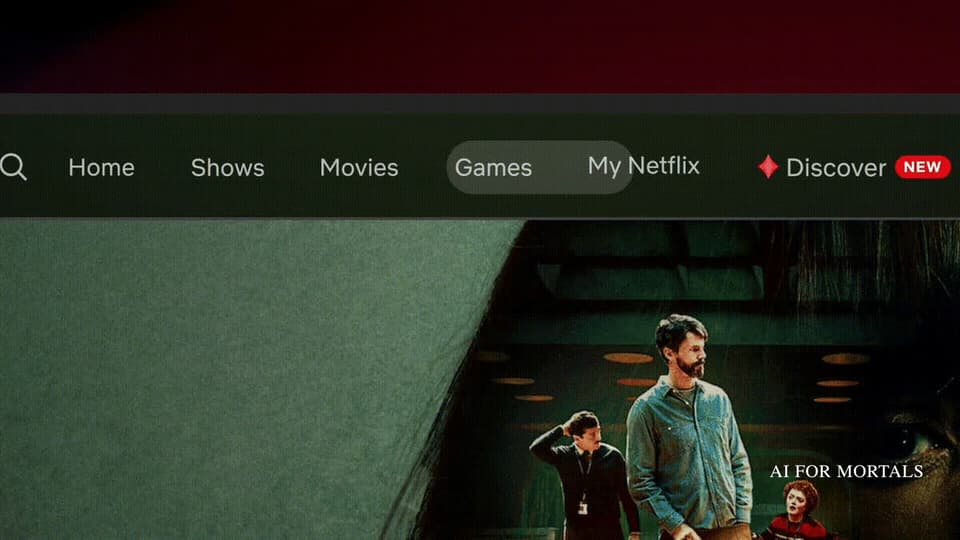
If you have it, look for "Discover" with a red gem icon and a "New" label in the top menu on your TV.

The tab is optional, and the rest of the Netflix app stays the same whether you use it or not. Netflix also notes that, like any AI feature, it can make mistakes.
Why Netflix is testing a new way to choose what to watch
Netflix calls AI Discover a "test kitchen." It plans to try more discovery experiments inside the tab, and the ones members use and like may move into the main Netflix app.
Netflix recently laid off about 1,000 employees as growth slowed, and Bloomberg reported in October that members are watching less and opening the app less often, The Verge notes.
So AI Discover tests whether starting from a mood gets people to something they want to watch faster than scrolling through rows. If you're in the test group, what you keep and skip in the tab helps decide what the rest of Netflix looks like next.
Other apps you already use are adding AI that works from what you tell it. Gemini's Personal Intelligence setting now answers questions about your own flights and appointments in the car, and TikTok's new Shopping Assistant answers your questions about a product you just saw.
Sources
- Netflix: Introducing AI Discover
- Netflix Help Center: AI Discover
- TechCrunch: Netflix's new AI Discover tab helps you find something to watch based on your mood
- The Verge: Netflix will show you themed recommendations through a new 'AI Discover' tab
- Bloomberg (via The Verge): Netflix members are watching less and opening the app less often



Comments
Sign in to join the conversation.