Atlas GPT (ChatGPT Atlas): What It Was, Why OpenAI Retired It, and What Replaced It
ChatGPT Atlas was OpenAI's Mac web browser with ChatGPT built in, and it stopped working on August 9, 2026, when OpenAI moved its browser features into ChatGPT.

On this page
- What is Atlas GPT?
- Is ChatGPT Atlas still available?
- Is ChatGPT Atlas available for Windows?
- What Atlas did: the sidebar, browser memories and agent mode
- What replaced Atlas: ChatGPT Work, the desktop app's browser and the ChatGPT extension
- What happened to Atlas bookmarks, history and passwords?
- Was ChatGPT Atlas safe to use?
- Questions people ask about ChatGPT Atlas
"Atlas GPT" is how many people search for ChatGPT Atlas, OpenAI's web browser with ChatGPT inside it. OpenAI launched Atlas on October 21, 2025, for Macs only, and retired it the next summer. Atlas stopped working on August 9, 2026, and the same jobs now live in ChatGPT Work, the ChatGPT desktop app and the ChatGPT browser extension.
OpenAI said at launch that Windows, iOS and Android versions were "coming soon," but none came out before the shutdown, so there is no Atlas for Windows to download. On a Windows PC, the same help now comes from the ChatGPT desktop app, which has a built-in browser ChatGPT can use, and from the ChatGPT extension in Chrome, Edge, Brave, Opera or Vivaldi.
Updated November 27, 2026: added a section on whether Atlas ever came to Windows and what to use on a Windows PC instead, a table of what works on each device now, and answers on the "not supported on this Mac" message and whether Atlas was built on Chromium.
Last checked November 27, 2026: OpenAI's Atlas launch post, its ChatGPT release notes, its Atlas retirement help page, its post on how it built Atlas and its ChatGPT download page, each linked where its facts first appear.
What is Atlas GPT?
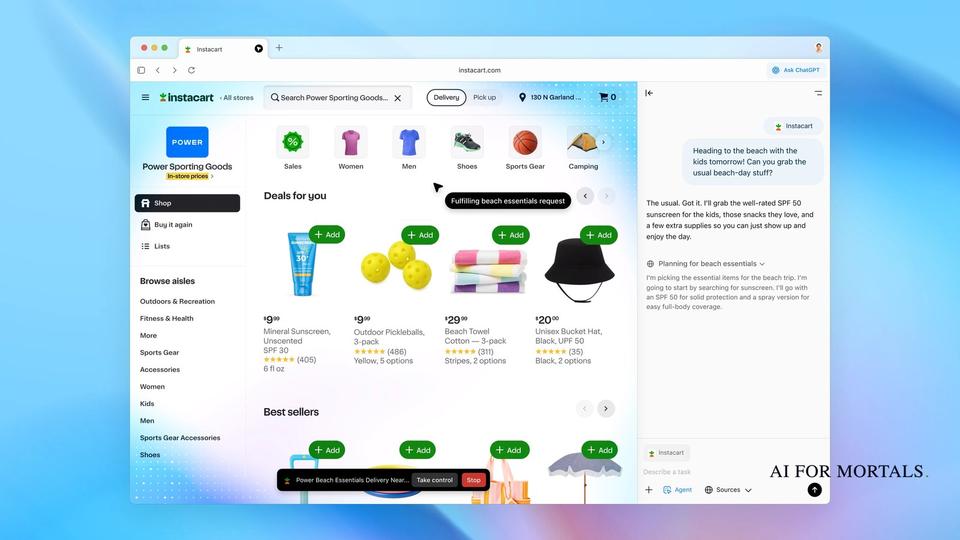
Atlas GPT means ChatGPT Atlas, OpenAI's Mac-only web browser with ChatGPT built into every page, which OpenAI retired on August 9, 2026. OpenAI called it "the browser with ChatGPT built in," and it had three ChatGPT features of its own: an "Ask ChatGPT" sidebar, optional browser memories, and agent mode, where ChatGPT clicked through websites for you.
At launch, Atlas was open to Free, Plus, Pro and Go users on macOS. Business users got it in beta, and Enterprise and Edu users got it if their plan administrator turned it on. OpenAI's launch post listed no separate price for Atlas, and it said "Experiences for Windows, iOS, and Android are coming soon."
That launch post now opens with a different line: "Atlas has since been deprecated." It sends readers to ChatGPT Work and the release notes instead.
Is ChatGPT Atlas still available?
No. On July 9, 2026, OpenAI posted a "Retiring Atlas" note in its ChatGPT release notes that said "Atlas is scheduled to stop working on August 9, 2026." That date has passed, and there is no version left to download.
OpenAI retired Atlas to move its browser features into ChatGPT itself. The one-line reason in the retirement note is "We're deprecating Atlas as we bring browser-based agentic capabilities into ChatGPT and Codex." Codex is OpenAI's tool for software development, and it now sits in the same desktop app as ChatGPT.
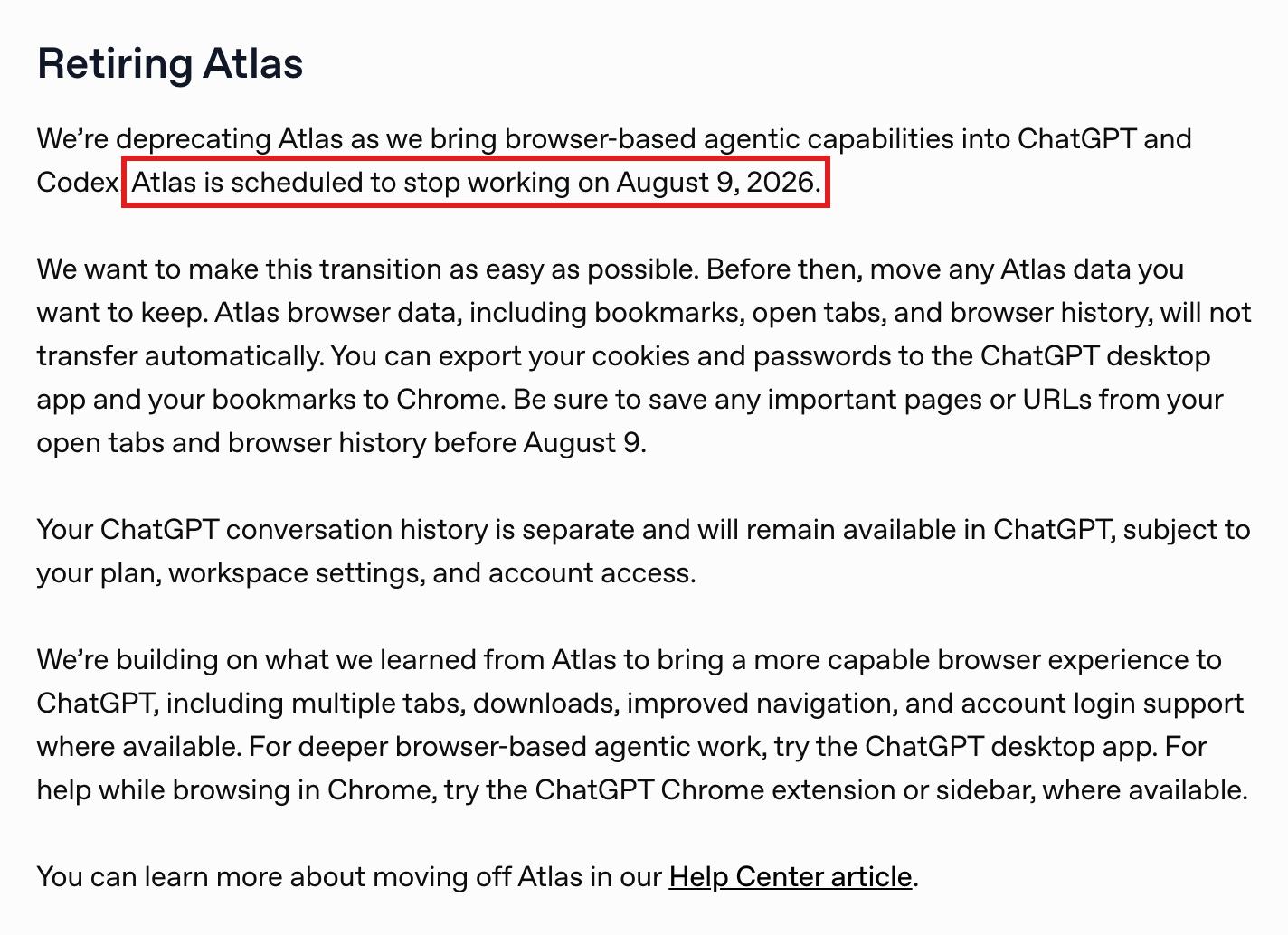
The same release-notes entry introduced ChatGPT Work and a new ChatGPT desktop app with its own built-in browser. OpenAI said it was "building on what we learned from Atlas" to give ChatGPT "a more capable browser experience," with multiple tabs, downloads and account sign-in where available. It published no usage figures and gave no other reason in its notes.
OpenAI's Atlas retirement help page now says "ChatGPT Atlas has been retired and no longer receives updates." If the app is still on your Mac, that page says to remove it the way you remove any Mac app, and to contact OpenAI Support first if you still need data saved inside it.
Atlas was one of several ChatGPT features OpenAI wound down in 2026. On the same July 9 date it stopped people from creating new group chats, and custom GPTs, another ChatGPT feature OpenAI is retiring, are next.
Is ChatGPT Atlas available for Windows?
No. Atlas only ever shipped for macOS, and OpenAI retired it on August 9, 2026 before the promised Windows, iOS and Android versions came out. OpenAI's launch post said those versions were "coming soon," and its release notes announce none of them before the retirement.
That also answers when Atlas will come to Windows and what its Windows release date is: OpenAI has announced none, and there is no way to get Atlas on Windows 11 or any other version of Windows. The same goes for an iPad, an iPhone or an Android phone.
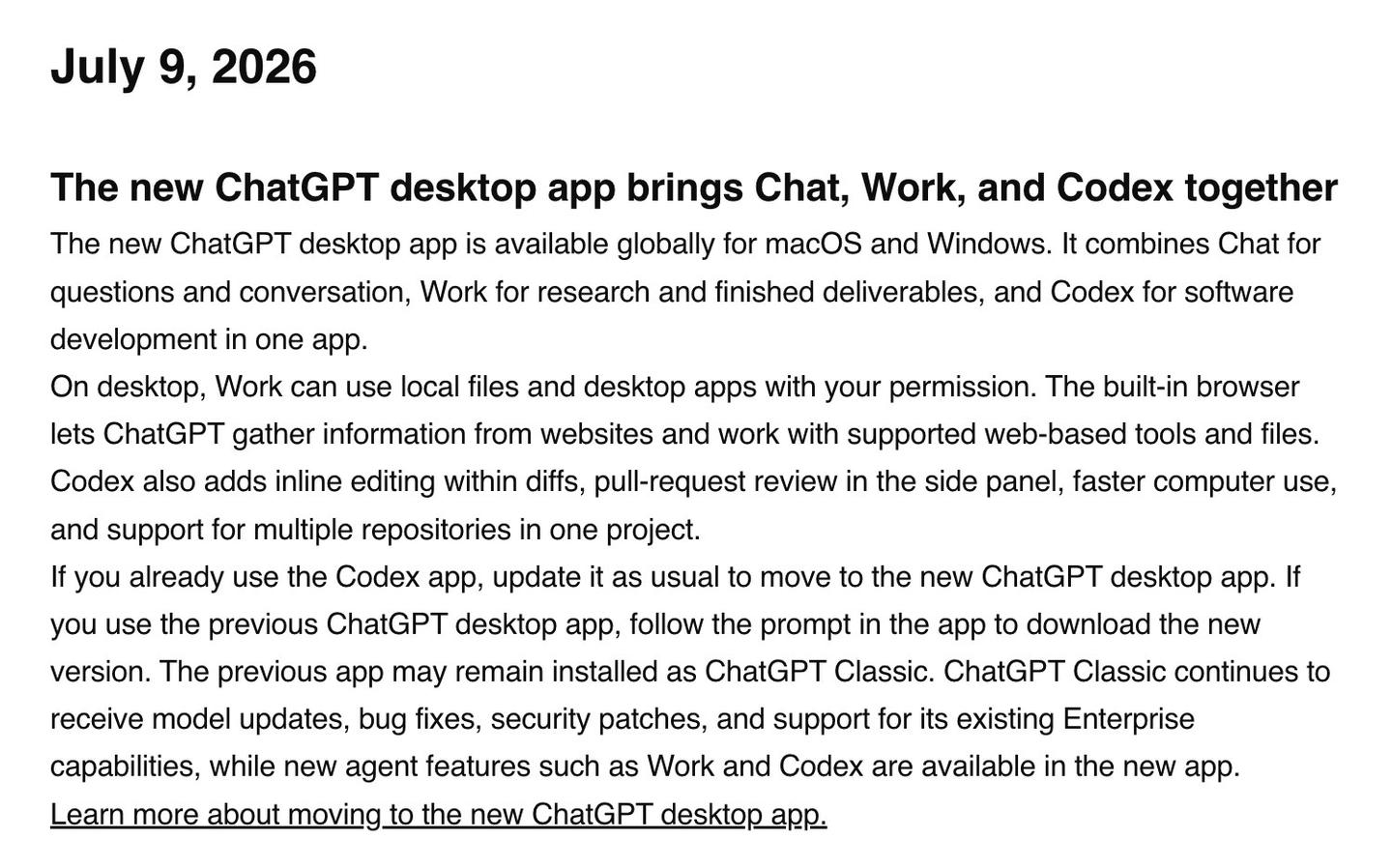
What you can use on a Windows PC is the ChatGPT desktop app for Mac and Windows. OpenAI's July 9 release notes say "The new ChatGPT desktop app is available globally for macOS and Windows," and that its built-in browser "lets ChatGPT gather information from websites and work with supported web-based tools and files." That built-in browser is where the agent jobs Atlas used to do now run on a PC.
If you would rather keep your own browser, the ChatGPT browser extension works in Chrome, and since August 31, 2026 also in Microsoft Edge, Brave, Opera and Vivaldi. It adds a side chat next to the page (in every one of those except Opera) and lets ChatGPT in the desktop app use your open tabs.
Get the desktop app from OpenAI's own ChatGPT download page, which the release notes point to for macOS and Windows. Because OpenAI never released Atlas for Windows, any download offered as "ChatGPT Atlas for Windows" on another site did not come from OpenAI, and it is safer to leave it alone.
What Atlas did: the sidebar, browser memories and agent mode
Atlas put ChatGPT next to whatever page you had open. An "Ask ChatGPT" button sat at the right end of the address bar and opened a chat panel beside the page, so you could ask about the page in front of you without copying and pasting it into a chat. OpenAI's launch post described ChatGPT "helping you in the window right where you are," with your regular ChatGPT memory built in.
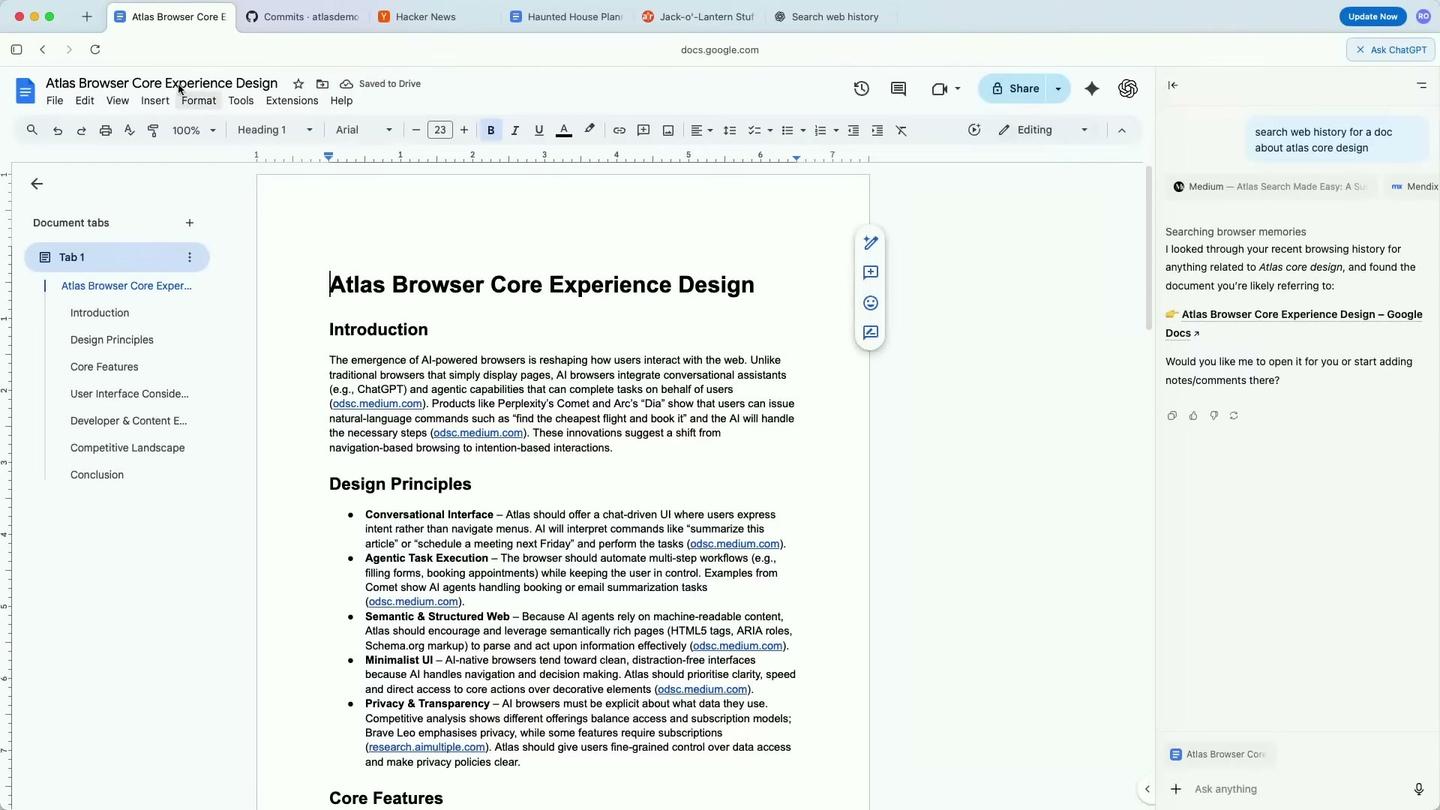
Browser memories went one step further. When you turned them on, ChatGPT remembered details from the sites you visited and used them later. OpenAI's own example was asking it to "Find all the job postings I was looking at last week and create a summary of industry trends so I can prepare for interviews." Memories were off unless you chose them, you could view or archive them in settings, and deleting your browsing history deleted the memories that came from it.
Agent mode let ChatGPT open tabs and click through websites in your own browser to finish a task. OpenAI's examples were taking a recipe, finding a grocery store, adding the ingredients to a cart and ordering them, or reading past team documents and compiling a brief. It was a preview for Plus, Pro and Business users only, and OpenAI warned that it "is an early experience and may make mistakes on complex workflows."
OpenAI also set hard limits on what the agent could do. It could not run code in the browser, download files, install extensions or reach other apps on your computer, and it paused on sensitive sites such as financial institutions to make sure you were watching while it acted.
Atlas picked up a few ChatGPT features after launch. The release notes show ChatGPT Pulse rolling out to Atlas for Pro users on October 29, 2025, and pinned chats arriving in Atlas on December 18, 2025.
What replaced Atlas: ChatGPT Work, the desktop app's browser and the ChatGPT extension
The retirement note pointed Atlas users to two places: the ChatGPT desktop app "for deeper browser-based agentic work," and the ChatGPT Chrome extension or sidebar "for help while browsing in Chrome." The agent jobs Atlas used to do now run in ChatGPT Work, which launched the same day.
OpenAI describes ChatGPT Work as "an agent for longer, more involved tasks." It researches, works across your connected apps and files, and produces finished documents, spreadsheets and presentations. OpenAI rolled it out on the web and mobile to paid plans except Free and Go. The new desktop app, for macOS and Windows, combines Chat, Work and Codex, and its built-in browser is where ChatGPT does web tasks on your computer. A Linux version followed in public preview on August 14, 2026, with browser actions included.
So there is an official ChatGPT app for Windows: the same desktop app Mac users get, and the release notes show its July 16, 2026 updates going live for all plans on macOS and Windows. Here is where the Atlas experience lives now on each kind of computer.
| Device or browser | Atlas (retired August 9, 2026) | What works there now |
|---|---|---|
| Mac | Available from October 21, 2025 until the shutdown | The ChatGPT desktop app, with its built-in browser |
| Windows | Promised as "coming soon," never released | The ChatGPT desktop app, with its built-in browser |
| Linux | No version announced | The ChatGPT desktop app in public preview since August 14, 2026, with browser actions |
| Chrome, Edge, Brave, Opera, Vivaldi | Atlas was its own browser and didn't run inside these | The ChatGPT browser extension: open tabs as context and browser tasks from the desktop app, plus side chat in all but Opera |
On August 25, 2026, Work's browser on the web and mobile started handling tasks on some websites that need you to sign in, such as booking a DMV appointment or filling out passport renewal forms. Signing in through Work's browser is available on Plus and Pro, and OpenAI says Work "will always ask for confirmation before consequential actions, such as completing a reservation or payment."
On August 31, 2026, the ChatGPT browser extension added Microsoft Edge, Brave, Opera and Vivaldi. With it installed, you can mention your open tabs so Work and Codex use them as context, or ask ChatGPT in the desktop app to do a task in that browser, and our explainer shows how ChatGPT's browser extension can now work inside your tabs. The side chat works in Edge, Brave and Vivaldi, while Opera gets tab mentions and browser control without the side chat.
Work runs on OpenAI's newest models. GPT-6.1 Terra rolled out in Work on October 26, 2026, and GPT-6.2 Astra and Sol arrived in Work in preview on November 17. Work tasks draw on a usage allowance, which OpenAI shows in the ChatGPT sidebar, and our explainer covers how fast Work tasks use up a paid ChatGPT plan's limit.
| Atlas feature | Where it is now |
|---|---|
| Ask ChatGPT sidebar | The ChatGPT Chrome extension or sidebar, where available; the extension also runs in Edge, Brave, Opera and Vivaldi |
| Agent mode | ChatGPT Work, including the desktop app's built-in browser |
| Saved passwords and cookies | Could be exported to the ChatGPT desktop app before August 9, 2026 |
| Bookmarks | Could be exported to Chrome before August 9, 2026 |
| Browser memories | OpenAI hasn't named a replacement; they are separate from ChatGPT memories |
| ChatGPT conversations | Still in ChatGPT, subject to your plan, workspace settings and account access |
The dates below come from OpenAI's launch post and release notes, both linked above.
| Date | What happened |
|---|---|
| October 21, 2025 | Atlas launches on macOS for Free, Plus, Pro and Go, in beta for Business, and for Enterprise and Edu if an admin enables it; agent mode in preview for Plus, Pro and Business |
| October 29, 2025 | ChatGPT Pulse starts rolling out to Atlas for Pro users |
| December 18, 2025 | Pinned chats come to Atlas |
| June 4, 2026 | Lockdown Mode, which restricts agent mode, opens to all logged-in users |
| July 9, 2026 | OpenAI announces Atlas's retirement and introduces ChatGPT Work and the new desktop app for macOS and Windows |
| August 9, 2026 | Atlas stops working |
| August 14, 2026 | The ChatGPT desktop app arrives on Linux in preview, with browser actions |
| August 25, 2026 | Work's browser can do tasks on some sign-in websites (sign-in on Plus and Pro) |
| August 31, 2026 | The ChatGPT extension adds Edge, Brave, Opera and Vivaldi, and open tabs can be used as context |
For the rest of what changed in ChatGPT this year, see our page on ChatGPT updates and features.
What happened to Atlas bookmarks, history and passwords?
None of them moved over on their own. The July 9 note said bookmarks, open tabs and browser history "will not transfer automatically," and it asked users to export what they wanted before August 9: cookies and passwords to the ChatGPT desktop app, bookmarks to Chrome.
The retirement help page covers what to do now:
- Bookmarks: import the HTML file you exported earlier into Chrome under More, then Bookmarks and lists, then Import bookmarks and settings.
- Passwords: import an exported password CSV file into Google Password Manager, then delete the CSV, since it holds readable passwords.
- Cookies and signed-in sessions: sign in to each website again in your new browser.
- Open tabs and history: these only survive if you saved the URLs or bookmarks before the shutdown.
- ChatGPT chats: they stay in ChatGPT, subject to your plan, workspace settings and account access.
If you never exported anything, OpenAI says to contact its support team, and it warns that "Recovery is not guaranteed."
Atlas browser memories are a separate set of data from your ChatGPT memories. Deleting your ChatGPT chats does not delete them, and neither does uninstalling Atlas or changing your ChatGPT memory settings. For questions or deletion requests about Atlas data, OpenAI points to its Privacy Portal or its support team.
Was ChatGPT Atlas safe to use?
OpenAI's own answer at launch was that ChatGPT's agent capabilities "still carry risk." Besides plain mistakes, it said agents can be fooled by "hidden malicious instructions," text planted in a webpage or email to make the agent do something you didn't ask for. OpenAI's later notes call this a prompt injection attack, and at launch it said the attack "could lead to stealing data from sites you're logged into or taking actions you didn't intend."
OpenAI said its safeguards "will not stop every attack," and it told users to limit what they shared with the agent. It suggested running agent mode logged out of your accounts and watching what it did.
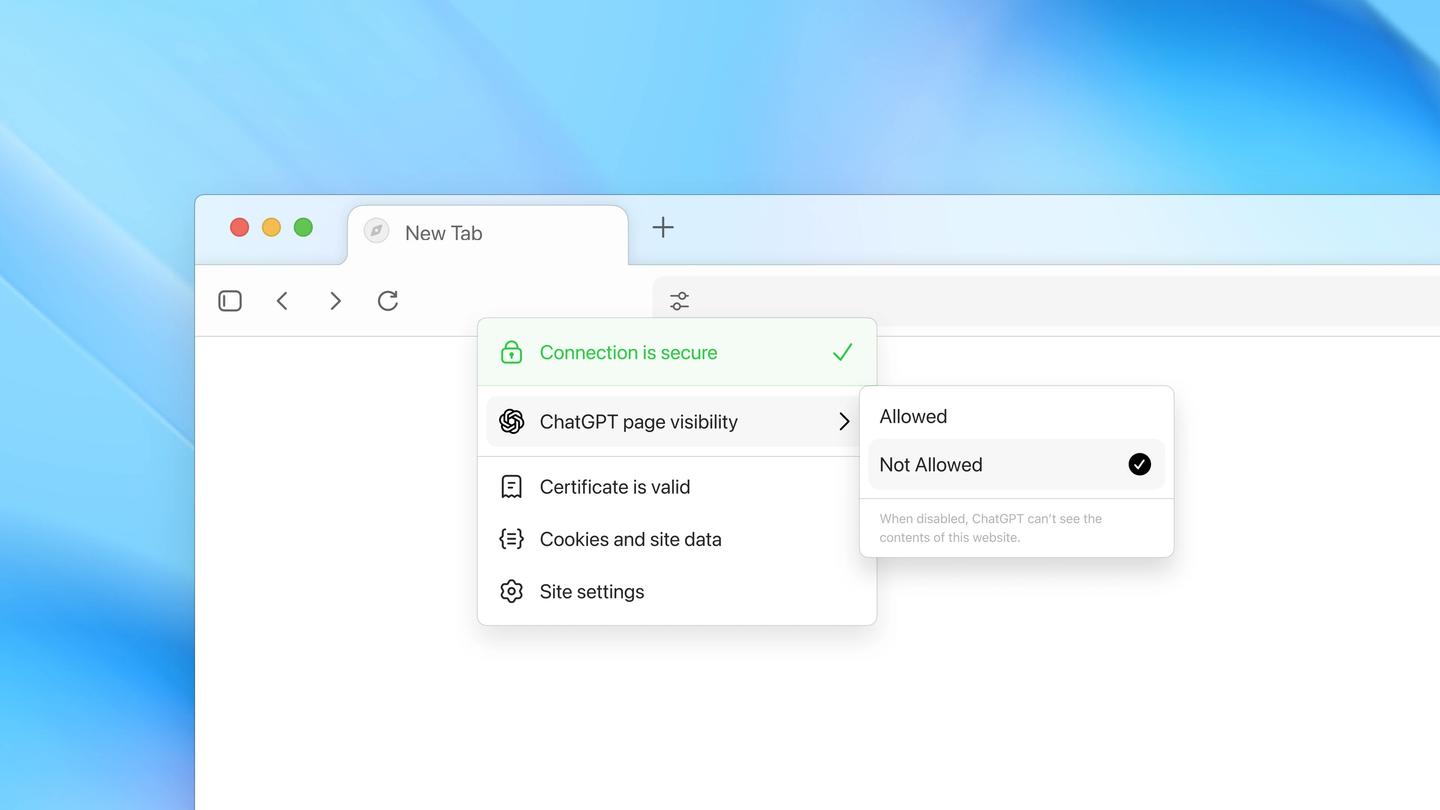
Atlas also gave you privacy controls for everyday browsing. You could open an incognito window to log out of ChatGPT for a while, clear single pages or your whole history, and switch off ChatGPT's view of any site from the address bar. OpenAI did not use your browsing to train its models unless you opted in, and parental controls could turn off browser memories and agent mode.
ChatGPT now has a setting aimed at this risk. Since June 4, 2026, any logged-in user can turn on Lockdown Mode under Settings, then Security. It restricts live web browsing, deep research, agent mode and file downloads to reduce the chance of data being stolen through prompt injection. Our safety guide covers what ChatGPT keeps and how to lock it down.
Questions people ask about ChatGPT Atlas
Was ChatGPT Atlas free?
Yes, for the browser itself. Free users on macOS could use Atlas from launch, and OpenAI listed no separate price. Agent mode was the exception: it was a preview for Plus, Pro and Business users. Our pricing guide lists what each ChatGPT plan costs today.
Was ChatGPT Atlas only for Mac?
Yes. OpenAI launched Atlas "worldwide on macOS," and the Windows, iOS and Android versions it called "coming soon" never came out before the retirement.
Why does it say ChatGPT Atlas is not supported on this Mac?
Since August 9, 2026, Atlas no longer works on any Mac, whatever the model, and OpenAI's help page says it no longer receives updates. OpenAI's current pages don't list the Mac models or macOS versions Atlas used to need. On a Mac today, the ChatGPT desktop app and the ChatGPT browser extension do the jobs Atlas did.
Was ChatGPT Atlas built on Chromium?
Yes. OpenAI's engineering post on how it built Atlas, from October 30, 2025, says Atlas used Chromium, the open-source browser engine many desktop browsers are built on. OpenAI ran it through a layer it called OWL, short for OpenAI's Web Layer, which runs "Chromium's browser process outside of the main Atlas app process." The windows and buttons you saw were rebuilt with Apple's own Mac frameworks (SwiftUI, AppKit and Metal).
Was ChatGPT Atlas any good?
Atlas put ChatGPT beside every page, remembered your browsing if you let it, and could click through sites for you in agent mode, which OpenAI itself called "an early experience" that "may make mistakes on complex workflows." OpenAI retired it less than ten months after launch and moved those features into ChatGPT Work, the desktop app's browser and the browser extension.
Can I still download or use Atlas?
No. Atlas stopped working on August 9, 2026, and OpenAI's help page says it no longer receives updates.
Is the ChatGPT browser extension the same as Atlas?
No. Atlas was a separate browser. The extension adds ChatGPT to a browser you already use (Chrome, Edge, Brave, Opera or Vivaldi) and connects it to Work and Codex in the desktop app.
Does removing Atlas cancel my ChatGPT subscription?
No. OpenAI says removing Atlas doesn't touch your subscription; you cancel that separately through whichever platform bills you.
What happened to the Atlas default browser offer?
OpenAI's help page says the temporary higher usage limits from its Atlas default browser promotion applied only in Atlas, for up to seven days in a row. They did not carry over to other ChatGPT apps, and the promotion did not create a paid subscription or an automatic charge.

Comments
Sign in to join the conversation.