Claude System Prompt: What It Is and How to Write Your Own
Claude's system prompt is the standing instructions it reads before every chat, and this guide covers Anthropic's published one, where to set your own and a template to copy.

On this page
- What is a system prompt?
- What's in Claude's own system prompt?
- How to set a system prompt in Claude
- A copy-paste system prompt template
- Prompting techniques Anthropic recommends
- Do you still need chain of thought prompting?
- ChatGPT and Gemini system prompts: where they live
- Questions people ask about system prompts
A system prompt is the set of standing instructions an AI reads before your first message: the role it plays, what it knows about you and the rules every reply follows. Claude has two layers of it. Anthropic writes one for the Claude apps and publishes it, and you can add your own on top through Claude's Instructions setting, a project's instructions or, if you build with Claude, the API.
This guide covers what Anthropic's published prompt tells Claude, where to set yours, two templates to copy and the prompting techniques Anthropic's own guide recommends for current Claude models, plus where ChatGPT and Gemini keep the same thing.
Last checked November 14, 2026: Anthropic's system prompt pages and prompting guide, Claude's help center, and the ChatGPT and Gemini help pages, all linked below where each fact comes from.
What is a system prompt?
A system prompt is text an AI receives before the conversation starts, and it shapes every reply in that chat. Your regular message asks for one thing. The system prompt sets the role, the background and the rules that stay in force for the whole conversation, so you don't have to repeat them.
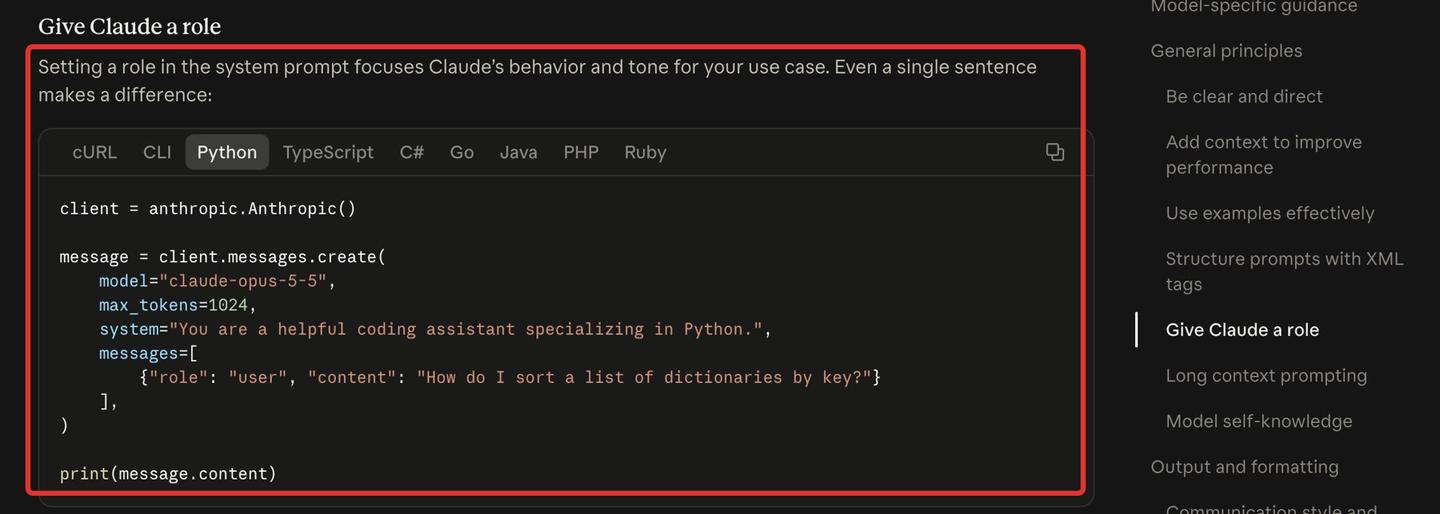
Its purpose is consistency. Anthropic's prompting best practices say that setting a role in the system prompt focuses Claude's behavior and tone, and that "even a single sentence makes a difference."
Every big chatbot has a version of it. Claude calls yours Instructions, ChatGPT calls it custom instructions and Gemini keeps it inside a Gem. Writing one is the same skill as how to write a good AI prompt, applied to the context you'd otherwise retype in every chat.
What's in Claude's own system prompt?
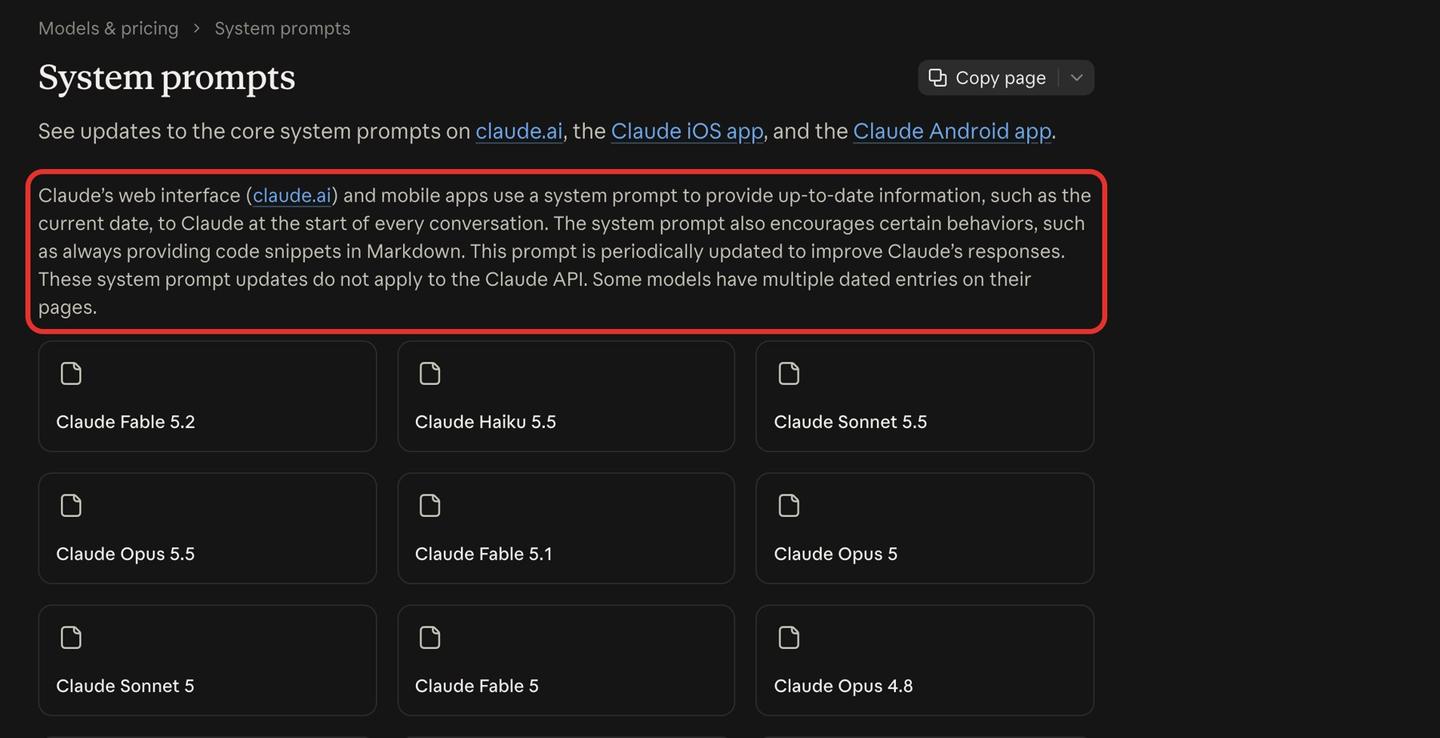
Claude's own system prompt is a long set of instructions Anthropic gives Claude at the start of every conversation in claude.ai and the Claude iOS and Android apps. It gives Claude up-to-date information, such as the current date, and encourages certain behaviors, such as always putting code snippets in Markdown.
Anthropic publishes the prompt for each model, from Claude Haiku 3 to Claude Fable 5.2, Haiku 5.5, Sonnet 5.5 and Opus 5.5. It updates the prompt from time to time, so some models have more than one dated version. The Opus 5.5 page has two, from September 22, 2026 and October 27, 2026.
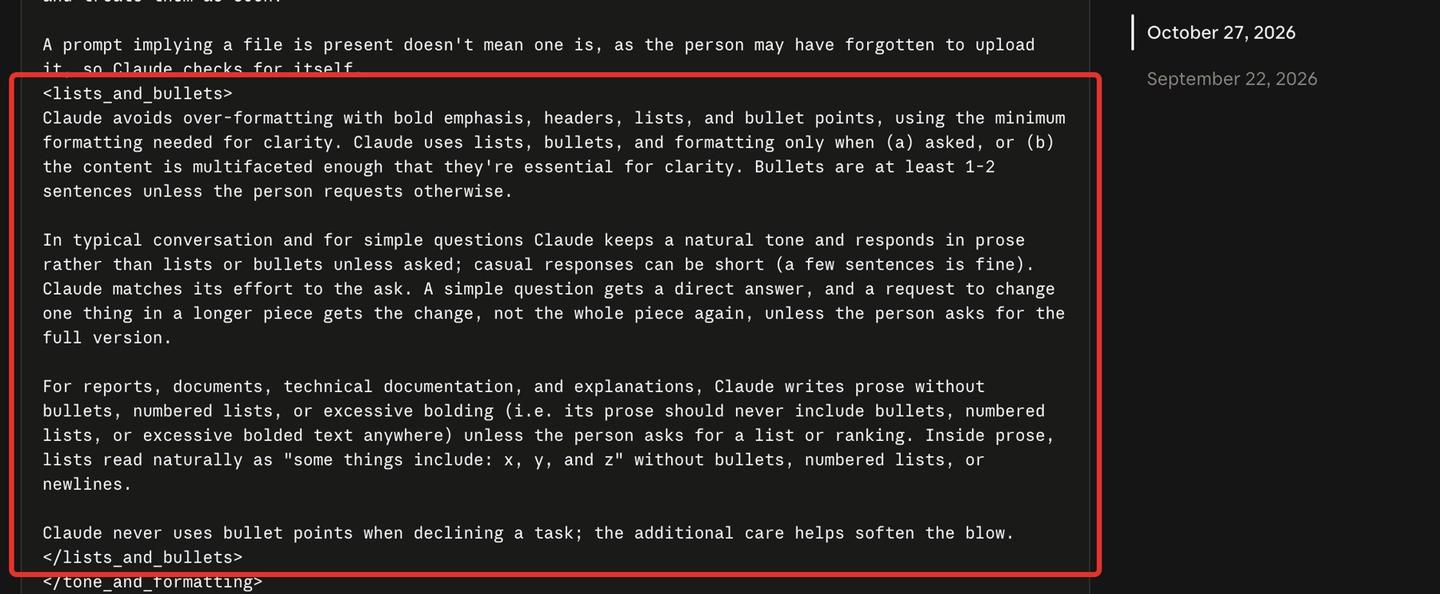
Reading the October 27, 2026 version for Opus 5.5 explains several things Claude does in the app.
It keeps formatting light. The prompt says: "Claude avoids over-formatting with bold emphasis, headers, lists, and bullet points, using the minimum formatting needed for clarity." It adds that Claude uses lists and formatting only when asked or when the content needs them, so if you want bullet points by default, put that in your own instructions.
It matches length to the question. In Anthropic's words: "A simple question gets a direct answer, and a request to change one thing in a longer piece gets the change, not the whole piece again, unless the person asks for the full version."
It knows the date and its own limits. The prompt has a slot for the current date and time, and it gives Opus 5.5 a reliable knowledge cutoff of the end of June 2026. For questions about message limits, pricing or in-app how-tos, it tells Claude to say it doesn't know and to point you to Anthropic's support site.
It expects model switches. One line reads: "The person can switch models mid-conversation, so earlier messages in this thread that identify as a different model or report a different knowledge cutoff may still be accurate."
Anthropic says the app prompt updates do not apply to the Claude API, so an app built on the API doesn't get any of this unless its developer writes it. The published pages cover claude.ai and the Claude iOS and Android apps, and Claude Code's system prompt isn't on them, so a copy you find elsewhere isn't Anthropic's published version.
How to set a system prompt in Claude
You set your own Claude system prompt in one of three places: Instructions for every chat, project instructions for the chats in one project, or the system parameter if you call Claude through the API. Claude's help center also lists skills for behaviors you only want some of the time.
Instructions: rules for all your chats
Anthropic's help article on Claude's personalization features gives the path:
- Click your initials in the lower-left corner.
- Select Settings, then Your Claude (Account in the older Settings layout).
- Write your rules under Instructions.
"Any instructions you add here will be applied to all of your conversations with Claude." Anthropic suggests putting in your preferred approaches, terms and concepts you use often, situations you run into and how you like Claude to communicate.
That is also how to use Claude as a personal assistant: Instructions hold who you are and how you want answers, and a project for each area of your work holds that area's details.
Project instructions: rules for one job
Each Claude project has its own instructions, and Anthropic's article says: "These instructions only apply to chats within that project." It suggests them for project-specific context, guidelines for one workflow and roles Claude should take on inside the project.
Skills: behaviors you switch on when needed
"Skills add specific behaviors or capabilities to your conversations with Claude," the same article says, and you activate them on demand. A rule you want every time belongs in Instructions; a format you use for one kind of task can live in one of your Claude skills.
The system parameter: for developers using the API
If you call Claude from code, you pass the system prompt as the system parameter of the request. Anthropic's own example is one sentence long.
A copy-paste system prompt template
A good system prompt gives Claude a role, the context it can't guess, rules with the reason behind each, the format you want and a few examples. The two templates below follow that order, and each part comes from Anthropic's prompting guide (covered in the next section). Fill in the brackets and delete any line that doesn't apply to you.
The first is for Claude's Instructions setting, so it applies to every chat.
I'm [your name], a [job title] at [type of company]. I mostly use you for [two or three regular jobs, such as client emails, report summaries and planning my week].

About my work:
- My readers are [who reads what I write], so explain technical terms in plain words.
- Names and terms I use often: [products, acronyms, colleagues and their roles].

How to answer:
- Give the answer first and the detail after, because I often read replies on my phone.
- Keep replies under [number] words unless I ask for more, because I'd rather ask a follow-up than scroll.
- Use bullet points for steps and lists I'll act on.
- If you're unsure of a fact, say so and tell me what would confirm it, because I forward some answers to clients.

Never:
- Invent numbers, quotes or sources.
- [Something you're tired of correcting, and why it bothers you.]
The second is for a project with one repeated job. It uses tags to separate the parts and leaves room for examples of replies you liked.
You help me answer customer emails for [business name], which [what the business does, in one line].

<context>
[Paste your refund policy, price list or FAQ here.]
Our tone is friendly and short, because customers read our replies on their phones.
</context>

<instructions>
1. Answer the customer's actual question in the first sentence.
2. If they ask for something the policy doesn't allow, say what we can do instead.
3. Sign off as [name].
</instructions>

<examples>
<example>
Customer: [a real past email]
Reply: [the reply you sent and liked]
</example>
[Add two to four more examples, each a different kind of request.]
</examples>
Keep the role plain. Anthropic says even a single sentence of role makes a difference, and the 27-run test behind our 12 Claude prompts we actually ran on Opus 5.5 found that grand personas such as "world-class executive assistant" and "senior data analyst with a PhD" changed nothing about whether the answers were right. A sentence that says what the job is does the work.
If you'd rather not fill in a template, you can make Claude write your prompt for you by having it ask you a few questions first, then paste the result into Instructions or a project.
For writing in your own voice, one block of instructions often isn't enough. Our guide to teach Claude your writing style from your own edits keeps the rules in a file instead: each correction you make becomes a short rule, and a second Claude checks every new draft against those rules before you see it.
Prompting techniques Anthropic recommends
Anthropic's prompting guide for current Claude models comes down to seven techniques: be specific, explain why, show examples, separate the parts with tags, put long documents first, write rules in a normal tone and, on most models, ask for a self-check.
Write it for a smart new colleague
Anthropic tells you to think of Claude "as a brilliant but new employee who lacks context on your norms and workflows." Its test is to show your prompt to a colleague with little context on the task: "If they'd be confused, Claude will be too." Say exactly what format and limits you want.
Give the reason behind each rule
Explaining why a rule matters gets better results than the bare rule. Anthropic's example swaps "NEVER use ellipses" for "Your response will be read aloud by a text-to-speech engine, so never use ellipses since the text-to-speech engine will not know how to pronounce them," and notes that "Claude can generalize from the explanation."
Show three to five examples
Anthropic calls examples "one of the most reliable ways" to steer Claude's format, tone and structure, a technique also called few-shot or multishot prompting. It recommends 3–5 examples that mirror your real use and vary enough to cover edge cases, each wrapped in <example> tags. You can also ask Claude to judge your examples or write more like them.
Separate the parts with tags
When a prompt mixes instructions, background and the material to work on, tags such as <instructions>, <context> and <input> help Claude tell them apart. Anthropic says this "reduces misinterpretation."
Put long documents at the top
Place long documents and inputs near the top of the prompt, above your question, instructions and examples. Anthropic says this improves performance across all models, and that putting your question at the end can improve response quality by up to 30 percent in tests, especially with complex, multi-document inputs.
Drop the all-caps warnings
Anthropic says Claude Opus 4.5 and Opus 4.6 respond more strongly to the system prompt than earlier models, so prompts written to make older models use a tool more often can now make them overuse it. Its fix is plain wording: "Use this tool when…" in place of "CRITICAL: You MUST use this tool when…". Our 27-run test on Opus 5.5 pointed the same way: Claude followed plain-sentence rules just as well as all caps.
Ask for a self-check, except on Opus 5
Anthropic suggests ending with a line like "Before you finish, verify your answer against [test criteria]," and says it catches errors reliably, especially in coding and math. Claude Opus 5 is the exception: it checks its own work well without being told, so Anthropic says to remove these lines on that model because they can make it over-check.
Do you still need chain of thought prompting?
On the newest Claude models, mostly no. Chain of thought prompting means asking the AI to write out its reasoning step by step before it answers, and Anthropic now treats it as a fallback for when Claude's built-in thinking is switched off.
For Claude Fable 5.2, Fable 5.1, Fable 5, Opus 5.5, Opus 5 and Sonnet 5.5, Anthropic says to rely on Claude's own thinking instead, because a prompt that asks the model to write out its reasoning, for example in <thinking> tags, "might be declined." On Fable 5.x and Opus 5.5, thinking is always on, and Claude decides how much to think from the effort setting (a dial for how hard it works on a request) and how difficult the question is.
If you want deeper reasoning, Anthropic says a general instruction such as "think thoroughly" often produces better reasoning than a step-by-step plan you write yourself, because "Claude's reasoning frequently exceeds what a human would prescribe."
Old habits can cost time. In our 27-run test on Opus 5.5, "take a deep breath and think step by step" mostly made spreadsheet answers longer and slower, and a "show all of your reasoning" rule pushed the spreadsheet answer to about 19 seconds and 420 words, where the bare prompt took about 10 seconds and 210 words.
Manual chain of thought still has a place when thinking is off, which through the API is the default for Claude Opus 4.6 through Opus 4.8 and Sonnet 4.6 if you don't turn it on. There, Anthropic's fallback is to ask Claude to think through the problem before it answers and to put the final answer in <answer> tags.
ChatGPT and Gemini system prompts: where they live
ChatGPT keeps your system prompt in custom instructions for every chat and in project instructions for one project. Gemini keeps it in a Gem, and Google says Gems on personal accounts are moving to skills starting in November 2026.
ChatGPT custom instructions and project instructions
OpenAI's help page on ChatGPT custom instructions says they are available on all plans on web, desktop, iOS and Android, and that changes apply immediately across all chats.
- On web or desktop, open Settings and select Personalization.
- On iOS or Android, open Settings and select Customize ChatGPT.
- Turn on Enable customization and write in the Custom Instructions field.
Free and Go users can save up to 1,500 characters there, and Plus, Pro, Enterprise, Business and Education users up to 5,000.
For one project, OpenAI's guide to projects in ChatGPT says to open the project's more options menu (•••) and select Project settings. "Project instructions apply only within that project and override your global custom instructions."
Gemini Gems
Google's help page on Gems gives these steps on a computer:
- Go to gemini.google.com and click Open Sidebar.
- Click Gems, then New Gem.
- Enter a name and instructions, then click Save.
After a few words, a "Use Gemini to re-write instructions" button can expand what you typed, and a Gem you make on the web also shows up in the Gemini mobile app and the Gemini side panel in Google Workspace. The page also says: "Starting in November 2026, Gems will go away on personal Google accounts and automatically transition to skills."
Where each app keeps your system prompt
| App | Where you set it | What it applies to | Source |
|---|---|---|---|
| Claude: Instructions | Your initials, then Settings, then Your Claude, then Instructions | All your chats | Claude help center |
| Claude: project instructions | Inside the project | Only chats in that project | Claude help center |
| Claude API | The system parameter of each request | That request (the app prompt doesn't apply) | Anthropic docs |
| ChatGPT: custom instructions | Settings, then Personalization (web and desktop) or Customize ChatGPT (phone apps) | All chats | OpenAI help center |
| ChatGPT: project instructions | The project's ••• menu, then Project settings | Only that project, overriding custom instructions | OpenAI help center |
| Gemini: Gem | Sidebar, then Gems, then New Gem | Chats with that Gem; moving to skills on personal accounts from November 2026 | Gemini help center |
Questions people ask about system prompts
Can you see Claude's system prompt?
Yes, for the Claude apps. Anthropic publishes the prompt it uses in claude.ai and the iOS and Android apps for each model, with a dated entry for each update. Claude Code's prompt isn't on that page.
Does Claude's system prompt affect the API?
No. Anthropic says the app system prompt updates "do not apply to the Claude API." On the API, the only system prompt is the one the developer writes.
What's the difference between a system prompt and a regular prompt?
A regular prompt is the message you send now. A system prompt sits underneath every message in the conversation and holds the role, background and rules you want applied each time.
Why doesn't Claude use bullet points unless I ask?
The Opus 5.5 app prompt tells Claude to use lists, bullets and formatting only when asked or when the content needs them. Ask for them in your message or in your Instructions.
Why won't Claude tell me its own message limits?
The app prompt tells Claude to say it doesn't know when asked about message limits, pricing or in-app how-tos, and to point you to Anthropic's support site.
Does Claude know today's date?
Yes, in the apps. The system prompt gives Claude the current date at the start of every conversation. Opus 5.5's prompt puts its reliable knowledge cutoff at the end of June 2026.
Is there a system prompt generator?
Gemini has one built into Gems: the "Use Gemini to re-write instructions" button. For Claude or ChatGPT, have the chatbot interview you and write the prompt, or start from the templates above.
How long can ChatGPT custom instructions be?
Up to 1,500 characters on Free and Go, and up to 5,000 on Plus, Pro, Enterprise, Business and Education, according to OpenAI's help page.


Comments
Sign in to join the conversation.