Gemini Will Keep Your Chats for About Two Months, Even With History Off
Temporary Gemini chats and chats made with history off will be kept for about two months instead of 72 hours, and AI training gets its own setting.
 AI for Mortals Staff
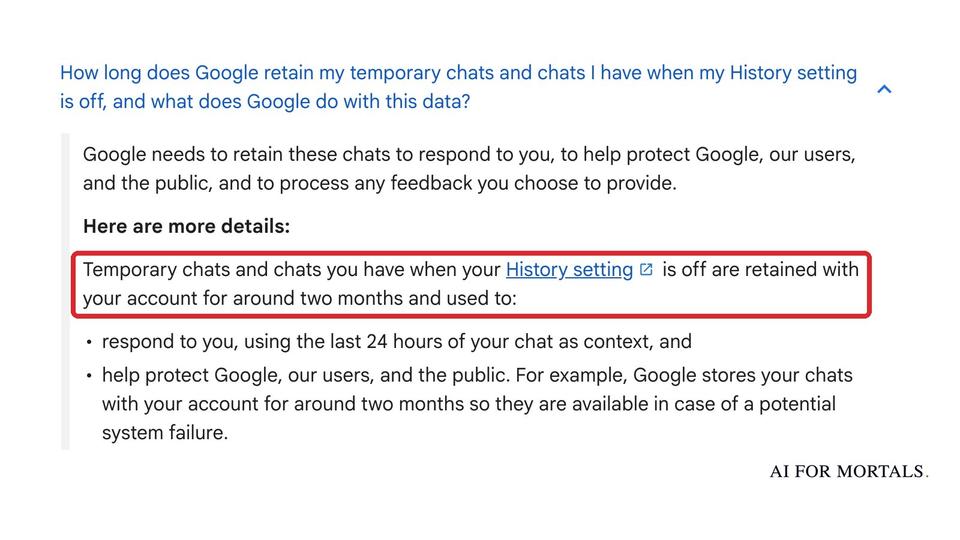
Google is changing what happens to your Gemini chat history when you turn it off. Chats made with history off, and temporary chats, will now be kept with your account for around two months. Until now, Google kept them for 72 hours.
In the same update, Google splits one setting into two. You can now keep your chat history and still stop Google from training its AI on your chats.
Both changes roll out to the Gemini app worldwide over the coming weeks, so your settings page may still look the old way for a while.

What Google keeps when your Gemini chat history is off
Two kinds of chats are covered: chats you have while the History setting is off, and temporary chats. Google's privacy hub says both are "retained with your account for around two months."
Google gives three reasons. It uses them to respond to you, to process feedback you send, and to "help protect Google, our users, and the public." The hub adds that Google stores them for two months "so they are available in case of a potential system failure."
People can see some of them. The same page says Google uses your chats to respond and protect "with help from human reviewers," whatever your settings. Any chat a reviewer looks at is separated from your account and kept for up to three years, even if you delete it.

Chats saved to your history work the same as before. They follow your auto-delete setting, which is 18 months by default and can be changed to 3 or 36 months, or to never.
Gemini temporary chat now lasts longer than ChatGPT's and Claude's
A Gemini temporary chat still stays out of training. Google's hub says temporary chats "are not used to train Google's AI models."
The difference is how long they sit on Google's servers. OpenAI says it may keep a ChatGPT Temporary Chat for up to 30 days, and Anthropic keeps a Claude incognito chat for 30 days. Google's two months is about twice that.
We compared what each assistant keeps in Is ChatGPT Safe?. Its Gemini row still shows the old 72 hours, which this change replaces.
Does Gemini train on your data? The new switch decides
Until now, Gemini had one switch, Keep Activity. Leaving it on saved your history and let Google train on your chats. The only way to opt out of training was to turn history off, which also meant you couldn't scroll back to an old chat.
The update makes training its own setting, a box labeled "Chat content including text & uploads." Google's privacy hub says your Gemini history includes your prompts and attachments, Gemini's replies, tasks and tool calls, your general location and data from apps you connect.
What you start with depends on what you had before. If you had Keep Activity off, Google says both new settings start off. If you had it on, your history stays on, and you decide about training separately.

Google's updated help page describes the training setting as off by default, something you turn on by ticking "Chat content including text & uploads." Launch-day coverage described it the other way for people who already had history on, as a toggle you have to find and switch off. Since the two don't match yet, open Settings, then History, once the update reaches you, and make sure the box next to "Chat content including text & uploads" is unticked if you don't want your chats used for training.
Where to find the new settings
On the web, Google's help page puts them at gemini.google.com, under Settings, then History. You can also go to myactivity.google.com/product/gemini.
Until the update reaches your account, that page is still called Gemini Apps Activity, with the single Keep Activity switch.
A few limits the help pages spell out:
- Training only stops going forward. Chats a reviewer already saw stay for up to three years, separated from your account.
- Feedback is still used. If history is off and you rate a reply, Google collects your feedback along with up to the last 24 hours of your chats, and may review them and keep them for up to three years, separated from your account.
- Turning history off narrows Gemini's apps. With history off, only Device assistance, Gemini Notebook, Messages, Phone and WhatsApp stay connected, so Gmail and Calendar aren't on the list.
- Other Google settings keep their own data. Turning off Gemini's history doesn't touch your Web & App Activity or Timeline.
Why two months matters this week
The new retention rule arrived alongside a bigger request. The same week, Google made Gemini Tasks free and asked people to let it into their email, passwords and Google Pay cards so it can make calls and buy things.
Tasks adds new places your words end up, too. Google's privacy hub says deleting your Gemini history doesn't delete texts you sent Gemini from your messaging app or carrier, and Google's texting setup screen notes those texts aren't end-to-end encrypted.
If you'd rather nothing you type sits on a server for long, two months is now the shortest Gemini offers. If you want to wipe your chats on another assistant too, our guide to deleting your ChatGPT chats and history covers what OpenAI keeps afterward.
Sources
- We're updating controls in the Gemini app (Google, November 16, 2026)
- Gemini Apps Privacy Hub (Google)
- Manage & delete your history in Gemini Apps (Gemini Apps Help)
- Temporary Chat in ChatGPT (OpenAI Help)
- Use incognito chats (Claude Help)
- Google to keep Gemini chats for 2 months, up from 72 hours, even with history off (TechCrunch, November 17, 2026)
- Google makes it easier to use Gemini without training AI on your data (Ars Technica, November 17, 2026)





Comments
Sign in to join the conversation.