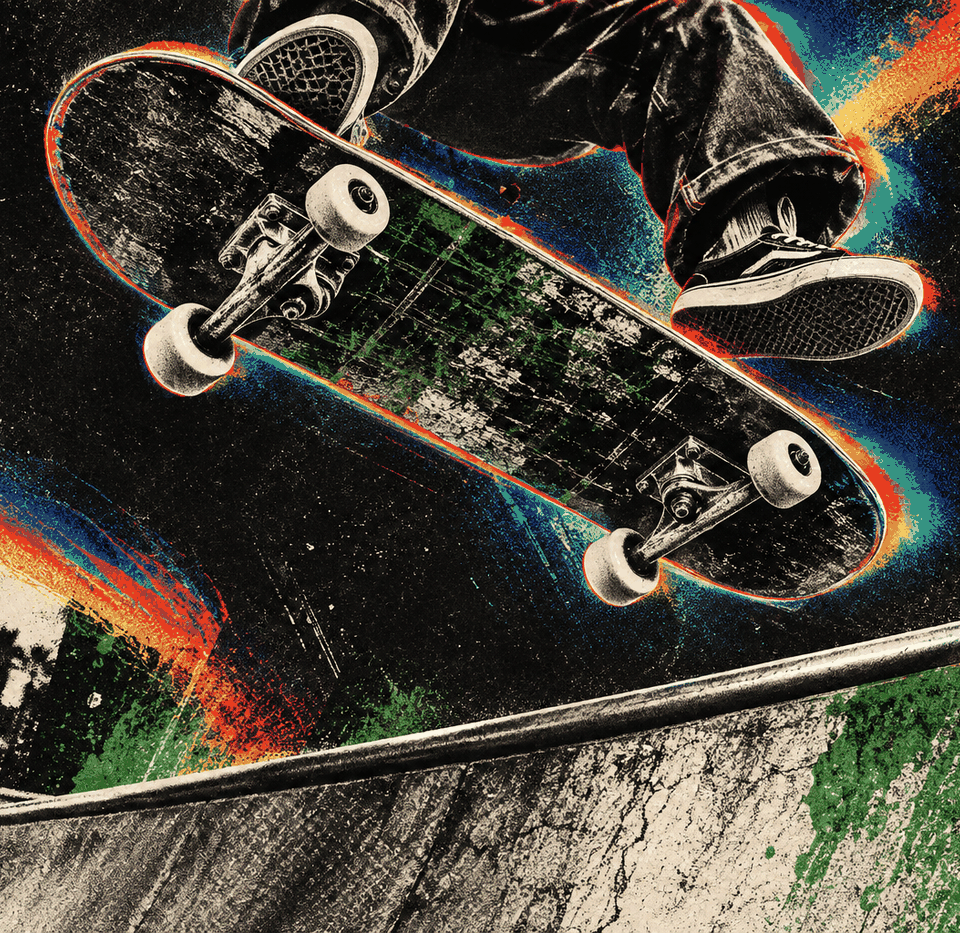
Anthropic released Claude Opus 5.5 on September 22. GPT-6 Astra has been the model I reach for day to day, so I wanted to see whether Opus could actually take that spot back, and I gave Opus 5.5, Claude Fable 5.1 and GPT-6 Astra the exact same prompts across three builds.
The builds cover illustration drawn entirely in code, a launch film with its own sound design, and a full 3D game. Every one of them is live on this site, so you can open any build below and judge it for yourself before you read what I thought.
What I tested
Opus 5.5 and Fable 5.1 ran in Claude Code and GPT-6 Astra ran in Codex, all on high effort on September 23, and each model got the prompt once and worked on its own until the build was finished and published. The launch films all pulled their images from the same image generator, so those images aren't counted in the costs below, and the costs themselves are what each model worked out from its own session logs at API list prices. Build time only counts the minutes a model was actually working.
Test 1: Illustration drawn entirely in code
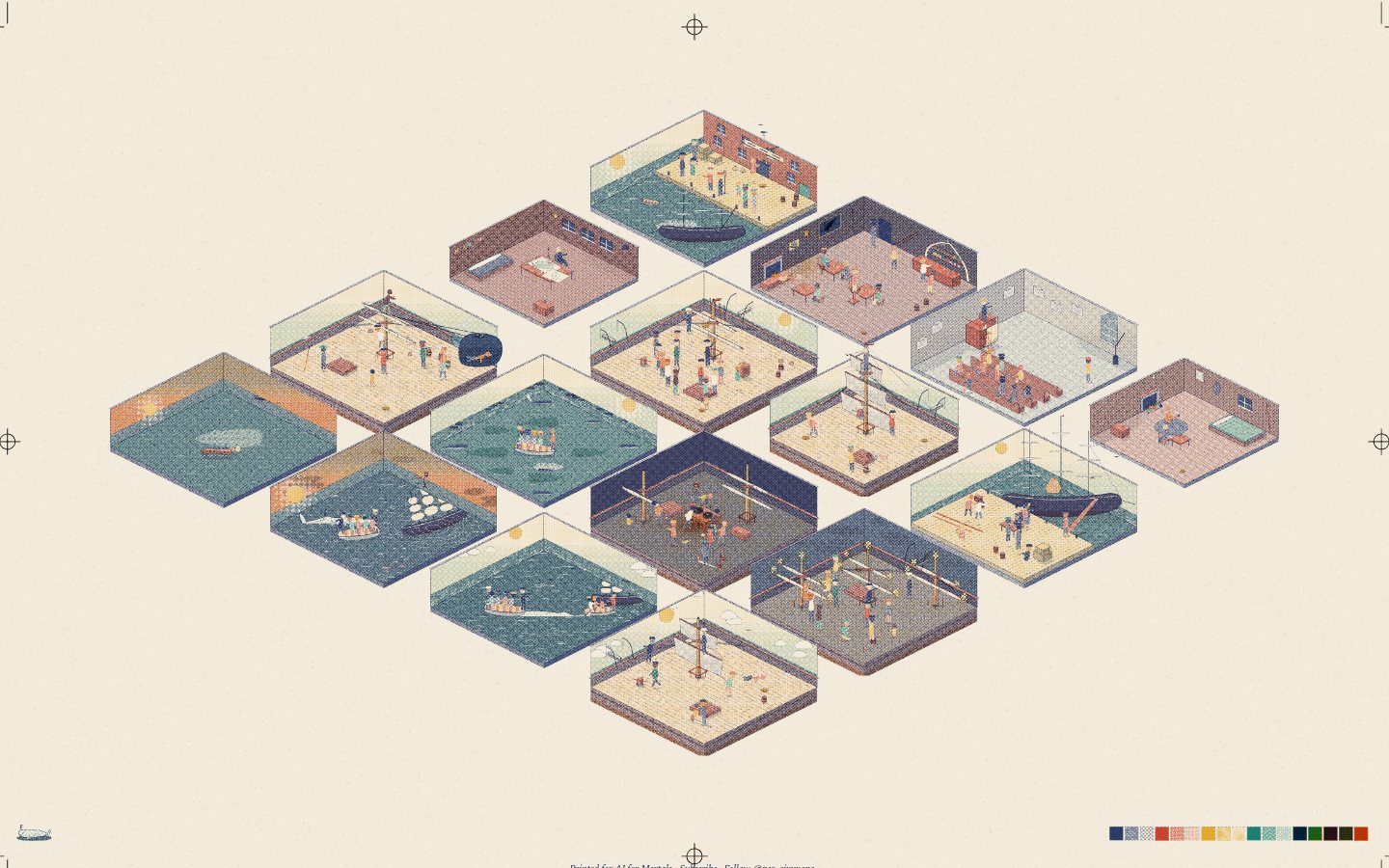
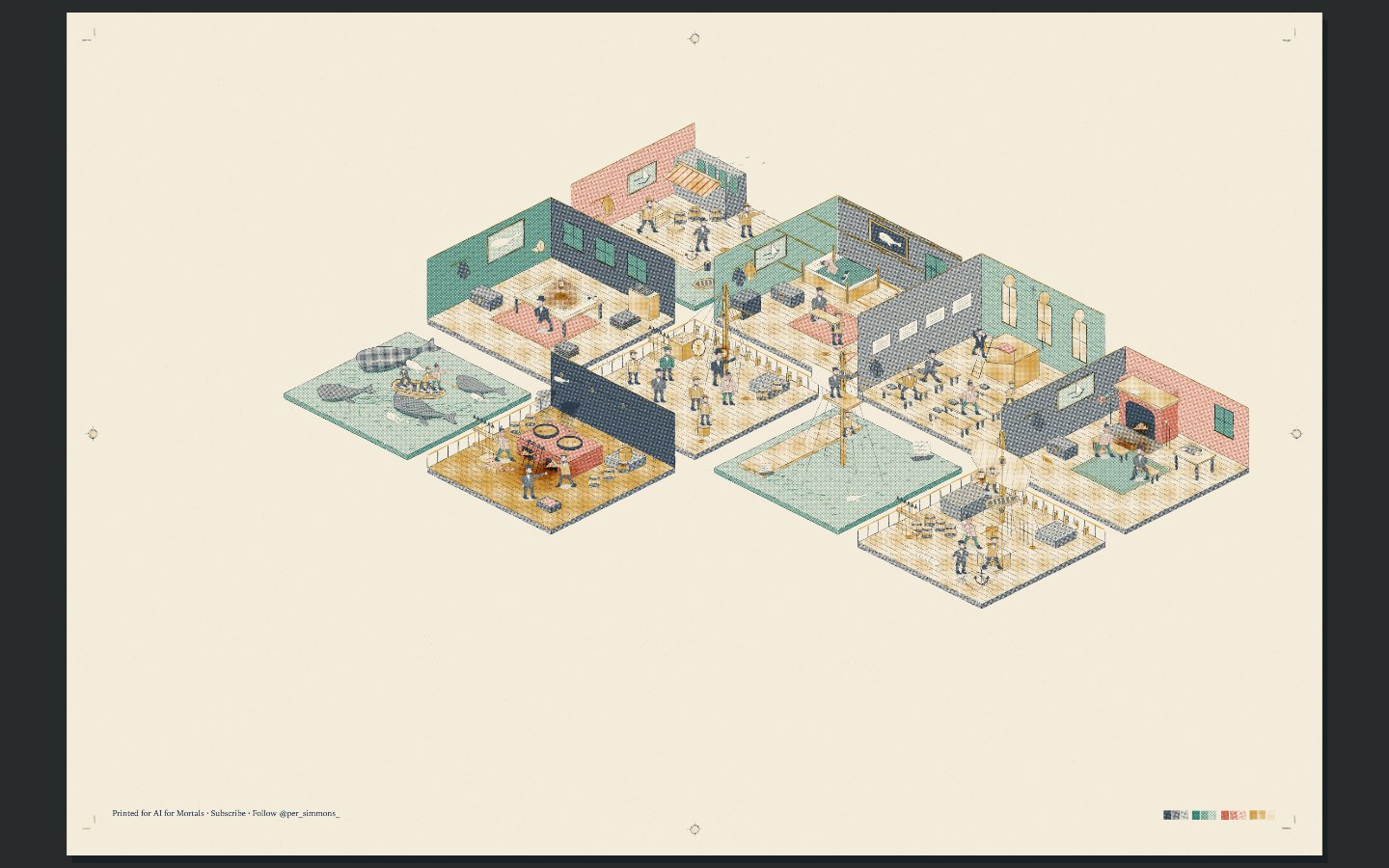
Scenes from Moby Dick as a single web page printed like a risograph poster, where every sailor, wave and ink dot is drawn by the model's own code with no images at all, in the same format as Kevin Ngo's a small light.
Make "Moby Dick, scene by scene": a single HTML file in which every scene, person, wave and ink dot is drawn in code, in the exact format of the reference below.

Context you should know: this is going into a video watched by a large audience. Your build is put on screen next to two other frontier models doing the same task and next to the original, and your work will be credited to you by name. Every model gets this identical prompt.

**The reference.** Open https://a-small-light-three.vercel.app/ and study it for a while: the overview, the tour, a close-up of a room. Kevin Ngo made it with Claude Opus 5: "I made a website with 25 mini rooms, each with Claude keeping people company. It's all JavaScript in one HTML file. There are no images, fonts or libraries. Every room, person, and ink dot is drawn in code." Your build uses the same format and the same print technique, with Moby Dick as the subject. Write your own code; do not copy his.

**The format, exactly:**

1. **One HTML file, nothing else.** A few lines of CSS, one full-screen `<canvas>`, one small overlay for the chapter card, and one script. No images, no data-URI images, no font files, no libraries, no external scripts, no network requests. Canvas 2D only, no WebGL. The only text anywhere is the chapter card (requirement 10), set in system font stacks. The page must load with exactly one network request, itself.
2. **A simulated risograph print.** Every colour is a halftone dot screen of one of **four spot inks** on warm cream paper, overprinted with multiply so the secondary colours come only from overlaps. Each ink has its own screen angle and its own slight misregistration offset. Dots get small jitter, solids get random ink dropout, and objects knock out what is behind them the way a printer's knock-out does. Choose four inks that suit a whaling voyage.
3. **Hand-drawn linework that boils.** Every line wobbles, and lines taper. Bake each scene in three variants with different wobble seeds and cycle them at about 3 Hz, so the linework breathes like hand animation on twos. All randomness is seeded, so the same scene draws the same way on every load.
4. **Light is ink.** Lamp pools, the try-works fire, the corposants and moonlight are stepped halftone rings, never smooth gradients.
5. **Isometric dollhouse dioramas.** Each scene is a cut-away isometric slab, like a dollhouse with the near walls removed: a room ashore, a slice of the Pequod's deck and rigging, a patch of open sea with whaleboats. All scenes sit together on **one printed sheet**, packed into a single block like a poster, with registration crop marks, edge crosshair targets and an ink swatch strip in the margins.
6. **The white whale in every scene**, the way the Claude spark is in every one of Kevin's rooms: a small presence, sometimes obvious and sometimes hidden. A carving on the chapel pulpit, a shape in the ocean, the doubloon's engraving, a spout on the horizon, the thing on the chart Ahab traces.
7. **Realistic people, not stick figures.** Every figure is a properly proportioned, illustrated human body: head, neck, shoulders, torso, hips and limbs drawn as solid, tapering volumes with real anatomy, then dressed in period clothing with weight and folds (pea coats, oilskins, wool trousers, boots, hats, Ahab's whalebone leg). Faces carry features when you zoom in: brows, noses, beards, Queequeg's tattoos. Draw the bodies, clothing and shading in the same risograph inks as everything else, so the people look printed in the same hand as the ship. Line figures, stick limbs, or circle heads on single-line bodies are a fail. Figures share one skeleton with keyframed pose clips (walk, haul, row, sit, point, climb, sleep, harpoon, pray, and so on), the body volumes deform with the joints, and they follow paths through their scene on a loop. Ishmael, Queequeg, Ahab, Starbuck, Stubb and the crew should be recognisable at a glance.
8. **It prints in, then tours.** The sheet appears first, with scenes painting in progressively as if coming off the press. After a few seconds the camera eases into the first scene, holds, and moves through the book in order. Any input pauses the tour and then it resumes. Drag to pan with inertia, scroll to zoom anchored on the cursor, pinch on touch, double-click a scene to fly to it, arrow keys and +/- work, and 0 fits the sheet. Apart from the chapter card there is no UI and there are no labels.
9. **The scenes.** Twelve or more, in book order, each a distinct and picturable moment, with enough going on to reward a close zoom. For example: Loomings on the Manhattan wharves (ch. 1), the Spouter-Inn (ch. 3), the Whaleman's Chapel pulpit (ch. 8), Queequeg and Ishmael by the fire (ch. 10), the Pequod fitting out (ch. 16), the Quarter-Deck and the doubloon (ch. 36), the mast-head (ch. 35), the Grand Armada (ch. 87), the try-works at night (ch. 96), the Candles (ch. 119), the three-day Chase (ch. 133–135) and the Epilogue's coffin life-buoy. Pick your own set and put the list, with chapters, in a comment at the top of the file.
10. **The chapter card.** Whenever the camera settles on a scene (on the tour, or when the viewer flies to one), a card eases in over a corner of the screen and eases out when the camera moves on. It is styled like the opening page of a chapter in a fine printed edition: the chapter number in roman numerals and small caps ("CHAPTER XXXVI"), the chapter title in a large book serif ("The Quarter-Deck"), a thin rule or printer's ornament, then a pull quote from that chapter in italic with a drop cap and proper curly quotes. Cream stock with the same paper grain and one of the four inks as the accent colour, so it looks printed on the same press as the sheet. Every quote is copied verbatim from the Project Gutenberg text (https://www.gutenberg.org/ebooks/2701). Use system serif stacks only (for example `"Iowan Old Style", "Palatino", "Book Antiqua", Georgia, serif`); no font files. A key (C) toggles the card.
11. **Performance.** A smooth frame rate at full screen on a laptop (cache layers, redraw only what moves), crisp on a 4K display, and working on a phone.
12. **Ship it.** The single `index.html`, plus a README with its byte size, the scene list with chapters and the quote used for each, the four inks, and how the print simulation works.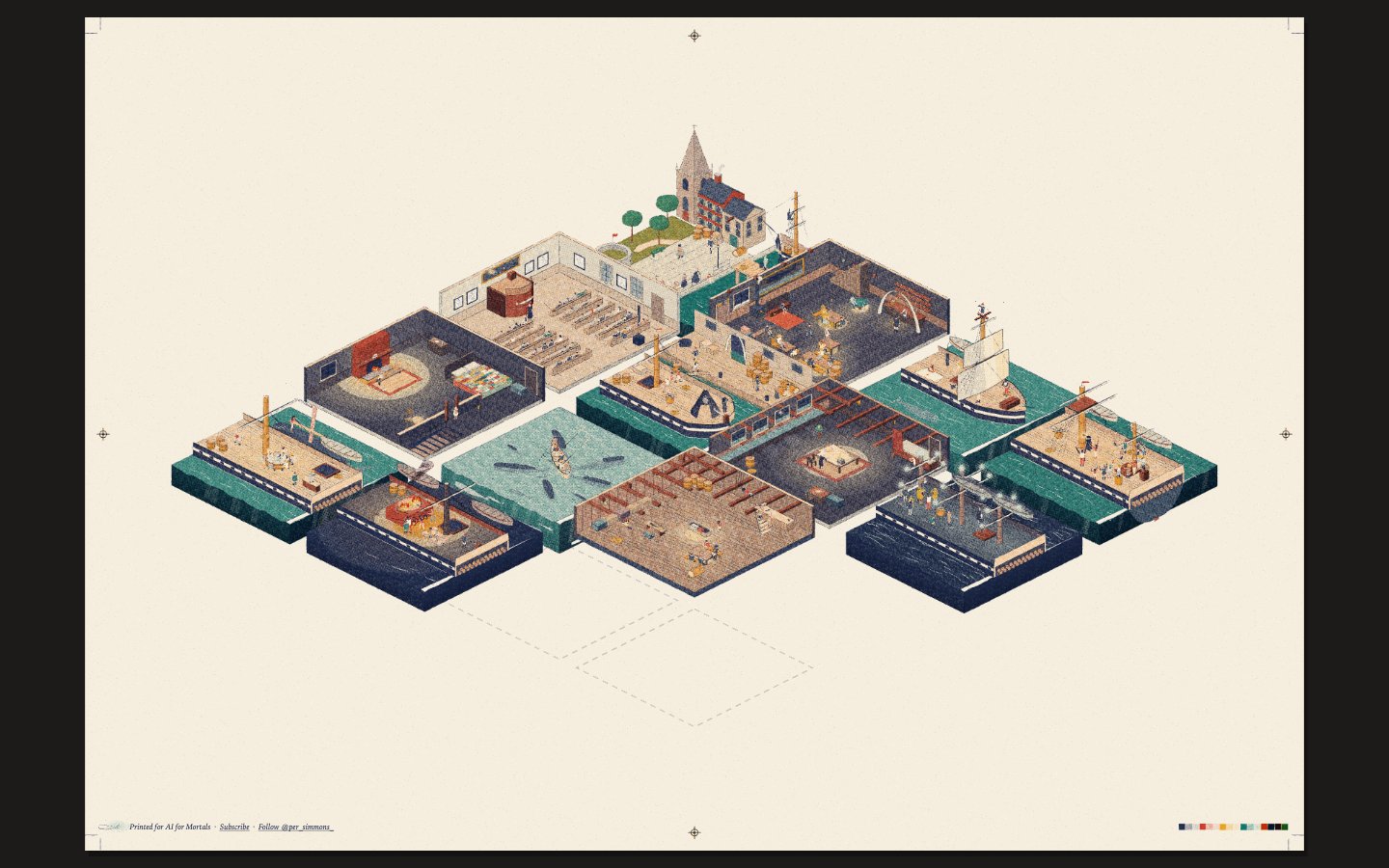
| Opus 5.5 | Fable 5.1 | GPT-6 Astra | |
|---|---|---|---|
| Input tokens | 69.2M | 32.2M | 4.2M |
| Output tokens | 425k | 261k | 49k |
| Cost | $37.22 | $42.18 | $8.16 |
| Build time | 85 min | 63 min | 30 min |
Test 2: A launch film with its own sound design
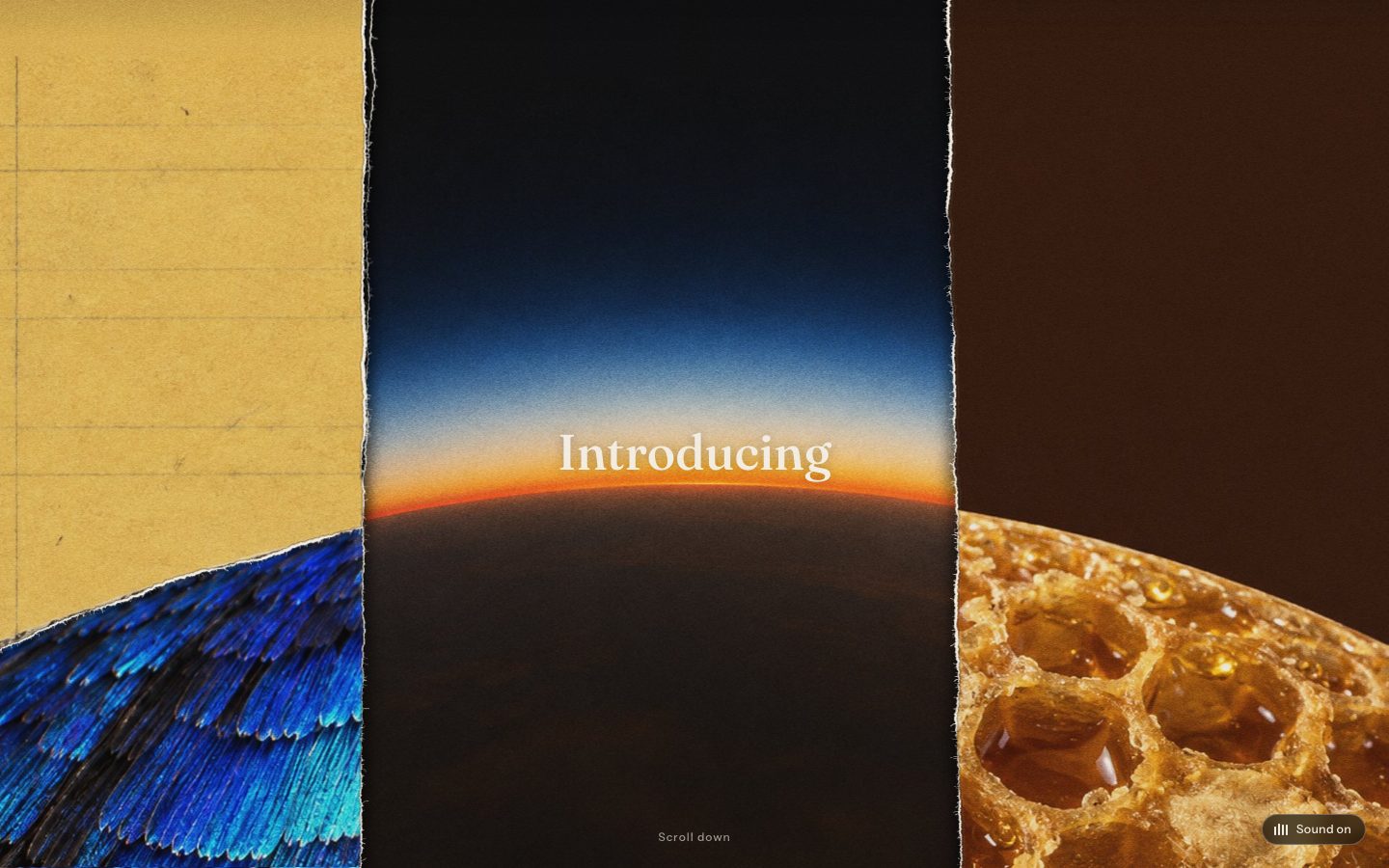
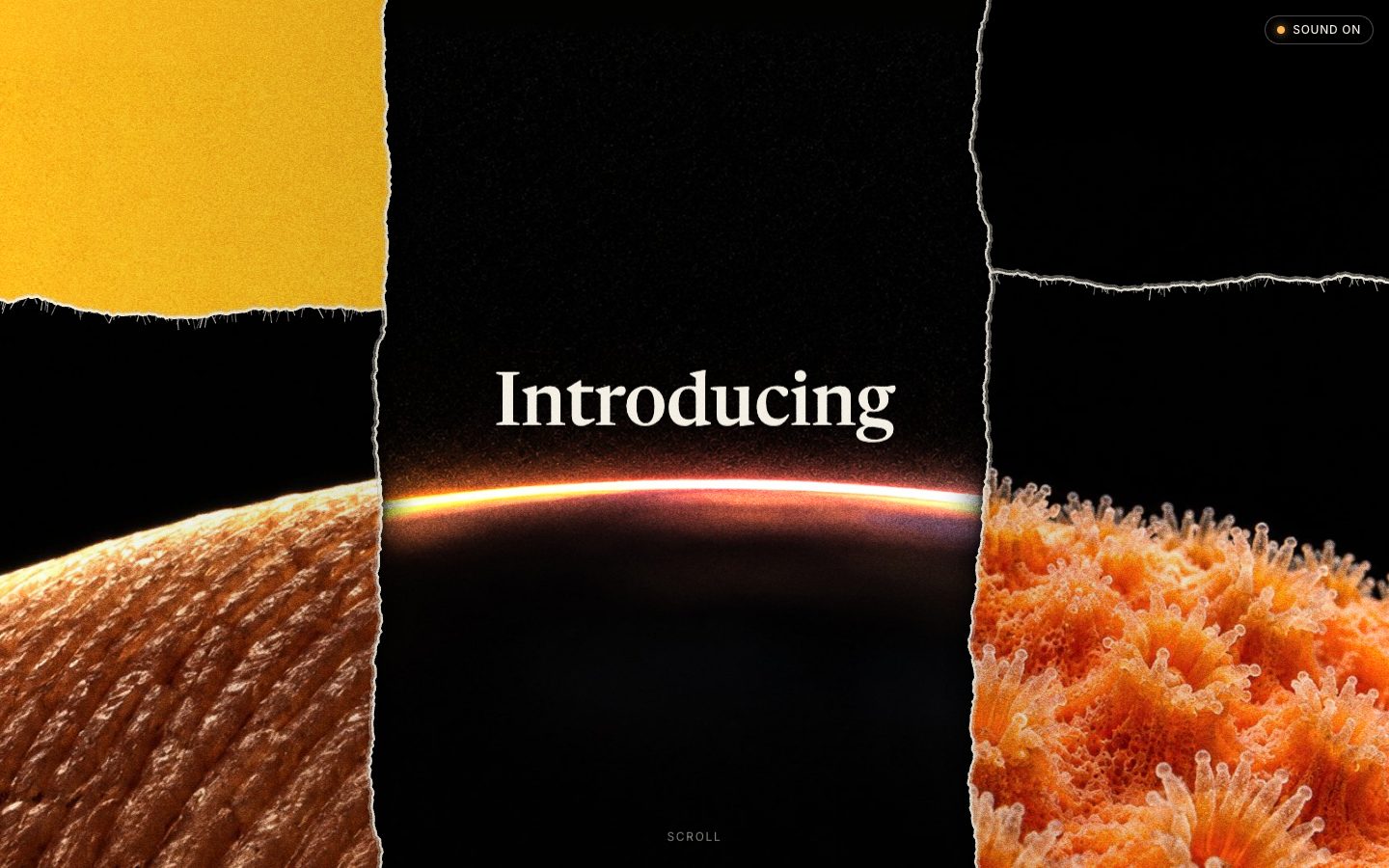
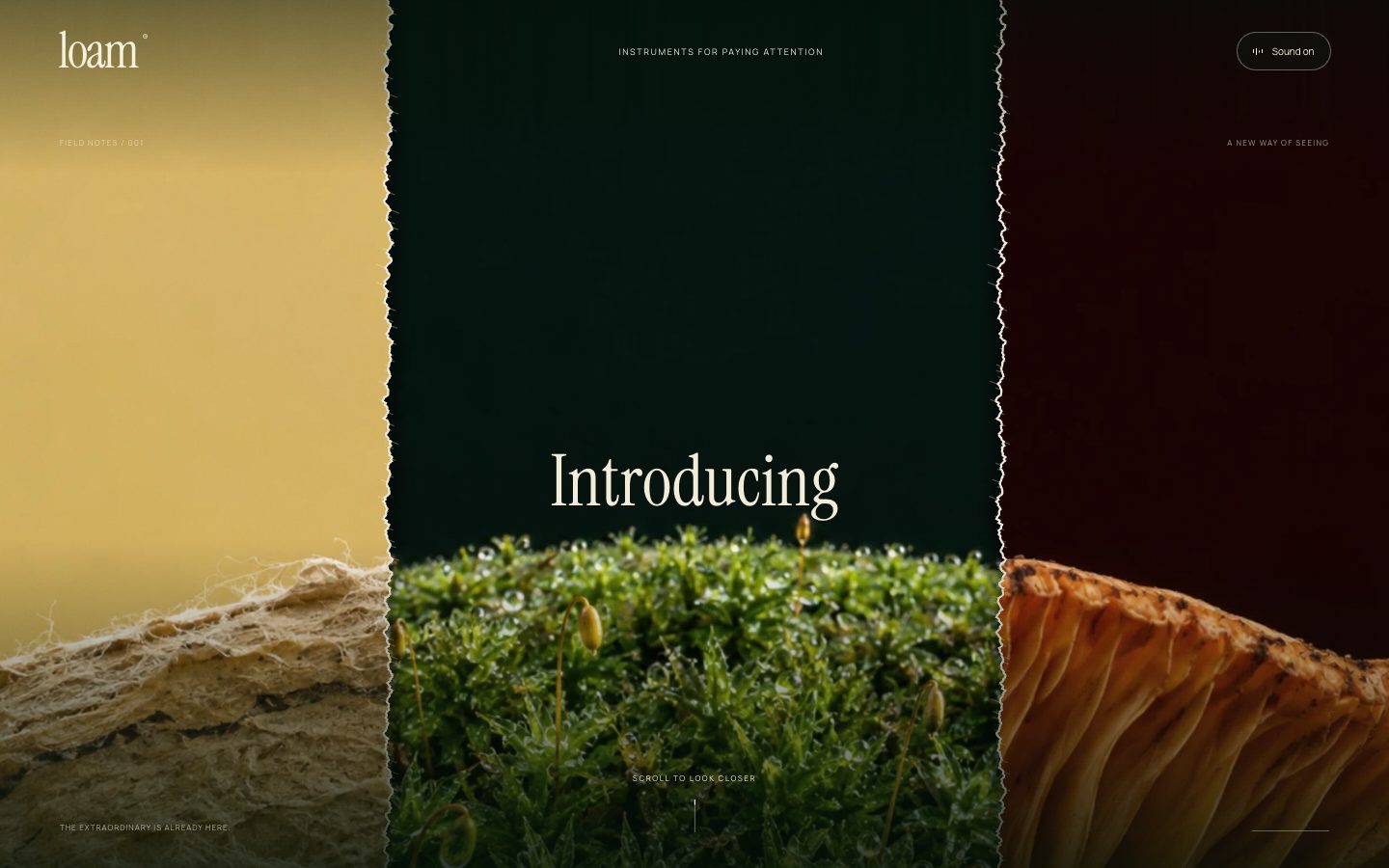
A 20-second launch film for a product each model made up, with every sound synthesized in code, set inside a launch page that opens with a torn-paper reveal.
Invent a launch, make its 20-second launch film, and build its launch page with a torn-paper reveal and the film embedded.

Context you should know: this is going into a video watched by a large audience. Your build is put on screen next to two other frontier models doing the same task, and your work will be credited to you by name. Every model gets this identical prompt.

**Study the references first.** Watch both films frame by frame (ffmpeg is installed) and scroll the Opus 5.5 launch page in a headless browser. The film: about 40 hard cuts in 20 seconds, getting faster as it goes. Every shot is a macro or microscope-like image of a different material, such as pollen, egg shell, lace, mushroom gills, a blueprint, torn paper or fruit skin. Every shot is composed around the same curved horizon, so one arc rhymes into the next. There's heavy film grain. Three short serif phrases grow in size, the film ends on the name, and the last frame loops back into the first. The page: three torn-paper panels fade up from black, and "Introducing" rises out from behind the planet's edge. On scroll, the torn scraps slide outward while staying locked to the curve, and the title rises and wipes on with a letterpress ink texture. The torn edges have a fibrous white paper seam on one side and a cast shadow on the other.

**The launch is yours.** Pick a subject: a product, a model, a mission, an expedition, a scientific instrument, anything with a reason to be revealed. Invent its name. It must not be an Anthropic product, and there must be no Anthropic or Claude branding anywhere. Say what it is in one sentence on the page.

Requirements:

1. **The film. 20 seconds, 1920×1080, H.264 MP4 with an audio track, rendered by you.**
   - Every image in it comes from the shared image tool (gpt-image-2, the same one for every model). **At most 40 images.** No stock, no downloaded images, no images lifted from the references.
   - Design the shot list around one repeating composition, the way the reference does, with a different material each time and chosen to suit your subject. Grade, grain, crop and align the shots in your own code so the arcs actually line up cut to cut.
   - Cut rhythm that accelerates, on-screen text in a few escalating phrases, the name at the end, and a last frame that loops cleanly into the first.
   - Assemble and render it yourself (ffmpeg, or frames from your own renderer). Check the result frame by frame.
2. **The sound. All of it synthesised in code. No sample files, no downloaded audio, no sound libraries.** Web Audio, or offline DSP in any language, rendered to the film's audio track.
   - **Realistic paper foley** is the centrepiece: not one generic crumple, but a family of distinct sounds, such as a sheet sliding across paper, a stack being shuffled, a page turning, a slow tear with fibres giving way, a crumple, a flick, a scrap landing. Each one has to sound like the real thing, so build it from noise, filters, envelopes, granular texture and randomisation. Two plays of the same sound should never be identical.
   - Hit every visual beat the way the Kimi K3 film does: each cut, each text change and the final reveal has its own sound. Add a music bed or tonal bed of your own if it helps. Keep it clean and mixed, with no clipping.
3. **The launch page.**
   - **The hero reveal**, with the Opus 5.5 page's mechanics as the target: three torn-paper collage panels made from your own generated imagery. They fade up from black, an intro word rises from behind a curved horizon, and on scroll the side scraps slide outward while staying locked to the curve, then your launch name rises and wipes on with a speckled letterpress ink texture.
   - **The torn edges are drawn in code:** a noise-driven, fibrous tear, a thin exposed paper seam on one edge, a soft cast shadow on the other, and film grain over everything. Not a PNG mask.
   - **The same paper foley plays live on the page**, synthesised in the browser: the scraps sliding, the title landing, pages turning as sections enter. Start sound on first click or keypress (browsers block autoplay audio) and show a small sound toggle.
   - **The film is embedded** in the page as its centrepiece, with the page's own player styling.
   - Below that, a short launch article for your subject in the same typographic voice: a date eyebrow, a table of contents, and three or four sections. Use a serif and a sans from an open CDN. Anthropic's fonts are off limits.
4. **No lifted assets.** Nothing downloaded from anthropic.com, x.com or Kimi. No copying the reference page's code or shaders. Rebuild the effects from what you observe.
5. **Ship it runnable.** A static site that runs from one documented command, deployable as-is, with the MP4 inside it, and a README listing the subject, the shot list with each image prompt, how each sound is synthesised, and the image count.
| Opus 5.5 | Fable 5.1 | GPT-6 Astra | |
|---|---|---|---|
| Input tokens | 26.1M | 7.5M | 4.5M |
| Output tokens | 179k | 101k | 39k |
| Cost | $11.66 | $16.55 | $7.96 |
| Build time | 40 min | 25 min | 23 min |
Test 3: 3D game development
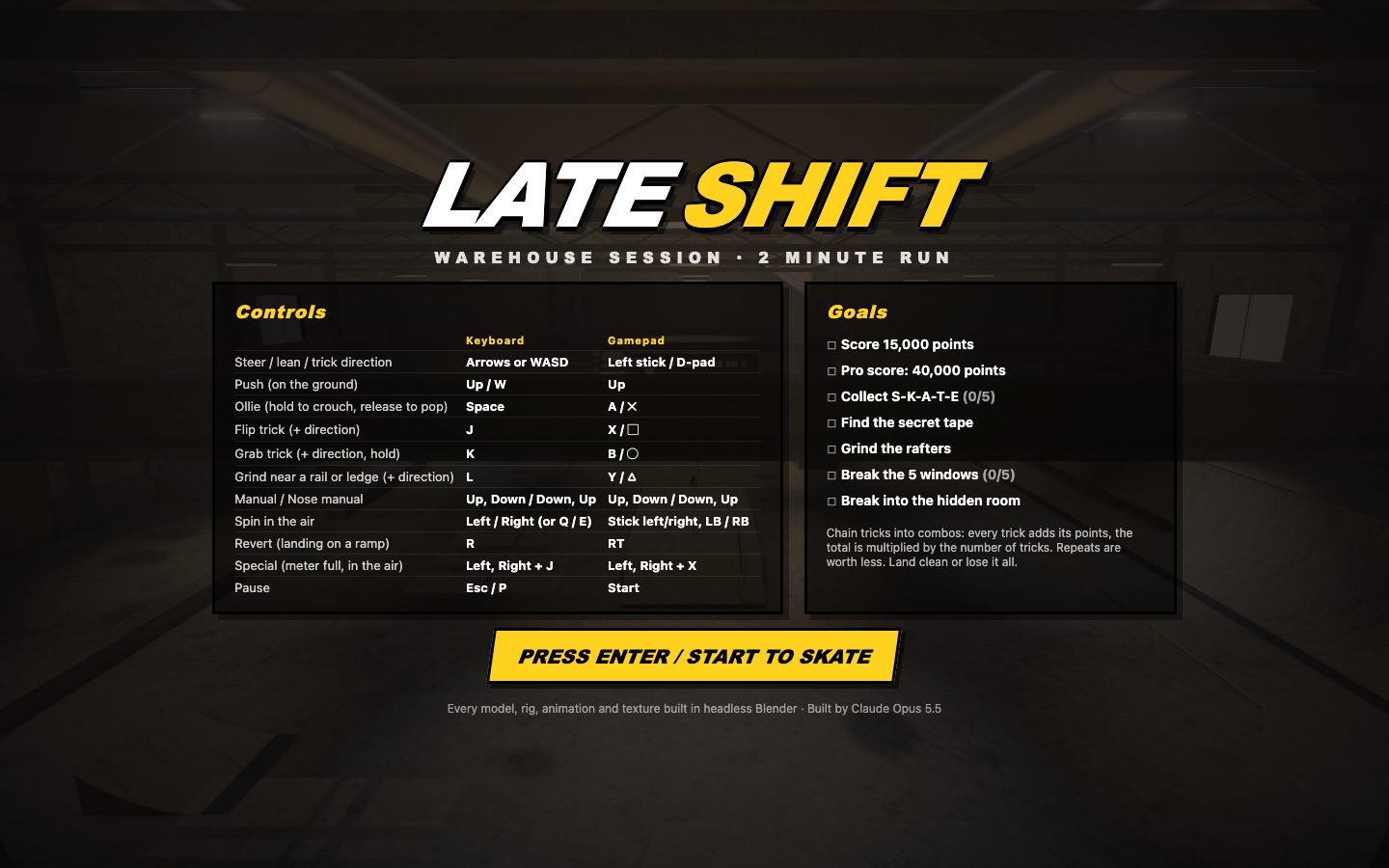
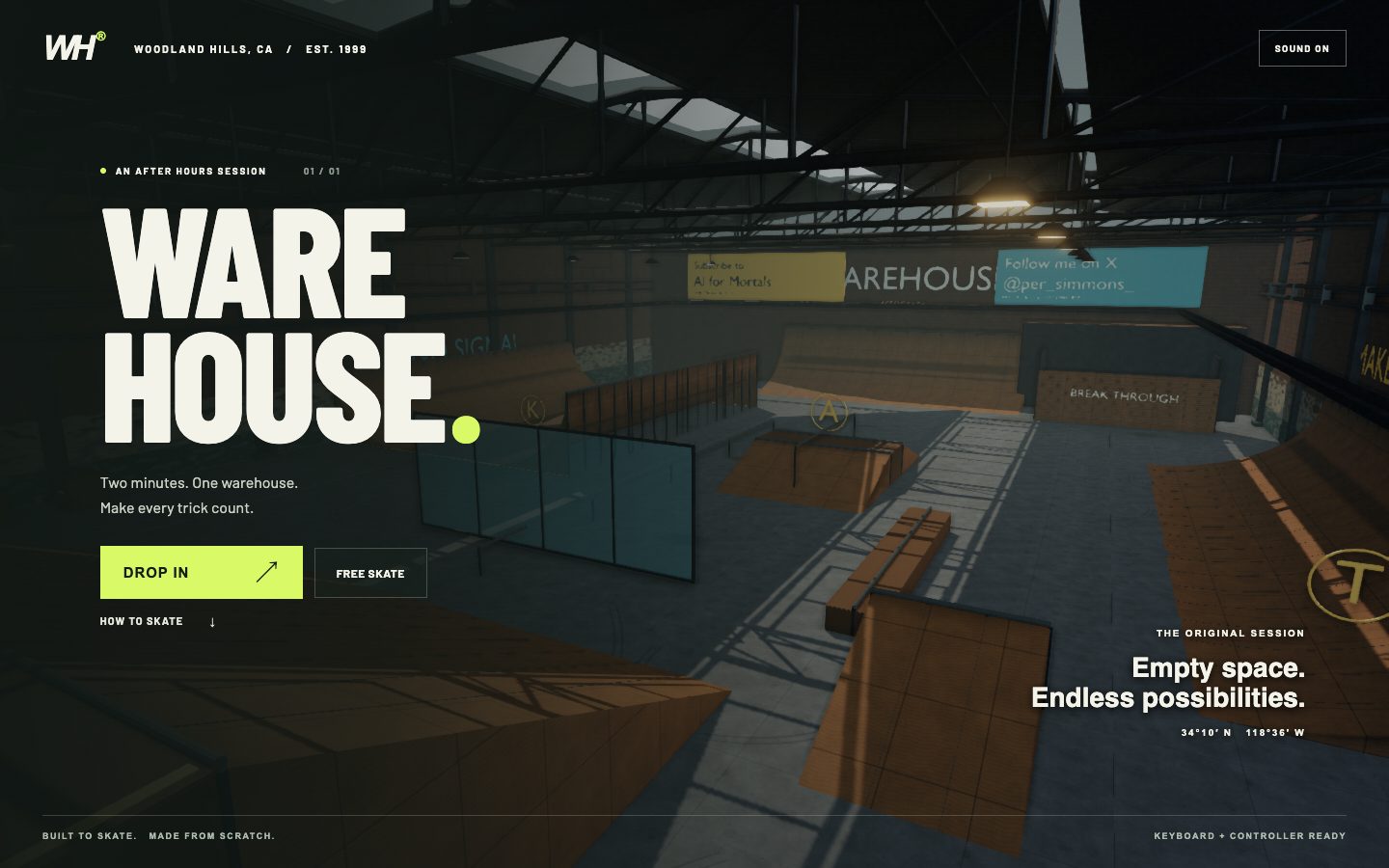
A Tony Hawk's Pro Skater style game set in a recreation of the original Warehouse level, where every 3D model had to be built in Blender before it went into the game.
Build a Tony Hawk's Pro Skater-style 3D skateboarding game set in a recreation of the THPS1 Warehouse, with every 3D asset created by you in headless Blender.

Context you should know: this is going into a video watched by a large audience. Your game is put on screen next to two other frontier models doing the same task, and your work will be credited to you by name. Every model gets this identical prompt. The bar is the look and feel of *Tony Hawk's Pro Skater 1+2* (2020). Solid graphics matter as much as the gameplay.

**The asset pipeline. This is the heart of the test.** Use Blender 5.1.2. Drive it headless: `blender --background --python <script>.py`. Every 3D asset in the game (the skater, the board, the whole park and every prop) is built by your Python scripts in Blender, then exported as GLB and loaded by the game.
- No downloaded models, textures, HDRIs, rigs or animations. No Mixamo, no asset stores, no Sketchfab. Materials and textures are made procedurally in Blender (shader nodes, then baked to images), generated in your own code, or generated with the shared image tool below.
- **Two tools you may use for realistic people, and only these two.** (1) **MPFB2**, the MakeHuman character generator for Blender (CC0 output), installed as a Blender extension and driven from your Python scripts to generate an anatomically correct human base mesh with a proper skeleton. You then shape, dress, texture and animate it yourself. (2) **The shared image tool** (gpt-image-2), the same one for every model, for photographic texture sources such as skin, face albedo, fabric, denim, sneaker leather, griptape and concrete. At most 30 images.
- Keep the scripts in `blender/` so the entire asset set rebuilds from one command. Commit the GLBs they produce in `assets/`.
- Render a turntable of every major asset (the skater in a T-pose and mid-trick, the board, and the park from a high three-quarter view) to `renders/`, using Cycles or EEVEE. These go on camera, so light them properly.

Requirements:

1. **The skater, photorealistic.** An original character, not a real person's likeness, who looks like a real human being on screen, at the level of the playable skaters in *Tony Hawk's Pro Skater 1+2* (2020). That means realistic anatomy and proportions, a detailed face with real features, eyes and eyebrows, physically based skin with subsurface scattering and pore-level normal detail, hair built from hair cards or strands (not a solid helmet of mesh), and real clothing (a hoodie or tee, jeans or cargo pants, skate shoes with laces and scuffed suede) with fabric folds and textures. A low-poly, blocky, capsule-limbed or faceless figure is a fail. It needs a skeleton, weight-painted skinning that deforms cleanly at the shoulders, elbows, hips and knees, and a separate board. Build a close-up portrait render of the face into `renders/` so the realism can be judged. Author the animations in Blender with Python keyframes and export them as GLB animation clips: idle, push, ride, crouch, ollie, kickflip, heelflip, pop shove-it, at least two grabs (e.g. indy, melon), 50-50 grind, boardslide, manual, nose manual, a vert air, landing, and a bail with a ragdoll or keyframed fall. The feet stay planted on the board through every trick; the board's rotation is its own animated object, synced to the feet.
2. **The Warehouse.** The layout from THPS1: the big ramp in the entry room with the steep drop-in, the halfpipe, quarterpipes along the walls, the kicker ramps, the funbox, the long rails and ledges, the pipes and the rafters you can grind, the windows you can break, the hidden room behind the breakable wall, and the high catwalks. Worn concrete, scuffed plywood ramp surfaces with coping, steel beams, crates, graffiti you design yourself, skylights. Model it in Blender at real-world scale, with a lightmap UV set.
3. **Solid graphics.** Physically based materials; lighting baked in Blender (lightmaps and/or ambient occlusion) combined with real-time shadows from the skylights; tone mapping, SSAO, subtle bloom on the skylights, and anti-aliasing. It should read as a lit, grimy, real warehouse, not a grey-box. A smooth 60 fps at 1080p on a laptop.
4. **Game feel.** Kicks and pushes build speed, and ramps carry momentum convincingly: pumping transitions, getting air out of the halfpipe, landing back into a transition. Grinds snap onto rails and ledges with a balance meter, manuals have a balance meter too, and landing sideways or off-balance bails. The third-person camera follows smoothly and handles vert air without clipping into walls.
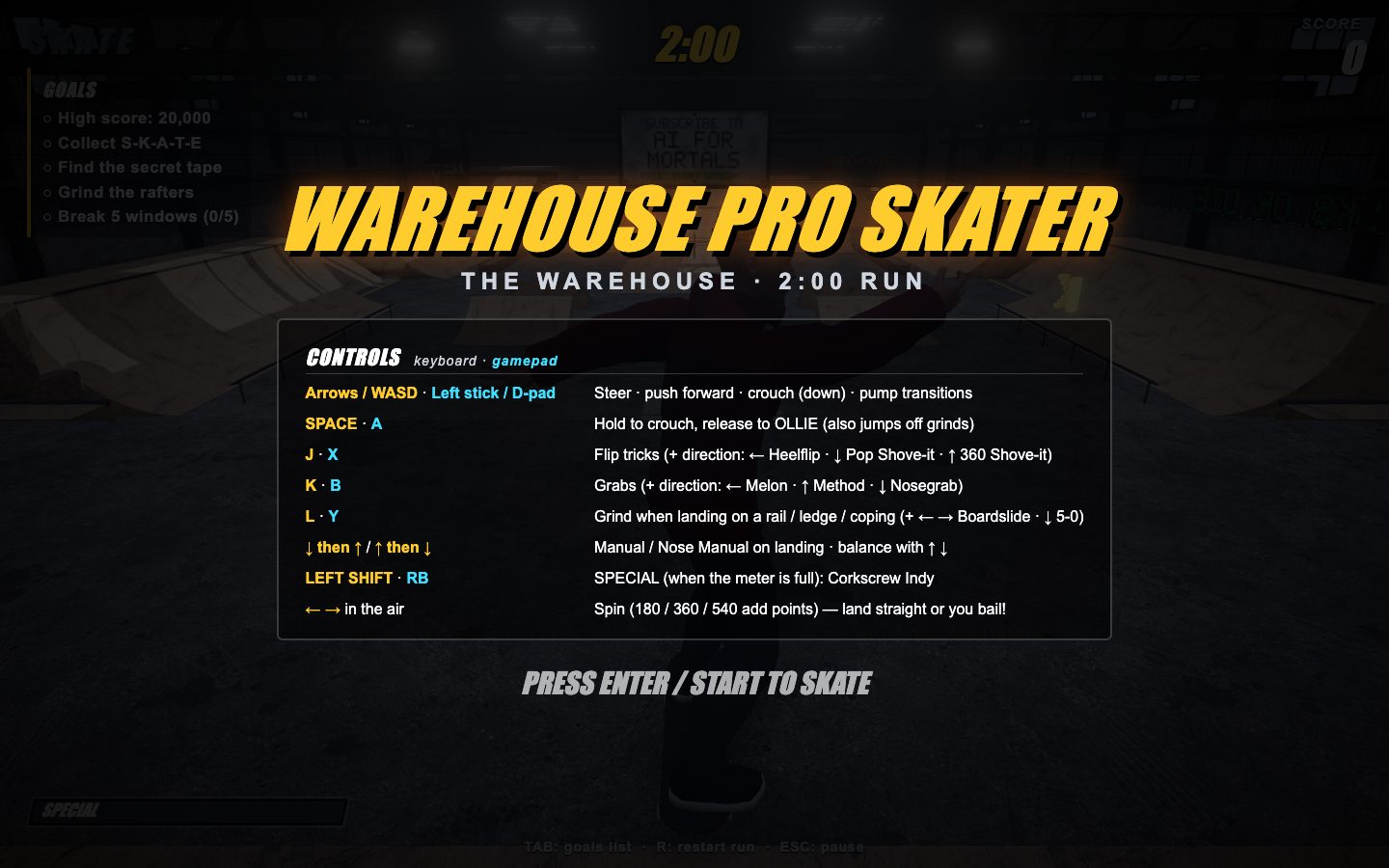
5. **Tricks and scoring, THPS rules.** Flip tricks, grabs, grinds and manuals chain into combos. Score is each trick's base points × the number of tricks in the combo, with repeated tricks losing value. A special meter fills as you land tricks; when it's full, one special trick unlocks (design your own and animate it). The combo string and running score show on screen in the THPS style.
6. **A two-minute run with goals.** A timer, a high-score goal, the S-K-A-T-E letters hidden around the park, a hidden secret tape, and "grind the rafters" and "break the windows" goals. Show a goals list and an end-of-run screen.
7. **Controls.** Keyboard and a gamepad (Gamepad API), with the controls shown on the start screen. The THPS layout: jump, flip, grab and grind buttons plus direction for trick variations.
8. **Sound, synthesised in code.** Wheels rolling (pitch rising with speed and changing on concrete vs wood vs metal), pop, landing, the grind scrape, bails and board clatter. No sample files and no licensed music.
9. **Ship it runnable.** A static web build that runs from one documented command, plus `blender/` with a single rebuild command, `assets/`, `renders/` and a README covering the controls, the trick list with point values, what each Blender script builds, and the image count.
| Opus 5.5 | Fable 5.1 | GPT-6 Astra | |
|---|---|---|---|
| Input tokens | 171.3M | 23.2M | 30.7M |
| Output tokens | 520k | 161k | 150k |
| Cost | $58.05 | $32.26 | $44.08 |
| Build time | 142 min | 56 min | 49 min |
What it cost
Astra was the cheapest on two of the three builds by a wide margin, finishing Moby Dick for $8.16 while Opus 5.5 spent $37.22 and Fable 5.1 spent $42.18. The skate game went the other way, though. Fable finished it for $32.26, and Astra came in at $44.08 because it split the work across three helper agents whose tokens all count toward its total. Opus ran for more than two hours and read 171 million input tokens, most of them spent re-reading its own growing session, and that's how it got to $58.05.
| Opus 5.5 | Fable 5.1 | GPT-6 Astra | |
|---|---|---|---|
| Input tokens | 266.6M | 62.9M | 39.5M |
| Output tokens | 1.1M | 524k | 238k |
| Cost | $106.93 | $90.99 | $60.20 |
| Build time | 266 min | 143 min | 102 min |
These are API-equivalent costs: real token counts from each build, priced at each model’s published rates. The builds themselves ran on subscriptions.
Every build: cost and time
| Build | Opus 5.5 | Fable 5.1 | GPT-6 Astra | |||
|---|---|---|---|---|---|---|
| Cost | Time | Cost | Time | Cost | Time | |
| Illustration in code | $37.22 | 85 min | $42.18 | 63 min | $8.16 | 30 min |
| Launch film | $11.66 | 40 min | $16.55 | 25 min | $7.96 | 23 min |
| 3D game | $58.05 | 142 min | $32.26 | 56 min | $44.08 | 49 min |
The verdict
Opus 5.5 won all three, and it wasn't especially close. On Moby Dick it went well past what I expected, with characters and buildings like the Whaleman's Chapel and the Spouter-Inn drawn in far more detail than the other two managed. Its launch film came closest to Anthropic's own, down to small touches like the images rotating with each cut and a reverb tail under the final logo, all of it written in code. And its skate game had the most realistic character and ramps of the three, with grinds where you actually have to hold your balance the way you do in Tony Hawk's Pro Skater.
The sound design was the weak spot for all three models, which makes sense when none of them can actually listen to what they make, so that's where I'd push hardest if I ran these again.
I'll be honest, I didn't see this coming. After Astra came out I thought nothing would beat it for at least a few weeks. Astra is still what I reach for in my everyday work, the big refactors and the multi-step site architecture, because it's so methodical that I rarely have to go back and correct it. It takes longer, but it's thorough. Fable 5.1 is much faster, but it still misses things I asked it to do, and from what I've seen so far that happens a lot less with Opus 5.5.
These builds are fun, and they're not a perfect stand-in for the work you do every day, so try them yourself and decide which model you'd hand this kind of work to. If you play the skate game and have feedback, whether that's bugs or features you'd want added, I'd love to hear it, because that's the one I want to keep building out.