Claude MCP: What MCP Is, How to Add a Server, and What It Did in Pat Simmons's Builds
MCP is the open standard that lets Claude connect to other apps and take actions in them. How to add a server in the Claude app or Claude Code, which plans get it, and what happened when Pat Simmons had Claude publish a blog post and cut a video through one.

MCP (Model Context Protocol) is an open-source standard for connecting AI apps like Claude to outside systems: files, databases, tools and other apps. Once you connect Claude to a service through MCP, Claude can access that service and take actions in it.
In the Claude app, you add an MCP server under Customize > Connectors as a "custom connector". Custom connectors work on the Free, Pro, Max, Ultra, Team and Enterprise plans, and Free accounts are limited to one. In Claude Code, you run claude mcp add in your terminal, and claude mcp list shows every server you've connected.
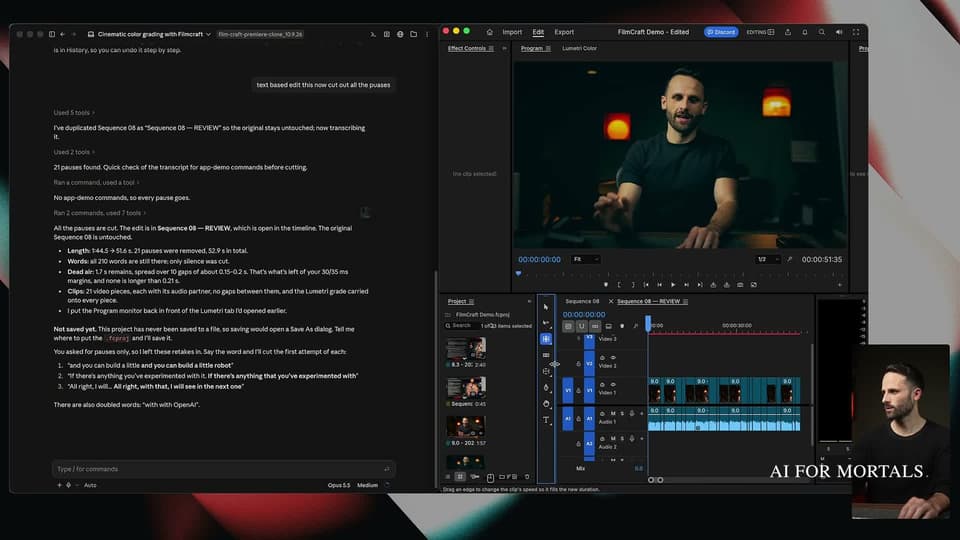
Pat Simmons has shown two of these on his YouTube channel. In a May 2025 video, Claude used the GitHub MCP server to publish a blog post to a live website. In the video at the top of this page, Claude edited video in FilmCraft, a free, open-source clone of Premiere Pro, through an MCP server, and cut all 21 pauses out of a talking-head clip without clicking a single button in the app. Both builds are covered below.
What is MCP?
MCP is a shared standard that lets an AI app connect to other software. Using it, apps like Claude or ChatGPT can connect to data sources (local files, databases), tools (search engines, calculators) and workflows (specialized prompts). The official docs compare it to "a USB-C port for AI applications", a standard way to connect AI apps to other systems.
Anthropic open-sourced MCP on November 25, 2024. Every connection has two sides: an MCP server is a small program that exposes one app or data source, and an MCP client is the AI app that connects to it, such as Claude Desktop. The server hands Claude a set of "tools", which can read data, create, change or delete data, and take actions on your behalf, depending on what the server's developer built.
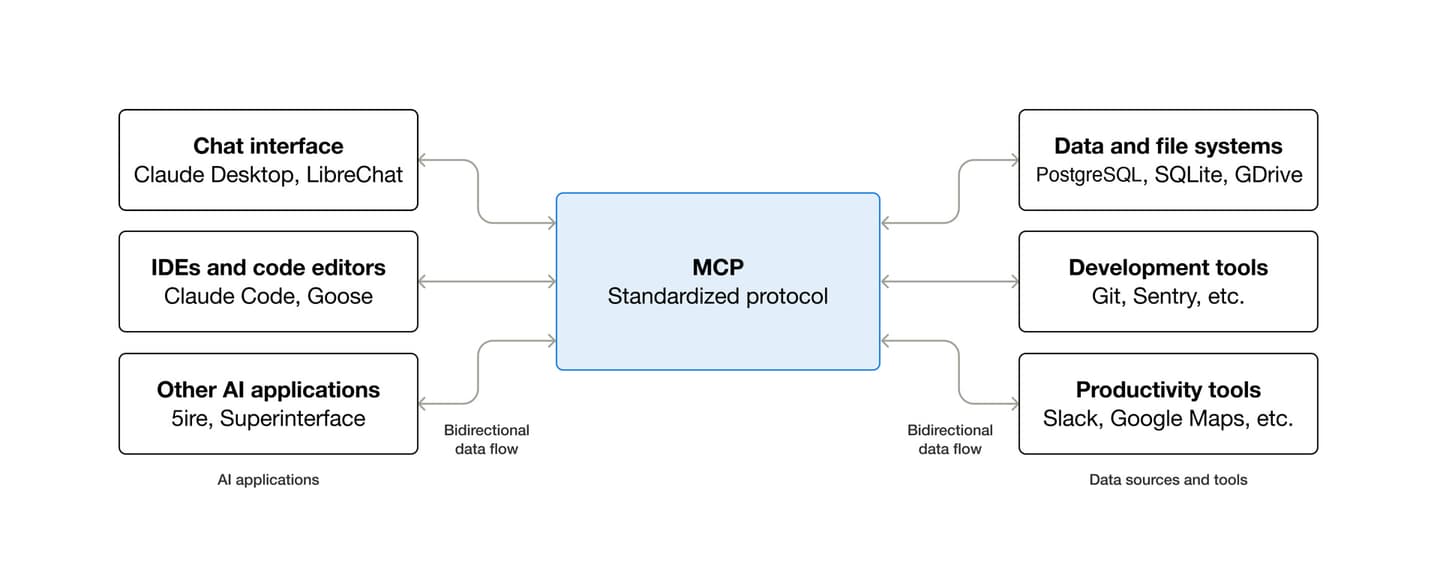
The official docs' examples include an assistant reading your Google Calendar and Notion, Claude Code building a whole web app from a Figma design, and AI creating 3D designs in Blender and sending them to a 3D printer. The same page lists Claude, ChatGPT, Visual Studio Code and Cursor among the apps that support MCP.
MCP servers used to run only locally, on your own computer. Now developers can also host remote servers on the internet, and those are what Claude calls custom connectors.
How to add an MCP server in the Claude app
Go to Customize > Connectors, click "+ Add", choose "Add custom connector" and paste the server's URL. Anthropic's help page gives these steps for the individual Pro and Max plans:
- Go to Customize > Connectors.
- Click "+ Add", then "Add custom connector".
- Enter a name and the remote MCP server URL, then click "Continue".
- Check the sign-in settings Claude detected, then click "Continue".
- Under Authentication, pick "Sign in now", "Sign in when needed" or "No sign in".
- Click "Add".
The same form has settings for servers that use an API key or their own sign-in setup. Once the connector is added, you switch it on for a chat with the "+" button at the lower left of the chat box, then "Connectors", where each one has a toggle.
On Team and Enterprise plans, an Owner adds the connector first under Organization settings > Connectors. Members then find it under Customize > Connectors and click "Connect".
Claude connects to custom connectors from Anthropic's cloud, even in Claude Desktop and Cowork, so the server has to be reachable on the public internet. A server behind a company VPN or firewall won't connect, even if your own computer can reach it.
Local servers work differently. Claude Desktop can run them from a file called claude_desktop_config.json, which uses your own network and doesn't carry over to Cowork or claude.ai, according to the same help page. That file is how Pat added the GitHub MCP server in his May 2025 video; for a remote server, the Connectors page above is the current route.
AI for Mortals runs a public MCP server of its own at https://www.aiformortals.co/mcp. It's read-only, needs no key, and gives an assistant three tools: latest_stories, search and read_article.
How to add and list MCP servers in Claude Code
In Claude Code, you add a remote server with one terminal command, claude mcp add --transport http <name> <url>, and see everything you've added with claude mcp list. Anthropic's Claude Code MCP docs use Notion as the example:
claude mcp add --transport http notion https://mcp.notion.com/mcpA server that runs on your own computer uses claude mcp add <name> -- <command> instead, where the command is whatever starts the server. After that, the same docs list four commands for managing what you've connected:
claude mcp list           # every server, with its status
claude mcp get notion     # details for one server
claude mcp remove notion  # remove it
/mcp                      # inside Claude Code: server status
claude mcp list shows a status next to each server, such as "Connected", "Needs authentication" or "Failed to connect".
Each server is saved at one of three scopes, which decide where it loads and who else gets it. Local is the default:
| Scope | Where the server loads | Shared with your team? | Saved in |
|---|---|---|---|
| Local (default) | The current project only | No | ~/.claude.json |
| Project | The current project only | Yes, through version control | .mcp.json in the project folder |
| User | All your projects | No | ~/.claude.json |
To pick one, add --scope project or --scope user to the claude mcp add command. Scopes are from Anthropic's Claude Code docs.
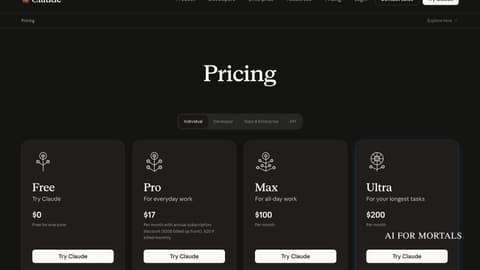
Claude Code itself needs a paid plan. Claude's pricing page lists Claude Code as included in Pro ($20 a month, or $17 a month billed yearly), Max ($100 a month) and Ultra ($200 a month), and not in Free (checked November 6, 2026). If you've never opened it, start with Claude Code for beginners, and our Claude page tracks what Claude does and what has changed in it.
What is the best MCP for Claude?
There isn't one best MCP server. Each one connects Claude to a single app or data source, so the right one is the server for the app you want Claude to work in: GitHub's for a code repository, Notion's for your Notion pages, an editor's own server for video. These are the ones that show up in Pat's videos and on this site:
| Server | What it lets Claude do | How it was added | Source |
|---|---|---|---|
| GitHub MCP server | Read a code repository and create or update files in it, which here meant publishing a blog post | Claude Desktop's config file plus a GitHub access token (May 2025) | Pat's GitHub video at 2:12 |
| FilmCraft MCP server | Run FilmCraft's editing commands from a chat: color grading, transcribing, cutting pauses | A server with about 17 tools already existed; Pat had Claude extend it to every button | The video at the top of this page, from 19:00 |
| AI for Mortals MCP server | Read-only: latest_stories, search and read_article | URL https://www.aiformortals.co/mcp, no key | aiformortals.co/llms.txt |
Two of Pat's published skills also lean on MCP. Blender Production uses Blender's Python tools for building and a Blender MCP server to look at the live scene, and Unreal Agent Harness has Claude Code build in Unreal Engine 5.8 through the Unreal MCP plugin.
Not every agent setup uses MCP. Pat's Premiere editing skill, which clicks through the app instead of using MCP, has a Codex agent read the macOS accessibility tree (the names macOS gives menus, panels and other controls) and click Adobe Premiere Pro's controls the way a person would.
Publishing a blog post through the GitHub MCP server
In the May 2025 video, Pat had a test website set up so that anything pushed to its GitHub repository went live through Vercel, a hosting service. He set up the GitHub MCP server in Claude by making a GitHub personal access token, pasting the JSON from the GitHub MCP docs into Claude Desktop's config file (under Settings, Developer) and restarting Claude.
Then he asked Claude to write a blog post and "Publish it to the Mindflow GitHub repository. Use the GitHub MCP." Claude looked at the repository's existing posts, wrote the new one in the same format and pushed it, and Vercel put it on the live site.
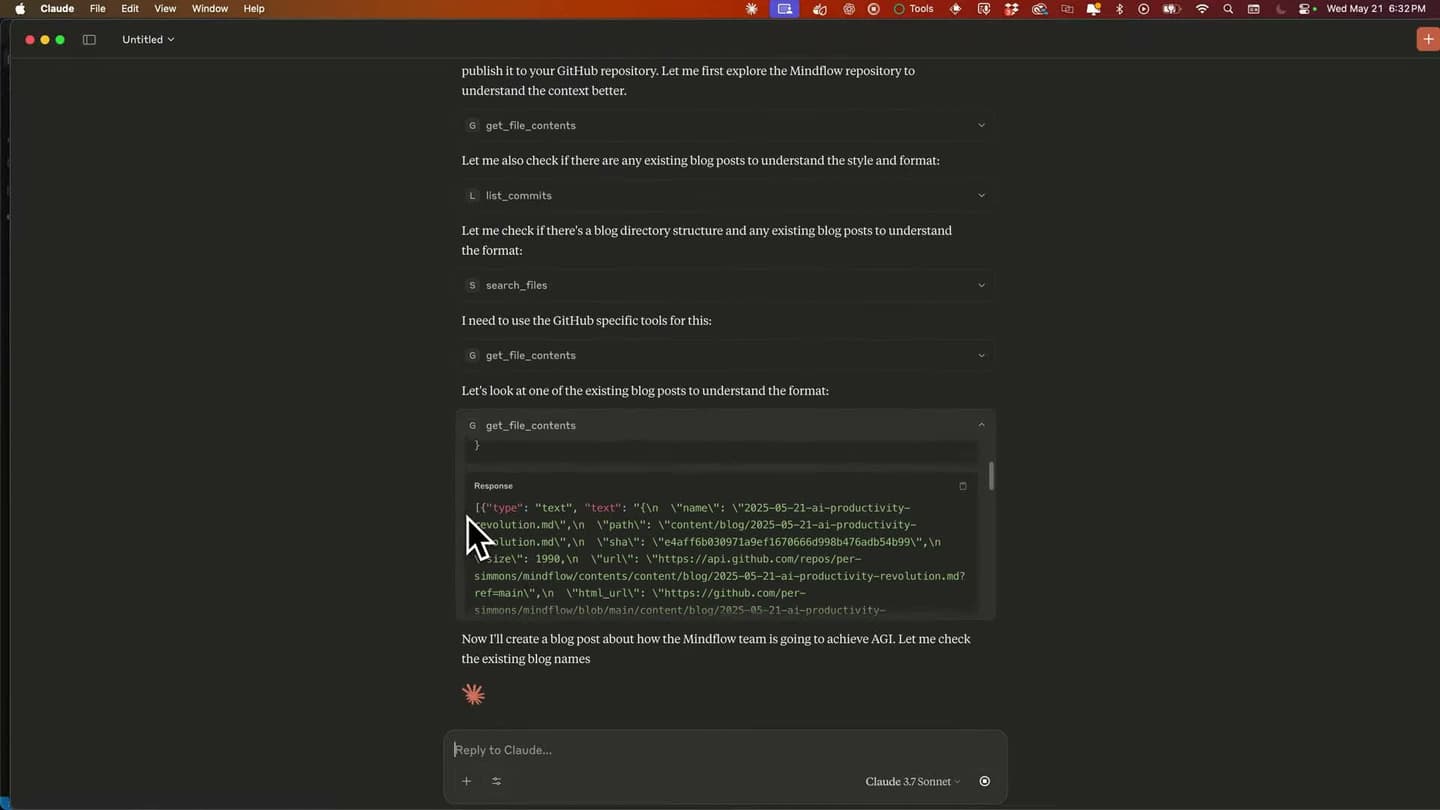
Claude's first post had no images. Pat uploaded an image to Imgur, pasted the link into Claude and asked it to put the image between paragraphs three and four; Claude added it with the right Markdown and the site updated. "I do a lot of writing with Claude," Pat says at the end, "and it's just so nice to not have to go to one app to go to another app."
Editing video in FilmCraft through its MCP server
FilmCraft is a free, open-source clone of Premiere Pro with the same panels, tools and keyboard shortcuts, and Pat worked in his own copy of it, with fixes Claude made earlier in the video. In Premiere Pro, his earlier way of getting Claude to edit was to let it take over the screen and click the buttons itself, which he says at 19:55 "was incredibly slow and it was super token intense. Like it was just burning through my usage."
An MCP server skips the clicking. Pat explains at 20:04 that Claude "can access this entire platform via its command line. So it doesn't need to click any buttons in the actual UI, which will just make it faster and much more token efficient." There was already an MCP server "with around 17 tools covering FilmCraft commands", and Pat asked Claude to extend it so Claude could use every button in the app.
Through that server, Claude color-graded a talking-head clip with the Lumetri color panel. When Pat asked it to cut out all the pauses, Claude transcribed the clip, found 21 pauses and removed them, taking the clip from 1:44.5 to 51.6 seconds with all 210 spoken words kept. Pat says it did the cut "in literally 40 seconds."
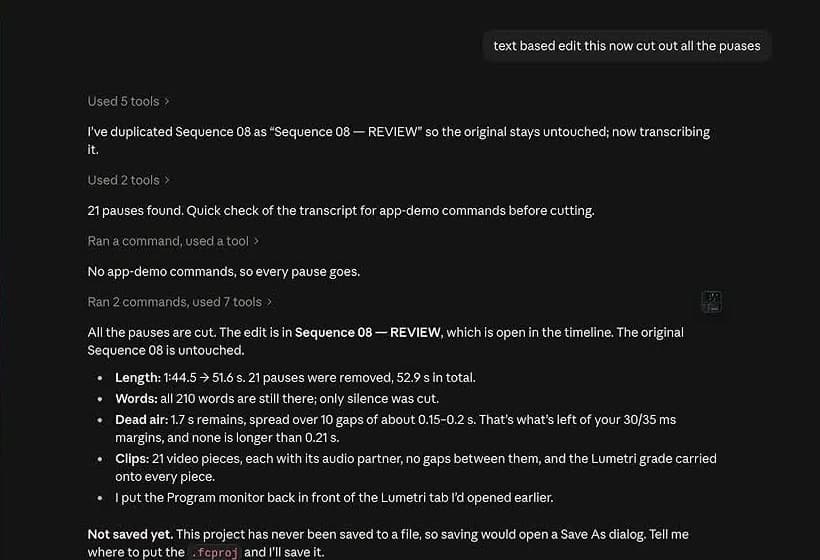
"This really is just for rough cuts," Pat says at 24:03. "This works especially well with my editing style, which is very basic." He also had a message for Adobe: he'd come back to Premiere "in a heartbeat" if it "gave agents full access to your platform via some kind of MCP server."
Can ChatGPT use MCP?
Yes, ChatGPT can use MCP servers, which it adds as plugins. OpenAI's MCP guide gives the steps:
- Go to ChatGPT Plugins and select the plus button, then "Add custom MCP server".
- Enter the server URL and sign-in details.
- Review the risk warning, select "I understand and want to continue", then "Create as a plugin".
- Install the plugin and test it in chat.
The same guide says an MCP server can also work in Codex, ChatGPT deep research, company knowledge and OpenAI's API. ChatGPT asks for your confirmation before a server takes a write action. OpenAI's page doesn't say which ChatGPT plans can add custom servers.
Because Claude and ChatGPT both support MCP, the same server can work in both. Notion's MCP server is the example on this site: Notion as one shared memory for Claude and ChatGPT.
MCP vs Claude Skills: what each one does
Claude Skills and MCP are separate features that work together. Anthropic's help page says: "MCP connects Claude to external services and data sources. Skills provide procedural knowledge." MCP gives Claude access to an app, and a skill teaches Claude how to do a job well, including how to use the tools an MCP server provides.
Skills are folders of instructions, scripts and resources that Claude loads when a task calls for them. They're on the Free, Pro, Max, Ultra, Team and Enterprise plans, and they need code execution turned on. Notion, Figma and Atlassian publish skills built to work with their own MCP connectors.
Pat's Blender Production skill is one of each in a single setup: the skill holds his steps for building and checking a 3D scene, and the Blender MCP server lets the agent see the live scene. For skills on their own, see the Claude skills we tested for office work.
What to check before you connect an MCP server
Connect only servers built by organizations you trust, and limit what each one can reach. Custom connectors can reach services Anthropic hasn't verified, and once connected, Claude can read and change data there with your permissions. Anthropic's help page lists what to watch:
- Use servers built and hosted by organizations you trust.
- Read the permissions a server asks for when you sign in, and turn down any that look unnecessary.
- Watch for prompt injection: hidden instructions in a bad server that try to make Claude do something you didn't ask.
- Notice when a server's tools start behaving differently, since its developer can change them.
- Click "Allow always" only for a server and tool you'd trust to run unsupervised.
- Switch off tools you don't need in a given chat.
The GitHub token Pat made for his 2025 demo was set to never expire and had read and write access to all his repositories. Anthropic's list above says to limit a server's permissions when possible and deny any that seem unnecessary.
OpenAI's guide recommends against connecting a custom MCP server unless you know and trust the app behind it, and warns that a server can still make changes even when its action is labeled read-only.
Sources
- Model Context Protocol: What is the Model Context Protocol (MCP)?
- Anthropic: Introducing the Model Context Protocol
- Claude Help Center: Get started with custom connectors using remote MCP, checked November 6, 2026
- Claude Code docs: Connect Claude Code to tools via MCP
- Claude pricing, checked November 6, 2026
- Claude Help Center: What are skills?
- OpenAI: Building MCP servers for plugins and API integrations
- AI for Mortals: llms.txt (MCP server details)
- Pat Simmons: Claude Just Replaced WordPress: Publish Blogs INSTANTLY with MCP (May 29, 2025)



Comments
Sign in to join the conversation.