AI Calorie Counters and ChatGPT Meal Plans: How Accurate They Are and What They Cost
How close photo calorie apps and ChatGPT get, what MyFitnessPal, Lose It!, Cal AI and ChatGPT cost, and how to plan meals and recipes with ChatGPT.

On this page
An AI calorie counter estimates the calories in a meal from a photo, a barcode or a typed or spoken description, then matches the food to a nutrition database. MyFitnessPal (Meal Scan), Lose It! (Snap It) and Cal AI build this into a daily food log. ChatGPT can estimate a meal from a photo you upload, and it can also write recipes and weekly meal plans.
The numbers are estimates. In a 2025 University of Gothenburg study, ChatGPT and Claude were off by 35.8% on average when they estimated the calories in standardized food photos, and all three chatbots tested underestimated big portions more than small ones. Check the portion on anything you eat often. MyFitnessPal and Lose It! both keep photo logging in paid plans (each $79.99 a year), and ChatGPT reads photos on its free plan within upload limits.
Last checked November 28, 2026: every price and plan on this page against MyFitnessPal's, Lose It!'s, Cal AI's and OpenAI's own pages, and every accuracy figure against the published study it comes from, each linked where it is used.
Can AI accurately count calories?
AI gets the foods on a plate mostly right and the amounts often wrong, and the amount is what sets the calorie count. Three published studies show the pattern.
Researchers at the Royal College of Surgeons in Ireland uploaded 114 meal photos to ChatGPT-4 and compared its answers with the known contents of each meal. ChatGPT named the foods correctly 93% of the time and judged the weight of small meals well. Its weight estimates for medium and large meals were poor, it was more than 10% off for 13 of the 16 nutrients checked, and it underestimated 11 of them.
The University of Gothenburg study gave 52 standardized food photos, in small, medium and large portions, to ChatGPT-4o, Claude 3.5 Sonnet and Gemini 1.5 Pro, and compared the answers with weighed food. ChatGPT and Claude missed the calories by 35.8% on average, which the authors put on a par with people writing down what they ate. Gemini's average errors ran from 64.2% to 109.9% depending on the nutrient. The authors concluded that these chatbots aren't ready for precise tracking where exact amounts count, such as in clinical care or for athletes.
Typed descriptions did well on the basics in a 2026 University of Minnesota study. Researchers typed commonly eaten US foods into ChatGPT 5.2, Claude Opus 4.5, Gemini 3 Pro Preview and Llama 4 Maverick and compared the answers with a research food database. Agreement was high for calories and macros (protein, carbs and fat) in all four. Vitamin D, folate and iron varied more, and condiments and mixed dishes caused a large share of the misses.
All three studies tested general chatbots. None of them tested Meal Scan, Snap It or Cal AI, and none of the app pages checked for this article publishes an accuracy figure.
To check a number yourself, the US Department of Agriculture's FoodData Central is the government's food composition database. It includes nutrition label data from food brands, which it updates monthly.
What the AI calorie counter apps do and cost
MyFitnessPal and Lose It! are food diaries that put a photo feature in their paid plans, Cal AI is built around the photo, and ChatGPT estimates a meal you upload or describe inside a normal chat. Prices below are US prices from each company's own page.
| Product | How the AI logs food | Free plan | Paid price (US) | Photo logging on the free plan? |
|---|---|---|---|---|
| MyFitnessPal | Meal Scan (photo), Voice Log, barcode scan | Yes: food, weight and exercise tracking | Premium: $19.99 a month or $79.99 a year, plus tax | No, Premium only |
| Lose It! | Snap It (photo), barcode scan, voice | Yes: Basic, with a daily calorie budget and a 50M+ food database | Premium: $79.99 a year; Lifetime: $299.99 once | No, Premium only |
| Cal AI | Photo, barcode or a typed description | Free to download; Cal AI's FAQ says tapping + to log food opens the paywall | Not listed on its website; the App Store listing shows "Unlimited" purchases from $2.99 to $29.99 | Paywall when you log, per its FAQ |
| ChatGPT | Upload a photo or type the meal and ask | Yes: $0, with "limited messages with uploads" | Go $8, Plus $20, Pro from $100 a month | Yes, within the Free plan's upload limits |
Lose It! Snap It
Snap It lets you take a photo of your meal or upload one. Lose It! then suggests the closest matches from its food database with an estimated serving size, which you can edit before you save, according to Lose It!'s Snap It help article. It is for Premium members only and works only when your phone's language is set to English.
Lose It! Basic costs $0. Premium costs $79.99 a year and adds barcode scanning, photo and voice logging, logging meals ahead of time and custom goals such as water and sleep. A one-time Lifetime purchase costs $299.99, or $229.99 if you already pay for Premium.
Cal AI
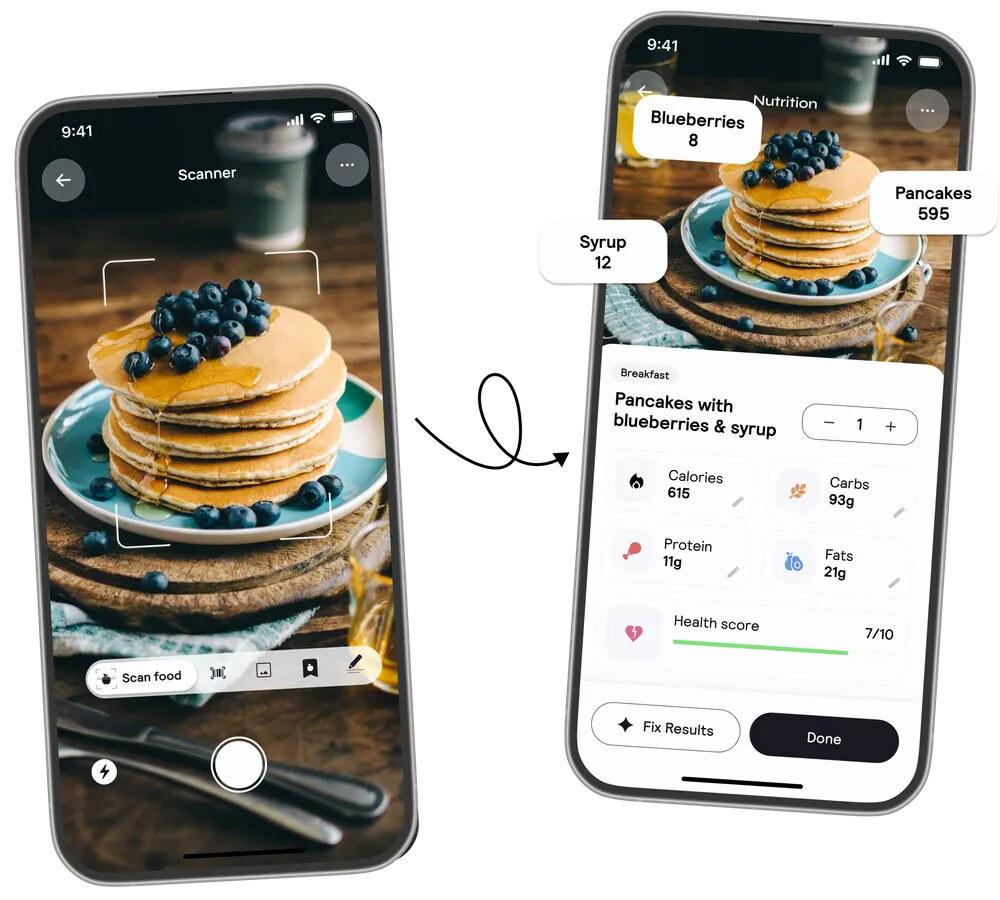
Cal AI is built around the camera. You snap a photo, scan a barcode or describe your meal, and it returns calories, protein, carbs and fat. Cal AI says your phone's depth sensor measures the food's volume before its AI breaks the meal down.
Cal AI doesn't list prices on its website. Its App Store listing shows in-app purchases named "Unlimited" at $2.99, $9.99, $19.99 and $29.99, plus an "Unlimited Plan" at $19.99, without saying how long each one lasts. Check the price in the app before you start a trial.
ChatGPT
ChatGPT can look at a meal photo and estimate it inside a normal chat. OpenAI's image help page says photo uploads work on the Free plan and every paid plan, within each plan's limits, and accepts PNG, JPEG and non-animated GIF files up to 20MB. The same page says ChatGPT's image reading shouldn't be used for medical advice and may give approximate counts of objects in a photo.
The Free plan costs $0. Go costs $8 a month, Plus $20 and Pro from $100. Our ChatGPT pricing guide lists what each plan includes.
Is MyFitnessPal still free?
Yes. MyFitnessPal's free plan covers food, weight and exercise tracking. Barcode Scan, Meal Scan, Voice Log, macro goals you set yourself, intermittent fasting and ad-free logging are in Premium, which costs $19.99 a month or $79.99 a year in the US, plus tax. The Premium page also offers a 7-day free Premium trial.
Meal Scan works in the MyFitnessPal app on iOS 18 or Android 13 and newer, with the language set to English, and it isn't on the website. You tap the plus button, choose Meal Scan, point the camera at your plate (or upload a photo), pick from the foods it suggests, adjust the serving and log it. MyFitnessPal says the feature compares your photo with what it learned from millions of food photos and suggests matches from its verified food database.
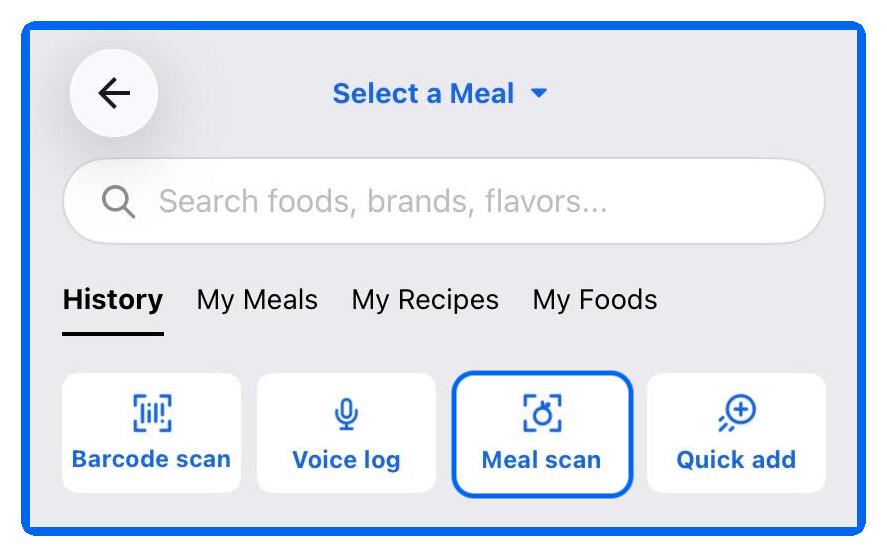
MyFitnessPal's help page calls Meal Scan a starting point and says you always have the last word on what goes in your diary. For a meal with several items, it suggests scanning one dish at a time.
Whether another calorie counter suits you better than MyFitnessPal comes down to price and features, because we found no published head-to-head accuracy test of these apps. Lose It! Premium costs the same $79.99 a year and also keeps photo logging in the paid plan. Cal AI sells access inside its app. ChatGPT reads a photo on its free plan.
Is ChatGPT good for recipes?
ChatGPT can write a recipe from the ingredients you list, scale it for more people, swap ingredients for a diet and turn a week of meals into a shopping list. We found no published test of how its recipes turn out once cooked, and it can get facts wrong while sounding sure of itself, so check cooking temperatures, quantities and allergens against a trusted source before you cook.
OpenAI's own help page says ChatGPT can produce incorrect or misleading answers, may sound confident when it's wrong, and should be checked against reliable sources for anything important.
In a kitchen, the facts to check first are the ones that can make someone sick. FoodSafety.gov's temperature chart lists 165°F (74°C) for all poultry, 160°F (71°C) for ground meat and sausage, and 145°F (63°C) plus a 3-minute rest for beef, pork and lamb steaks, roasts and chops, and it says to use a food thermometer. If a ChatGPT recipe gives a different temperature, go with the chart.
The calorie counts ChatGPT adds to a recipe are estimates too. In the 2026 University of Minnesota study of typed food descriptions, condiments and mixed dishes caused a large share of the errors.
How to use ChatGPT for meal planning
Tell ChatGPT who you're cooking for, what they can't eat, what's already in the kitchen and how much time you have, then ask for the meals and a shopping list. You can do this on the Free plan, which includes unlimited text chats with GPT-6; photo uploads are limited there.
- Start a new chat and list who you're cooking for, any allergies, your budget and your cooking time.
- List what's in your fridge and cupboard, or attach a photo of it.
- Ask for the number of days, meals and servings you want.
- Ask for a shopping list of only what you still need to buy.
- Check temperatures, allergens and amounts before you cook.
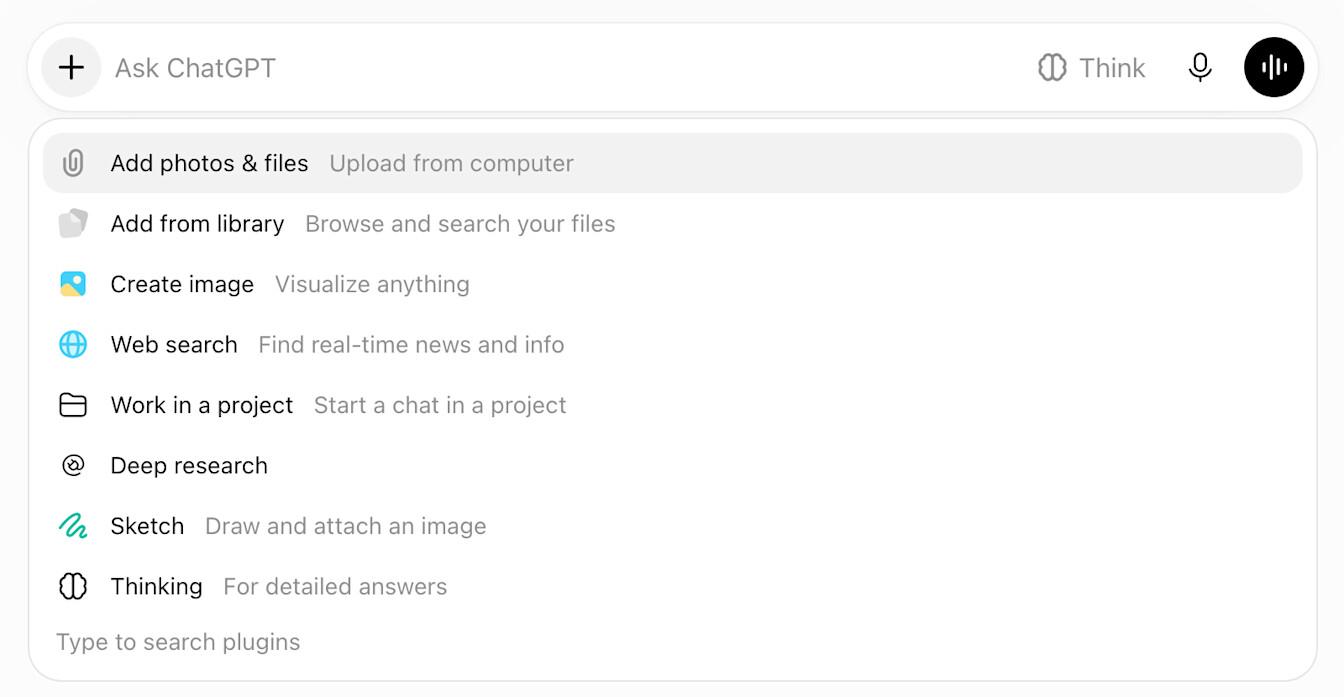
To attach a photo, tap the + button in the message box and choose Add photos & files.
Three example prompts to copy and change for your household:
Plan 5 dinners for 2 adults and a 7-year-old. One of us is vegetarian, nobody eats mushrooms, and we have 30 minutes to cook on weeknights. We already have chicken thighs, rice, spinach and canned chickpeas. For each dinner, give the ingredients with amounts, the steps, and the safe cooking temperature for any meat. Then give one shopping list of everything we don't have yet, grouped by supermarket section.
This is a photo of my fridge. Suggest three dinners for 2 people that I can make tonight in under 40 minutes, mostly from what you can see. List anything I'd still need to buy, and tell me which items in the photo you weren't sure about.
Below is my lasagna recipe for 6 servings. Suggest swaps that cut the calories and keep it filling, then estimate the calories per serving before and after, and label both numbers as rough estimates.

[paste your recipe here]
The last two prompts ask ChatGPT to flag what it wasn't sure about and to label its estimates, so you know what to check. Our guide to writing a good AI prompt covers how to word a request like these. If you plan to share health details in a chat, read what ChatGPT keeps on each plan first.
Can AI make a free diet and workout plan?
Yes. ChatGPT's Free plan will write a meal plan and a workout schedule from what you tell it, and MyFitnessPal's free plan and Lose It! Basic both track food and exercise at no cost. AI doesn't know your medical history, and calorie needs differ from person to person: the NHS says they depend on your age, weight, height and how much exercise you do.
For the best free AI for meal planning, the options checked here are ChatGPT's Free plan, MyFitnessPal's free plan and Lose It! Basic. The photo features in both apps are paid, and our page on ChatGPT's free plan and its limits covers what you get in ChatGPT without paying.
No source checked for this article names one AI as the best for weight loss, and none of these tools replaces medical advice. If you have a medical condition or take medication that affects eating, take diet changes to your doctor or a registered dietitian before following an AI plan. OpenAI also offers ChatGPT Health, and our ChatGPT Health guide covers what it is, what it costs and how to set it up.
When to use an app and when to use a chatbot
Use a food-diary app to log what you eat every day, and use ChatGPT for one-off jobs such as a recipe, a week of meals or a shopping list. The diary apps keep your history and total each day against a calorie budget, and they match foods to a database you can search and correct.
| The job | A good fit | Why |
|---|---|---|
| Logging everything you eat, every day | MyFitnessPal or Lose It! | A diary and a daily calorie budget, matched to a food database; both have free plans |
| Logging from photos | Cal AI, or Meal Scan and Snap It on a paid plan | Built around the camera; check the portion it picks |
| A recipe from what you have | ChatGPT | Works in a free chat and can read a fridge photo |
| A week of meals and a shopping list | ChatGPT | Plans around your household, budget and time in one request |
| Diet changes for a medical condition | A doctor or registered dietitian | AI tools don't know your history |
For what's new in ChatGPT, see our ChatGPT updates and new features page.
Questions people ask about AI calorie counters
Is there a free AI calorie counter?
ChatGPT's Free plan can estimate a meal from a photo within its upload limits. MyFitnessPal's Meal Scan and Lose It!'s Snap It both need a paid plan, and Cal AI's FAQ says the paywall opens when you tap + to log food.
Is Lose It! free?
Yes. Lose It! Basic costs $0 and includes a personalized daily calorie budget and its food database. Snap It, the photo feature, needs Premium at $79.99 a year.
Can ChatGPT count calories from a photo?
It can estimate them. In the Irish study of 114 meal photos, ChatGPT-4 named the foods correctly 93% of the time but was more than 10% off for 13 of 16 nutrients, and its weight estimates for medium and large meals were poor.
How do I take a photo that gets a better estimate?
MyFitnessPal suggests holding the phone steady, getting the whole plate in the frame, using good light and scanning one dish at a time for a meal with several items. Lose It! suggests keeping all the food inside the frame, leaving out distracting objects and using good light, and its camera has a flash button.
Where do calorie apps get their numbers?
From food databases. MyFitnessPal matches photos to its verified food database, Lose It! searches a database of more than 50 million foods, and USDA's FoodData Central is the US government's reference database you can search yourself.
Can ChatGPT make weight-loss recipes?
It can write lower-calorie versions of a recipe and estimate the calories per serving. Treat those numbers as rough, check them against the food labels or FoodData Central, and talk to a doctor or registered dietitian about any weight-loss goal tied to a health condition.
Sources
- MyFitnessPal: Premium plans and Free vs Premium
- MyFitnessPal Help Center: How to use the Meal Scanner
- Lose It! Support: Membership tiers and pricing
- Lose It! Support: How to use Snap It
- Cal AI homepage and FAQ
- Cal AI on the App Store
- OpenAI: ChatGPT pricing
- OpenAI Help Center: Image inputs for ChatGPT
- OpenAI Help Center: Does ChatGPT tell the truth?
- O'Hara et al., Nutrients (2025): ChatGPT nutrient estimates from meal photographs
- Fridolfsson et al., Current Developments in Nutrition (2025): three AI models estimating food images
- Lawabni et al., Journal of Nutrition (2026): AI estimates from text queries
- USDA FoodData Central
- FoodSafety.gov: Safe minimum internal temperatures
- NHS: Understanding calories
Comments
Sign in to join the conversation.