How to Build an App With AI (No Coding): Claude Code, Codex, Lovable and More
You can build a working app by describing it in plain English: the tools, what each costs, and the apps Pat Simmons built with them.

On this page
- Can I really build an app with AI?
- Which AI app builder should a beginner use?
- Can ChatGPT help create apps?
- How to build your first app with Claude Code
- Can you build a phone app with AI?
- What does it cost to build an app with AI?
- Copy, clone or rebuild an app you already use
- Questions people ask about building an app with AI
Yes, you can build a working app with AI by describing it in plain English, with no coding. In a beginner test on this site, Claude Code built a working invoice tracker in 90 seconds from one paragraph, and Pat Simmons rebuilt the dictation app Wispr Flow as a free Mac app called Murmur in two prompts.
The tools come in two kinds. Chat builders such as Lovable, Replit and Google AI Studio build a web or Android app in your browser. Coding agents such as Claude Code and OpenAI's Codex write and run the code in a folder on your own computer, which suits personal tools. Claude Code needs a paid Claude plan from $20 a month, and OpenAI lists limited Codex access on the free ChatGPT plan.
Last checked November 28, 2026: the prices and plans on this page come from the pricing pages of Anthropic, OpenAI, Lovable and Replit, and from Google's own launch post, each linked in the section that uses it.
Can I really build an app with AI?
Yes. You describe what you want, the AI writes the code, and you react to what comes back in the same plain words you'd use with a person. The examples below are small tools built for one person: an invoice tracker, a dictation app and a game.
For the beginner test, the request was one paragraph from a freelancer who forgets who still owes them money. It asked for a browser app with each client, the amount and the due date, the late invoices at the top, and a button that writes a polite reminder email. Claude Code built it as a single file called Who Owes Me in about 90 seconds, tested it in a browser on its own, and added a backup button because the list lives inside one browser.
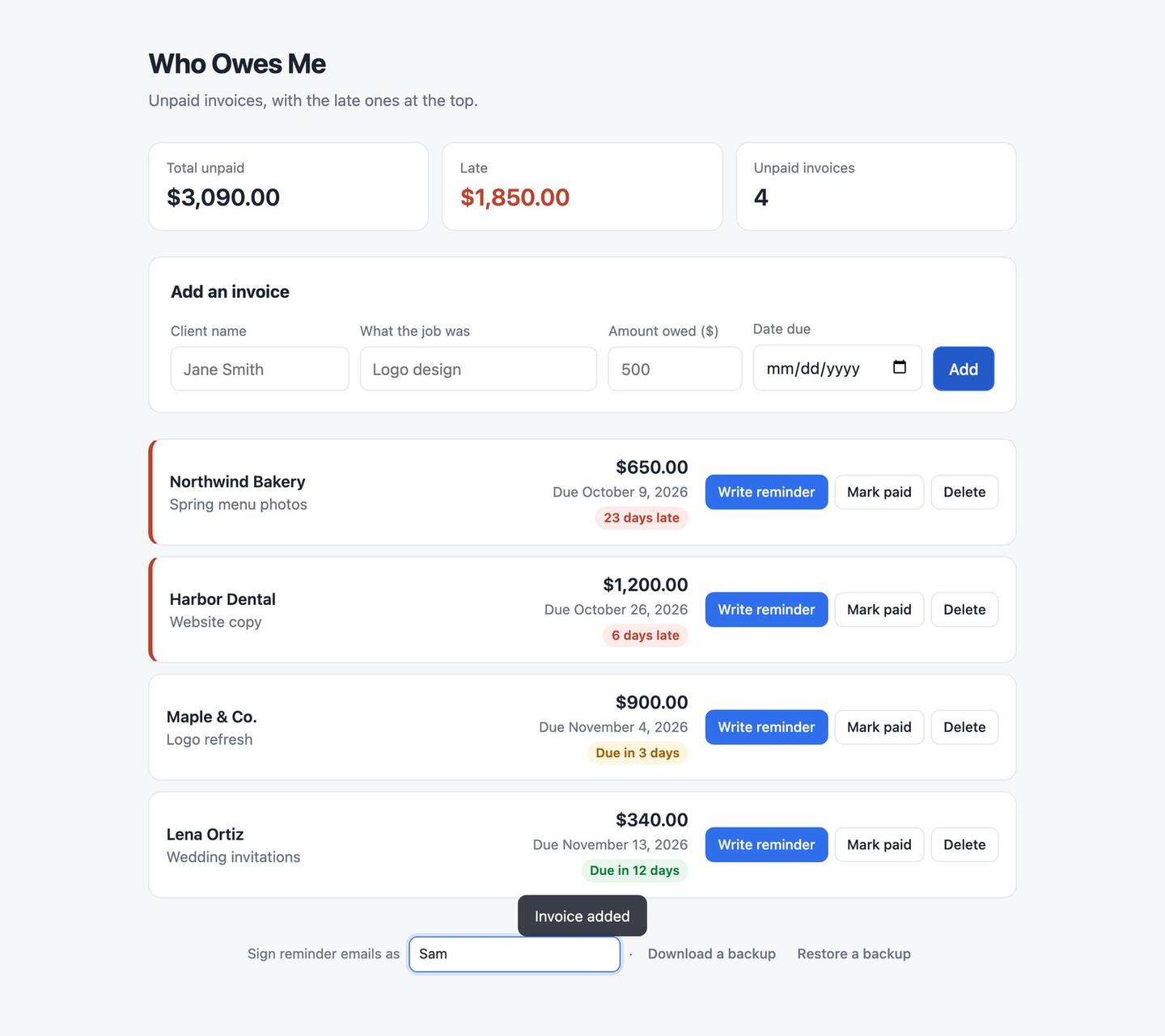
It got one thing wrong. The reminder email greeted the client as "Northwind", the first word of a bakery's name, because the app only knew the business name. The fix was to describe the problem and ask for a contact-name field, and the second version, with four changes in all, took about two minutes.
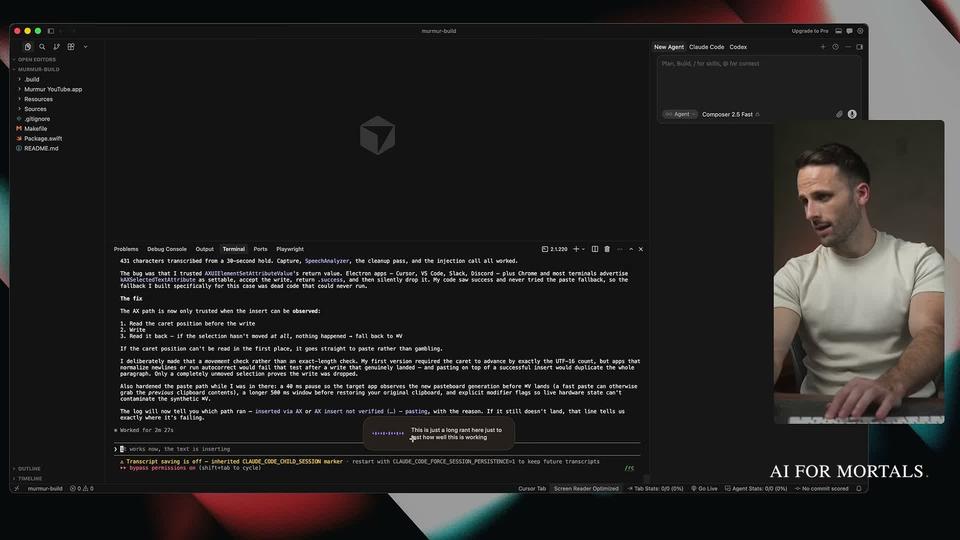
Bigger apps work the same way. Murmur is a free, open-source Mac dictation app: you hold a key, talk, and the text appears wherever your cursor is. Pat built it with Claude Code in two prompts and about 20 minutes, with no knowledge of Swift, the language Mac apps are written in. His hands-on work was approving macOS permission pop-ups and pasting error logs back to Claude so it could fix them. In his side-by-side test against Wispr Flow, the gap in speed and accuracy was marginal (how Pat built Murmur, a free Wispr Flow alternative).
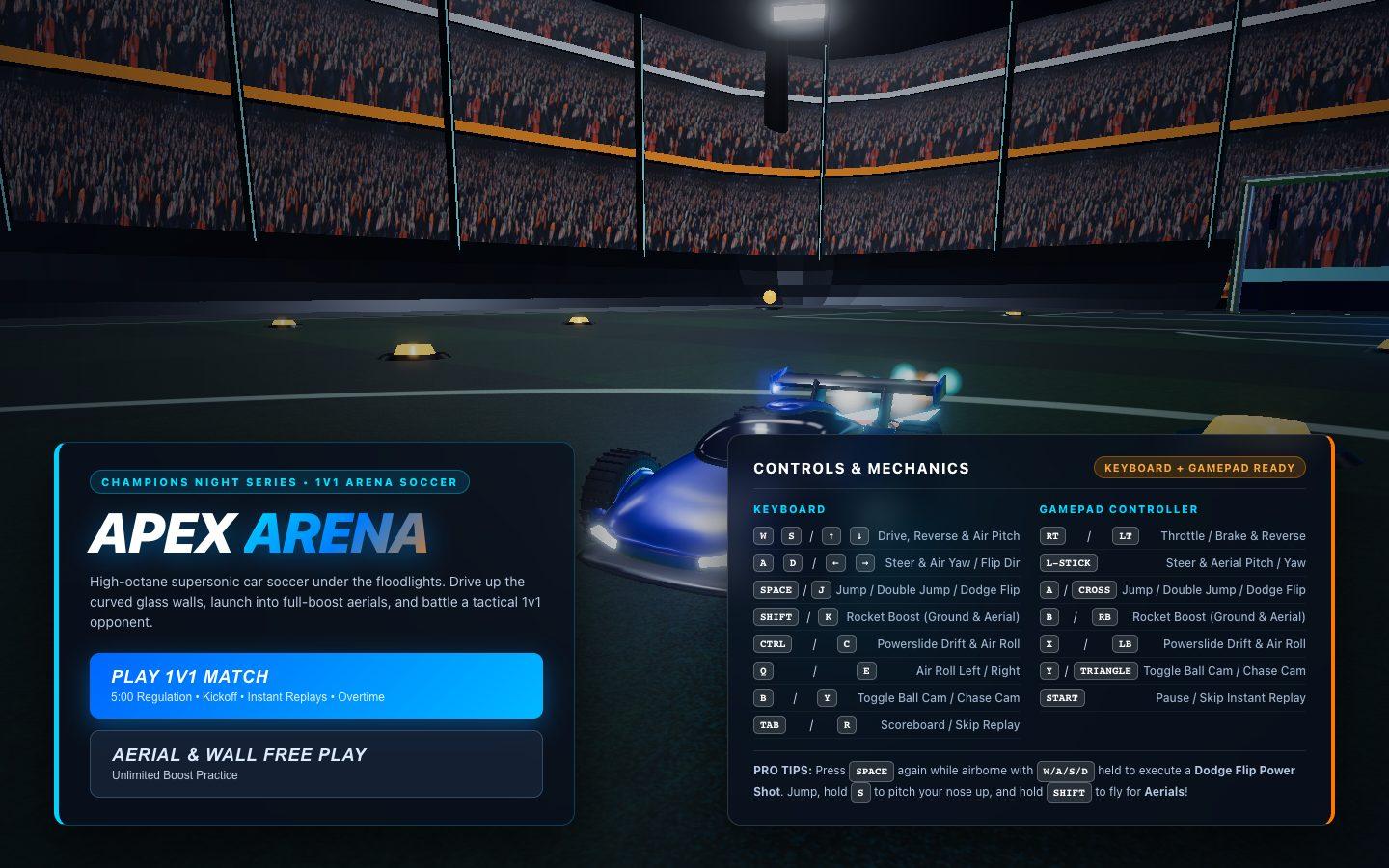
Pat tests AI models by building things, and the 84 apps, games and sites Pat built with AI, prompts included are collected on one page, each with the exact prompt to copy. One of them is a car soccer game in the style of Rocket League, built in the browser by Gemini 4 Argon from a single prompt.
This is the Murmur build from start to finish, made for people who have never written code:
Which AI app builder should a beginner use?
Pick by where you want the app to live. If you want a website or web app you can share with a link, a chat builder that runs in your browser fits. If you want a personal tool on your own computer, such as a Mac app or a file you open in your browser, a coding agent is the better fit. If you want an app on your Android phone, Google AI Studio installs it through Google Play.
Pat has tested Claude Code and Codex head to head on the same prompts. He hasn't tested Lovable, Replit or Google AI Studio's app builder, so the descriptions below for those come from each company's own pages.
| Tool | What it builds | Where it runs | Starting price |
|---|---|---|---|
| Claude Code | Any app, site or tool, from plain English | Your computer (desktop app or terminal) | $20 a month (Claude Pro); not on the free plan |
| Codex | Any app, site or tool, from plain English | Your computer, ChatGPT and the cloud | Limited on free ChatGPT; Plus is $20 a month |
| Lovable | Websites and web apps from a chat | Your browser | Free plan with 5 build credits a day; Pro is $25 a month |
| Replit | Apps, sites and tools from a description | Your browser | Core is $20 a month, or $18 billed yearly |
| Google AI Studio | Android apps and web apps from a description | Your browser, then your Android phone | Free with a regular Google account |
Lovable's own pricing page says it lets you "chat to instantly build websites and web apps, with no technical knowledge needed" (Lovable, the chat-to-web-app builder). Its free plan gives 5 build credits a day, up to 30 a month, and the same page prices a request to "Add authentication with sign up and login" at 1.20 credits.
Replit describes itself on its pricing page as a place to "describe what you want in natural language, then create, launch, and grow apps, sites, tools, and businesses in one place." Its Core plan is for "personal projects and simple apps" and its $100-a-month Pro plan is for "commercial and professional builds."
Claude Code and Codex take a little more setup, since they work in a folder on your computer, and they can build apps that run on your computer itself, such as Murmur.
Can ChatGPT help create apps?
Yes, through Codex, OpenAI's coding agent, which comes with ChatGPT plans. You describe a goal in plain English, and it reads and changes the files in a folder you pick, then builds and fixes the code (what Codex does and which ChatGPT plans include it). OpenAI made Work and Codex available on every ChatGPT plan, including Free, when it shipped its new desktop app in July.
On the free plan, ChatGPT's pricing page lists "Limited Codex access." Plus adds "Expanded Codex usage," and OpenAI's Codex page lists Plus at $20 a month, Pro at $100 a month and Business at $20 a user a month (for two or more seats, billed yearly). OpenAI says you can use Codex in ChatGPT, in a code editor and in the terminal, all on the same account.
Teams on OpenAI's business plans also get Codex Sites, which builds team apps with databases and sign-in. It rolled out to Business and Enterprise plans in June and became generally available for Enterprise on October 15.
In Pat's head-to-head published September 25, Codex running GPT-6 Astra finished all three same-prompt builds faster and for less money than Claude Code with Opus 5.5. Opus 5.5 won all three on quality. The full numbers are in the cost section below.
How to build your first app with Claude Code
Get a paid Claude plan, install the Claude desktop app, open its Code tab, pick an empty folder and describe your idea. You don't need the terminal. Anthropic's desktop quickstart says Claude Code is in the Code tab at the top of the app's sidebar and needs a Pro, Max, Ultra, Team or Enterprise subscription.
The steps the beginner build followed:
- Sign up for Claude Pro, the $20-a-month plan.
- Download the Claude desktop app for Mac or Windows, sign in and click the Code tab.
- Make an empty folder for your app, for example in Documents, and pick it with the project folder button under the prompt box.
- Choose Manual in the mode button, so Claude asks before every change.
- Describe your idea, press Enter, then try the app and write back about whatever feels wrong.
The beginner build's prompts all follow one shape: who you are, the annoying problem, what you want to see and how you'll use it. This is its starting prompt, with blanks for your details:
I'm a [your job] and I keep [the annoying thing that happens]. I don't know how to code. Build me a simple app I can open in my web browser that [what it should do, in a sentence or two]. It should remember everything I type when I close it and open it again. Keep it simple and clean. When you're done, test it yourself in a browser, then tell me exactly how to open it.
Before a big change, switch to plan mode. Claude reads your files and writes a plan, and it edits nothing until you approve it. In the desktop app you pick Plan under the prompt box, and in the terminal you press Shift+Tab. There's a full walk-through of how to install Claude Code and use plan mode, including the one terminal command that installs it.
When something breaks, describe what you saw and ask Claude to check the logs, the running record an app keeps of what it did. Murmur's first test typed nothing into Cursor, and Pat wrote: "It's just not inserting it where my cursor is. Please look at logs and fix." Claude found the bug and rebuilt the app, and the next test worked.
A few habits from the beginner build keep a homemade app safe:
- Know where your data lives, and use the backup if the app keeps everything in one browser.
- Keep bank logins, card numbers and passwords out of anything you built in an afternoon.
- Use plan mode, or the words "don't change anything yet", before a big change.
Can you build a phone app with AI?
Yes, on Android. In Google AI Studio you choose Build, then Android, describe the app, and install it on your own phone through Google Play with your regular Google account (build an Android app in Google AI Studio and install it from Google Play). Google's launch post says no developer account is needed, the apps stay private to you, and it is rolling out in select markets, including the US, to people 18 and over.
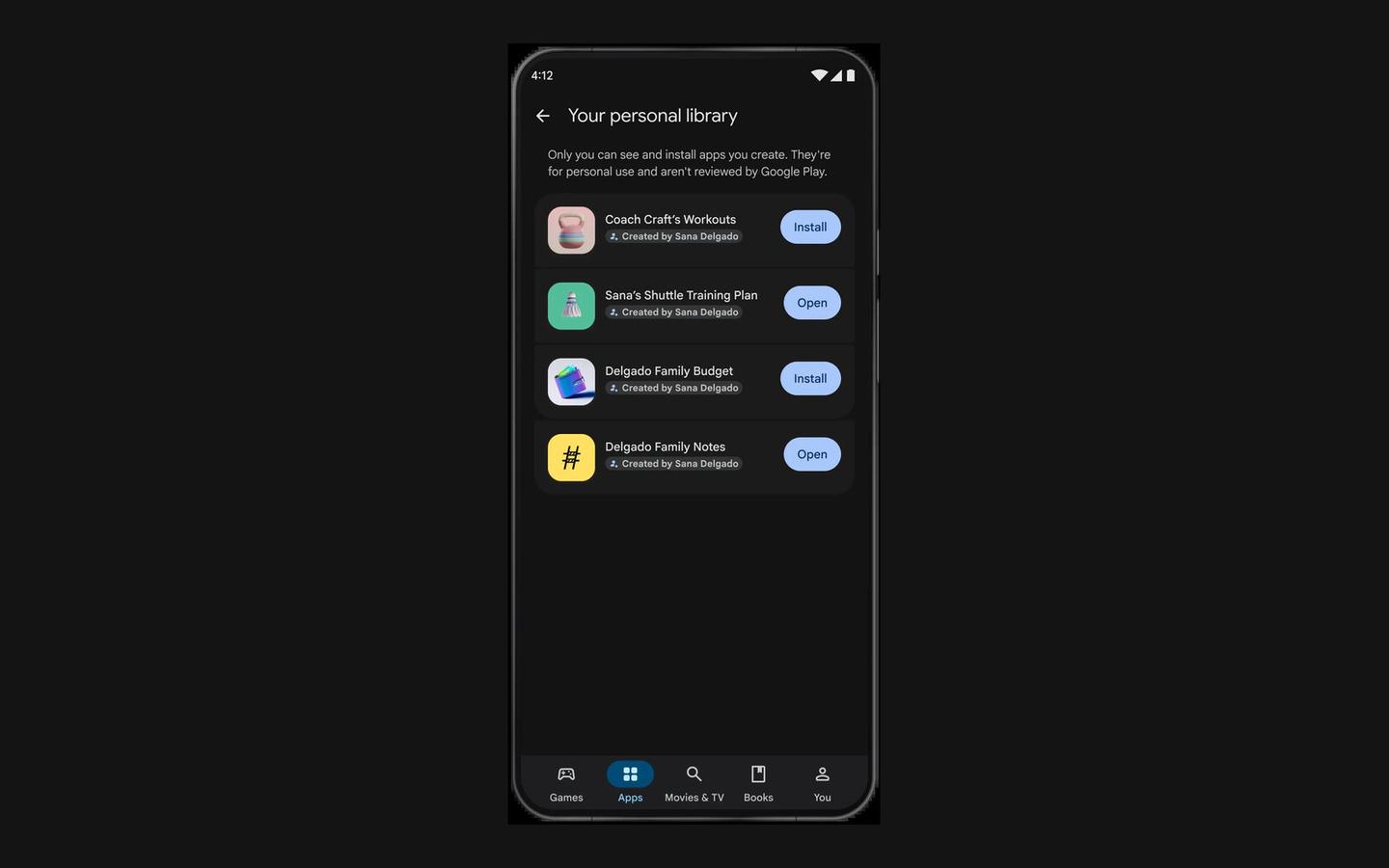
These apps run entirely on the phone. Google's AI Studio docs say Android apps there are "client-side only," so features that need a server, such as multiplayer, work only in the web apps AI Studio builds. Google says you'll be able to share personal apps with friends and family in the coming months, and putting one in the public Play Store still needs a Google Play developer account, which costs a one-time $25.
An iPhone is harder. When Pat rebuilt the note-taking app Notability as Inkwell with Opus 5.5, he had to install it on his iPad from his Mac over a cable. As Pat wrote in his Google Play post, on a free Apple account the app stops opening after seven days until you rebuild it, and paying Apple $99 a year stretches that to a year.
What does it cost to build an app with AI?
It can cost nothing, and the main paid plans start at $20 to $25 a month. Google AI Studio is free for personal Android apps, Lovable and ChatGPT have free plans with small allowances, and Claude Code starts at $20 a month. On a subscription, building uses up your plan's usage limits, so you don't pay per app.
| Plan | Price | What it includes for building |
|---|---|---|
| Claude Free | $0 | No Claude Code |
| Claude Pro | $20 a month, or $17 a month billed yearly | Claude Code |
| Claude Max | $100 a month | Claude Code, 5x Pro usage |
| Claude Ultra | $200 a month | Claude Code, 10x Pro usage every week |
| ChatGPT Free | $0 | Limited Codex access |
| ChatGPT Plus | $20 a month | Expanded Codex usage |
| ChatGPT Pro | $100 a month | Higher Codex usage limits |
| Lovable Free | $0 | 5 build credits a day, up to 30 a month |
| Lovable Pro | $25 a month | 100 monthly credits |
| Replit Core | $20 a month, or $18 billed yearly | For personal projects and simple apps |
| Google AI Studio | $0 | Build and install personal Android apps |
Prices are from each company's pricing page, checked November 28, 2026, and don't include tax.
Heavy builds cost more. On September 23, Pat gave Opus 5.5, Claude Fable 5.1 and GPT-6 Astra identical one-shot prompts for three builds: an illustrated print of scenes from Moby Dick, a launch film with its launch page, and a skate game. The builds ran on subscriptions, and the costs below are what each model's work would have cost at API prices, the pay-per-use rates developers pay (what three frontier models cost per finished build).
| Model | Ran in | Time for all three builds | API-equivalent cost |
|---|---|---|---|
| Opus 5.5 | Claude Code | 266 minutes | $106.93 |
| Fable 5.1 | Claude Code | 143 minutes | $90.99 |
| GPT-6 Astra | Codex | 102 minutes | $60.20 |
Opus 5.5 won all three builds and was the most expensive, and GPT-6 Astra was the cheapest and fastest. A small personal app is far lighter work than any of these: the beginner build calls three rounds on a small app light work for a $20 plan.
Copy, clone or rebuild an app you already use
Rebuilding an app you already pay for is one of the easiest first projects, because you already know what it should do. Murmur started with Pat telling Claude Code: "I want to clone Wispr Flow. Look up what this is." Claude looked it up, proposed the parts, and built it.
For web apps, Pat made a free Claude Code skill, an add-on that teaches Claude a job (Pat's free Claude Code skill that clones a web app from one URL). In his words, "I built this to clone a web app from one URL." It opens the live site, pulls the exact colors, fonts and spacing from its code, rebuilds it, then checks the copy against those measurements and fixes it until they match. It stops at login walls.
You can also rebuild a program from the finished app alone. Pat built a skate game called Late Shift with Opus 5.5, turned it into a compiled app, deleted the source code, and had Opus 5.5 rebuild the code from the game file using Reverse Engineer Anything, a free tool that connects Claude Code to the Ghidra decompiler. The prompts and the legal lines are in rebuild a game you own from its binary with Claude Code.
Publishing a clone is a different job from building one. After building Inkwell, Pat said: "Building the app now, as you can see, is the quickest part. The hard part now, of course, is everything that comes after it."
Questions people ask about building an app with AI
Is it free to build an app with AI?
It can be. Google AI Studio builds and installs personal Android apps for free, Lovable's free plan gives 5 build credits a day, and the free ChatGPT plan includes limited Codex access. Claude Code isn't on Claude's free plan.
Do I need to know how to code?
No. Every build on this page started from plain English. Pat's comment on the technical plan Claude wrote for Murmur was: "you really don't need to know what any of this stuff means."
Can AI build an iPhone app?
Claude Code built Inkwell, a native iPad app, for Pat, but getting it onto the device needs a Mac and a cable, and, as Pat wrote in his Google Play post, Apple charges $99 a year for an app to keep working past seven days.
How long does it take?
A small app took about 90 seconds in the beginner build, and Murmur took Pat about 20 minutes. Bigger builds take hours: Opus 5.5 spent 266 minutes on the three build-off projects.
Where does my app's data go?
Wherever the app keeps it. The invoice tracker kept its list inside one browser, and Google's Android apps keep everything on the phone. Ask the AI where your information is saved before you rely on it.



Comments
Sign in to join the conversation.